Customer engagement
Customer Engagement Developer Guide
Introduction
- Guide the customer engagement app ISVs through the development process from inception to launch.
- Understand a comprehensive view of use cases for customer engagement app scoping and development.
- Understand how to utilize the TikTok Shop customer engagement and all related capabilities (API).
About Customer Engagement
Integrating customer engagement and CRM platforms with TikTok Shop empowers businesses to capitalize on the platform's extensive reach, elevate the shopping experience, and execute more impactful marketing campaigns.
This integration enables businesses to connect with TikTok's vast user base and engage potential customers in a platform-native way. It facilitates seamless product promotion through TikTok's dynamic content formats, including products, coupons, and live streams.
By enhancing the touch-points between TikTok Shop sellers and buyers, the integration allows customers to discover products and offers, interact with branded content, and complete purchases effortlessly—streamlining the shopping journey and reducing friction.
Additionally, businesses can leverage data insights and analytics to optimize their TikTok Shop strategy. By tracking performance metrics, analyzing audience behavior, and refining marketing efforts, businesses can achieve improved results and maximize ROI.
Apply for API
Currently these APIs are opened up on an as-needed basis. Please reach out to your TikTok Shop representative for more information.
Integration Flow
There are two options for integration with our Customer Engagement API:
- Integrate into Shopify dashboard as a Shopify Marketing App, to allow sellers to manage CRM activities for TikTok Shop from within Shopify. Best for partners that are already integrated as a Shopify Marketing App
- Integrate with TikTok Shop directly
Shopify Marketing App
Campaign

Flow

Customer Engagement Platform
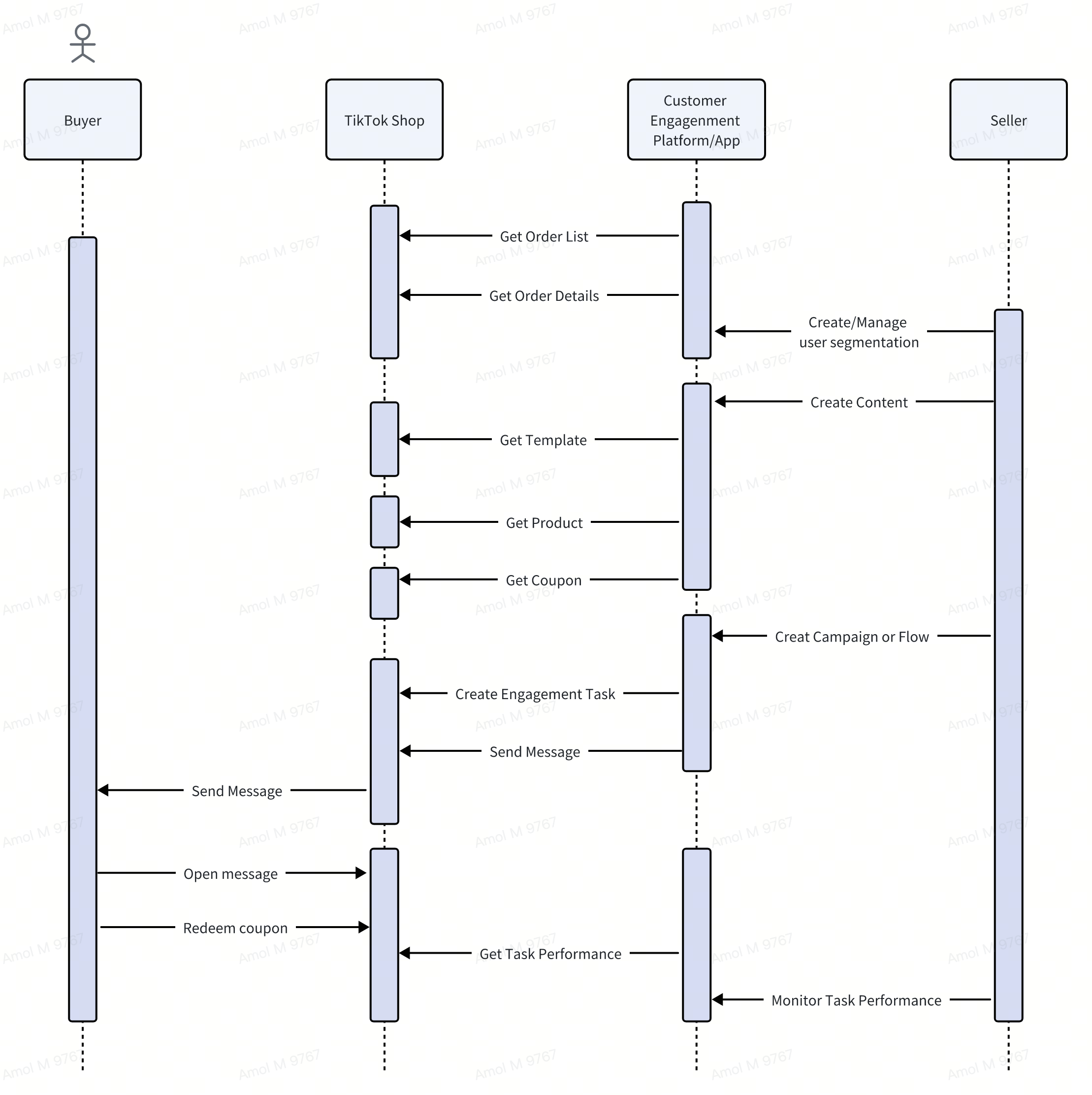
App Features
Shop Authorization
| Use Case ID | Use Case Summary | Required | Tags | Scopes |
|---|---|---|---|---|
| SHOP-CONN-SINGLE | The application must be able to connect one store from the platform to one shop in TikTok Shop. | Yes | * Shop Connections | * Shop Authorized Information(431812) |
- Global Shop Information(431300) | | SHOP-CONN-MULTI | The application may be able to connect one store from the platform to multiple shops in TikTok Shop. | No | * Shop Connections | * Shop Authorized Information(431812)
- Global Shop Information(431300) | | SHOP-DISCON-SINGLE | The application must be able to disconnect one store from the platform to one shop in TikTok Shop. | Yes | * Shop Connections | * Shop Authorized Information(431812)
- Global Shop Information(431300) | | SHOP-MAN-MULTI | The application must be able to manage shop connections by adding new ones or removing existing ones. | Yes | * Shop Connections | * Shop Authorized Information(431812)
- Global Shop Information(431300) | | SHOP-MAN-WHOOK | The application must be able to use the Upcoming Authorization Expiration webhook to notify sellers to re-authorize their shop connection. | Yes | * Shop Connections | * Shop Authorized Information(431812) |
Customer Management
| Use Case ID | Use Case Summary | Required | Tags | Scopes |
|---|---|---|---|---|
| CSENG-CUSMAN-GETPERMS | Currently, only eligible sellers can access customer engagement functions. Please leverage the Get Feature Permissions endpoint to check the seller's eligibility. | Yes | N/A | N/A |
| CSENG-CUSMAN-GETNATIVE | Sellers can retrieve the TTS customers with identifiers, specifically the buyer's email, through the Get Order Details API. This email is anonymized and serves as the unique identifier for sending messages to the buyer. | Yes | * Get Order Details | Order Scopes |
| CSENG-CUSMAN-GETSHOPIFY | Option 1 | |||
The Shopify marketing app can access TikTok Shop (TTS) customers through the Shopify Customer API. The TTS buyer's email will populate the emailAddress field, and the tag field can be utilized to identify TTS customers. | ||||
| Option 2 | ||||
| The Shopify marketing app can alternatively integrate with TikTok Shop (TTS) order endpoints to retrieve order details and obtain the buyer identifier (buyer email) directly from the orders. | Yes | N/A | N/A | |
| CSENG-CUSMAN-SEGTNATIVE | Since the customer engagement app can access order data, it enables customer segmentation based on order behavior. For instance, sellers can create customer segments using a combination of the following criteria: |
- Customers who spent at least $xx in the past xx days
- Customers who placed at least x orders in the past xx days
- Customers who purchased a specific product within the past xx days
- Customers who initiated a return for a specific product
- Customers who canceled an order.
This allows for targeted engagement and personalized communication. | Yes | N/A | N/A | | CSENG-CUSTMAN-SEGSHOPIFY | The Shopify marketing app can utilize Shopify's native Customer Function to create and manage customer segments, allowing it to retrieve customers in specific segments via the API (https://shopify.dev/docs/api/admin-graphql/2024-07/queries/customerSegmentMembers) | Yes | N/A | N/A |
Content Management
| Use Case ID | Use Case Summary | Required | Tags | Scopes |
|---|---|---|---|---|
| CSENG-CONTMAN-TMPLT | Sellers can retrieve the template list from TTS using the Get Message Template API. All the templates include: |
- Title
- Content
- Product Card Constraints
- Coupon Card Constraints (not all coupons are valid) | Yes | GET Message Templates | Customer Engagement - Read, Customer Engagement - Write | | CSENG-CONTMAN-EDIT | To finalize the content, sellers can insert product cards and coupon cards according to the template setting. | Yes | GET Message Templates | Customer Engagement - Read, Customer Engagement - Write | | CSENG-CONTMAN-PREVIEW | It is highly recommended to provide sellers with the option to preview the message while editing its content. | Yes | GET Message Templates | Customer Engagement - Read, Customer Engagement - Write | | CSENG-CONTMAN-PRODUCT | Sellers can retrieve the product list from Get/Search Product API. The product ID will be used as the identifier of the product card. | Yes | GET Products | Customer Engagement - Read, Customer Engagement - Write | | CSENG-CONTMAN-COUPONS | Sellers can retrieve the coupon list from Get/Search Coupon API. The coupon ID will be used as the identifier of the coupon card. | Yes | GET Coupons | Customer Engagement - Read, Customer Engagement - Write |
Engagement Task and Messaging
| Use Case ID | Use Case Summary | Required | Tags | Scopes |
|---|---|---|---|---|
| CSENG-ENGMSG-CREATE | Before sending messages to customers, sellers should assign a task that aligns with the message's content. For messages that follow the same rules and contain the same content, sellers should use the same task. This approach allows sellers to track and compare task performance, enabling them to refine and enhance messaging strategies over time. | |||
| ***NOTE:***The task can be used for either one-time messaging or ongoing automated messaging. However, note that every engagement task has a mandatory end time. Once a task expires, any associated messages will be rejected. To continue, create a new task by duplicating the expired one and link future messages to the new task. | Yes | GET Message Templates | Customer Engagement - Read, Customer Engagement - Write | |
| CSENG-ENGMSG-CUSTOM | Sellers can create engagement tasks using custom messages instead of predefined templates from TikTok Shop. The integration app can provide predefined templates with customizable content for sellers to use. Each task serves as a container for grouping messages with similar content and rules, enabling sellers to track and compare performance across different messaging strategies. | |||
| ***NOTE:***Every task requires a mandatory end time—once expired, it can no longer send additional messages. | Yes | GET Message Templates | Customer Engagement - Read, Customer Engagement - Write | |
| CSENG-ENGMSG-SEND | Once a task is created, sellers can send messages through the task using the customer identifier. Multiple recipients can be targeted within a single API call. | |||
| ***NOTE:***A customer can receive one message per week from a specific shop and up to three messages per week from TTS. If a customer has already received three messages within the week, any additional messages will be rejected and discarded by TTS. | ||||
| ***NOTE:***If a message is sent during a system Do Not Disturb (DND) period, it will be suspended until the DND ends. | Yes | GET Message Templates | Customer Engagement - Read, Customer Engagement - Write | |
| CSENG-ENGMSG-PREVIEW | Sellers preview the message to validate the message content. | No | N/A | Customer Engagement - Read, Customer Engagement - Write |
| CSENG-ENGMSG-SHPAUTO | Sellers can create automation either using predefined templates from the Shopify marketing app or by building new ones. When creating new automation based on existing templates, sellers can modify the trigger, condition, and action as needed. | |||
| While setting up automation, the trigger and condition must be based on TTS customer behavior, and the actions should be TTS-specific. Here are the general steps for creating automation: |
- Automation template name: This will serve as the engagement task name.
- Description: Provide details of the automation.
- Automation trigger: This must be triggered by TTS customer behavior.
- Automation condition: (Optional) Conditions that refine the trigger.
- Automation action: Must involve TTS-specific actions.
- Message content: Selected from TTS templates.
Once the automation is successfully created, the Shopify marketing app will automatically generate a corresponding TTS engagement task. | No | N/A | Customer Engagement - Read, Customer Engagement - Write | | CSENG-ENGMSG-SHPCMPGN | When creating a campaign, sellers can select the existing predefined templates from the Shopify marketing app. All the campaign templates include:
- Campaign template name
- Campaign message type: Must be TTS IM.
- Description
- Content Template
- Target Audience
When a template is selected, the app will check if the customer segment in the template exists. If not, the app will ask sellers to create it according to the template definition. Sellers can create a new campaign by following the below steps:
- Define the campaign name
- Select the campaign type (Email, IAM)
- Create the content message (From predefined templates)
- Insert Product Card
- Insert Coupon Card
- Define the target audience
- Set the campaign start time
- Scheduled
- Immediately
Once the campaign is successfully created, the Shopify marketing app will automatically generate a corresponding TTS engagement task. | No | N/A | Customer Engagement - Read, Customer Engagement - Write | | CSENG-ENGMSG-ACTDACT | This is a native Shopify feature that allows sellers to activate or deactivate automation. Once automation is deactivated, no further messages will be triggered. | Yes | N/A | N/A |
Task Performance Monitoring
| Use Case ID | Use Case Summary | Required | Tags | Scopes |
|---|---|---|---|---|
| CSENG-TASKPRF-DISPLAY | Sellers can track marketing performance using the following dimensions: |
- Date Range
- Task Name
.The dashboard provides key metrics, including:
- Sent_recipient_count: Number of customers who received the message
- Read_recipient_count: Number of customers who read the message
- Order_count: Number of converted orders
- Gmv_amount: Revenue from converted orders
- Claimed_coupons_count: Number of claimed coupons
These metrics can be analyzed by trends with daily granularity. ***NOTE:***Performance data is updated with a two-day delay (T+2) | Yes | GET Task Performance | Customer Engagement - Read | | CSENG-TASKPRF-COMPARE | Sellers can compare the performance of multiple tasks based on task type (Campaign or Automation). This comparison helps sellers identify the most effective task strategies. | No | GET Task Performance | Customer Engagement - Read |