App development process overview
Introduction
This document serves to guide you through the development process for apps using TikTok Shop APIs. This includes before, during, and after development.
We hope you will gain a better understanding of:
- The different categories we support, and the features supported within each category. Each feature can have one or more use cases.
- The API integration flow for each use case. Click on the Master Integration Guide hyperlink for more detail about the integration flow.
- The TikTok Shop Review Process and how to submit your app for store listing.
Lifecycle
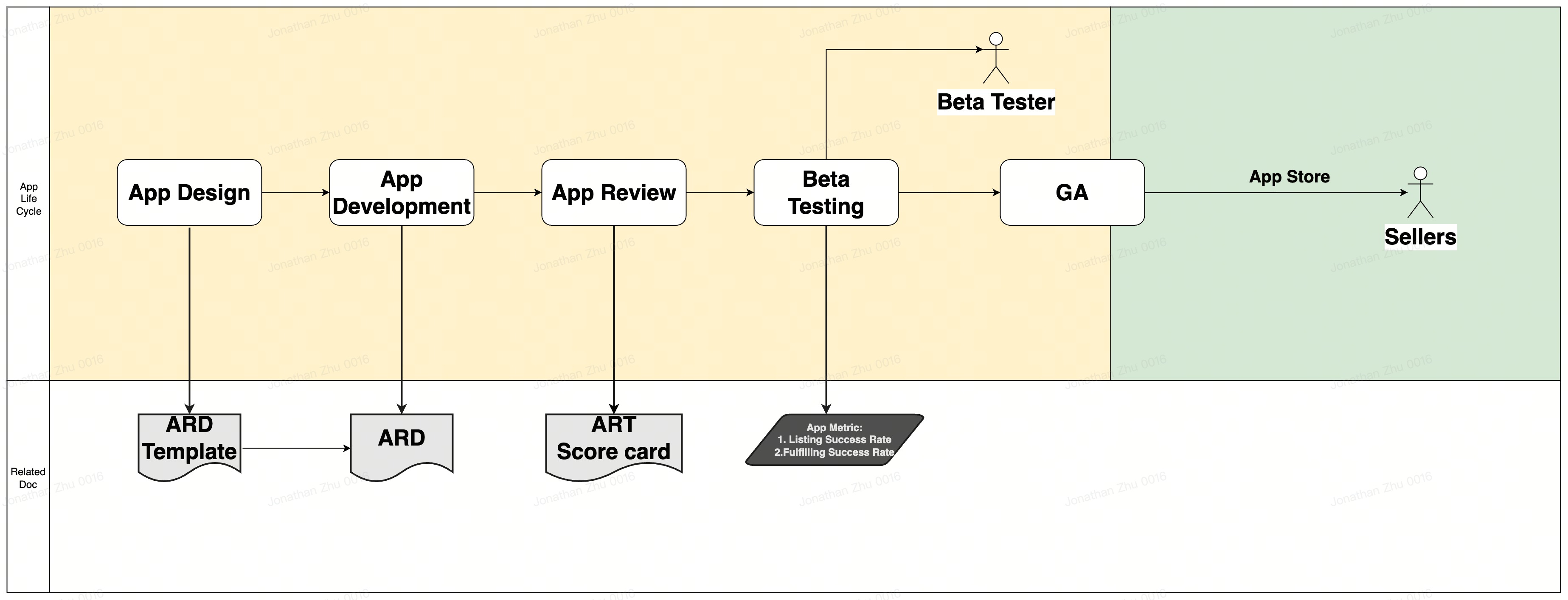
If you have confirmed your intent to develop a TikTok Shop app, and you are about to begin design and development, ensure that:
- The TikTok Shop Partnerships team has kicked off the OPIS/USDS process on your behalf.
- You have a developer account on the TikTok Shop Partner Center.
- You have a Development Shop account.
Additionally, you may be added to an internal Lark group depending on the scope and category of your application.
❗ During development, it's important to note:
- You should create your app as a custom app in Partner Center. Once it is ready to launch, you can convert it into a public app for review.
- Once development is finished, the app will be reviewed and tested by our team members. Please ensure you have set up the test accounts, and have shared them with our team.
- After a proposed public app has been reviewed, it will be published to the TikTok Shop Seller Center App Store.
Before development
- Familiarize yourself with the TikTok Shop Partner Center.
- Request the appropriate markets and categories you are developing for.
📌 Note: If you would like to develop for both the UK and US markets, you must create two separate Partner Center accounts. One for partner.tiktokshop.com and partner.us.tiktokshop.com.
Request the appropriate markets and categories you are developing for. - 📌 Note: If you would like to develop for both the UK and US markets, you must create two separate Partner Center accounts. One for partner.tiktokshop.com and partner.us.tiktokshop.com.
- Read through our guide on calling your first TikTok Shop API.
- Familiarize yourself with the glossary at the bottom of this guide.
During development
Familiarize yourself with the Partner Center apps detail page, and read through the use cases that might be relevant to your app categories. Apps can easily span multiple categories, it all depends on the value proposition you would like to provide to your customers.
App categories
| Category | Tags | Development shop | ARD |
|---|---|---|---|
| Connector, MCA, Dropshipping, Print on Demand | * Shop Connections |
- Category Management
- Product Listing
- Order Management
- Fulfillment | Core | Connector, MCA, Dropshipping, Print On Demand | | Accounting / Finance | * Finance | Full | Accounting and Finance | | Enterprise Resource Planning (ERP) | * All Connector categories
- Finance | Full | Enterprise Resource Planning (ERP) | | Customer Service | * Customer Service | Full | Customer Service | | Shipping / Fulfillment / OMS | * Order Management
- Fulfillment | Core | Order Management System (OMS) | | Promotions (Flash Deals / Coupons) | * Promotions | Full | Promotion API Overview | | System Integrator | All | Core | | | In-house Seller Developer | All | Full | |
After development
Once development is complete, you can submit your application for review. In this submission, please provide your app testing credentials. We test apps on a case-by-case basis and will let you know. Sometimes, we will ask for a demo video of the application.
Review process
Assigned accounts
If you are working with a representative from TikTok Shop, they will follow-up with you on next steps.
Unassigned accounts
If you don't have a TikTok Shop representative, please submit a copy of the table in the use case database after filling in the Will Implement column.
Glossary
| Term | Definition |
|---|---|
| Application requirement document (ARD) | This document gives you an overview of the various use cases that a seller needs, in order to manage their shop on TikTok via an application you plan to build. |
| Integration solution document/guide | This document is a technical integration guide that outlines which TikTok Shop APIs to call based on common use cases in Catalog, Order, and Return/Refunds Management. The use cases taken from these documents are applicable to building your app. |
| Integration flow | A development guide related to a specific use case. |
| TTS | An acronym for TikTok Shop. |
| Buyer | A person who purchases a product on TikTok Shop. |
| Seller | A person who sells a product on TikTok Shop. |
| Seller Center | A portal for TikTok Shop sellers to manage their shop, products, orders, returns/refunds, and more. |
| Commerce platform | A software application that allows businesses to manage their website, marketing, sales and operations. Some popular examples include Shopify, Salesforce Commerce Cloud, WooCommerce, and BigCommerce. |
| Multi-Channel App (MCA) | An app that supports sellers in managing products and shipping orders on it, connects multiple platforms (TikTok Shop, Amazon, Shopify, and other platforms) and shares data among the multiple platforms to enable sellers to manage their catalogs and ship their orders more efficiently. |
| Module | A subcomponent of the ecommerce selling lifecycle. |
| Feature | A subcomponent of module. Features are a set of functionalities in a product that will allow the seller to complete a set of tasks or actions. How you design the feature will determine the overall experience of the end user. |
| Use case | A specific situation in which an app could potentially be used by a seller or buyer. |
| App developer | Partners/developers who are building the app. |
| App reviewer | Once the app development is complete, a team member will review and test the app based on the ARD you filled out. |
| Beta testers | Once internal review is done, we will invite sellers to beta test your app. The sellers are the beta testers. |