Affiliate integration
Background
TikTok Shop is excited to launch a new category of APIs focused on affiliate marketing on TikTok Shop.
These APIs will provide Sellers, Creator Affiliates, and TikTok Shop Partners more efficient ways to create, manage, matchmake, track, monetize, and collaborate across TikTok Shop Affiliate Collaborations and Partner Campaigns.
✏️ Test Credentials
Partner Center:
- Use Development Shops as shown in this guide.
Affiliate Center/Seller Center:
- Use the ones associated with your Development Shop.
Test Creator:
- 86 12341968831, 003615 ( Ymd_ttp_8831, 7205096607046632494 )
- 86 12343432801, 007424 ( testdziwjtmwbq, 7400230764149244970 )
Affiliate API is inactive by default and the partner/ ISV has to apply for access, which requires approval from your Account Manager or Partner Manager to activate the API to build applications.
Partner account setup
- Refer to Register as a service partner to register yourself. Ensure you select the following values during registration.
Business Guide: For app developers (ISVs) Category: App developer > Customer Engagement > Affiliate
 Refer to Register as a service partner
to register yourself. Ensure you select the following values during registration. - Business Guide: For app developers (ISVs)
- Category: App developer > Customer Engagement > Affiliate
- Go to App & Service and create the following apps:
Affiliate (public): For launching an official app on the TikTok Shop App Store. Affiliate (custom): For testing purposes. Connector (custom): For obtaining necessary access to non-affiliate APIs. Go to App & Service
and create the following apps: - Affiliate (public): For launching an official app on the TikTok Shop App Store.
- Affiliate (custom): For testing purposes.
- Connector (custom): For obtaining necessary access to non-affiliate APIs.
- Initiate a compliance review for the Affiliate (public) app by referring to Publish and list a Public App.
- Provide your app key (a 14 character long key, not the App ID or Partner ID) to your partner manager so that we can list you for creator authorization. Creator authorization is necessary for accessing Creator APIs.
- Begin development of integration once API accessibility is granted.
Development shop setup
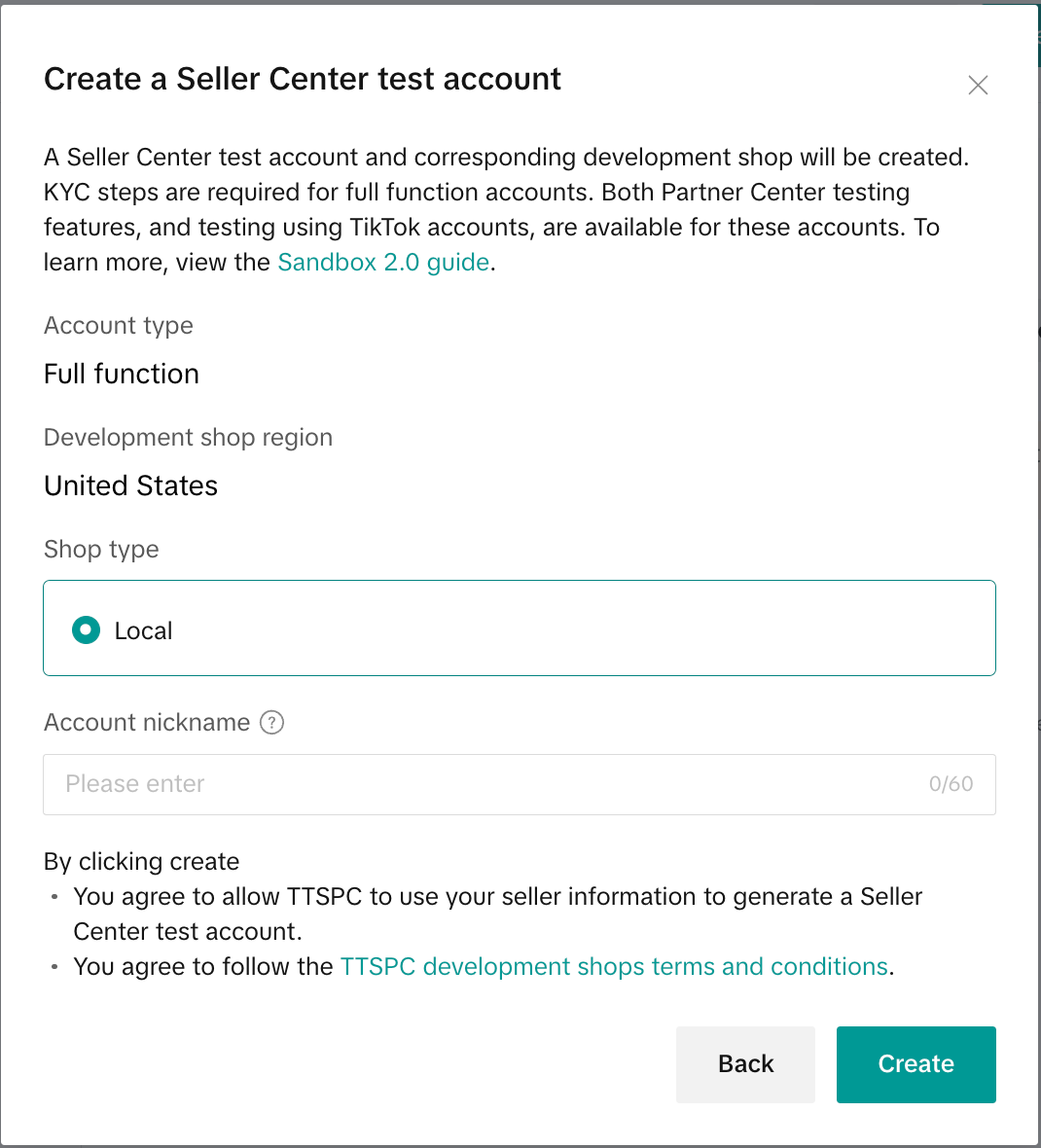

Development shop Seller Center setup
Tax information
Provide dummy information to fulfill this requirement.
Navigate to Seller Center and there should be a banner similar to the following:

Click Verify Now on this banner and you should be greeted with a tax form as shown below. You may use the same values as shown in this example.


When you click Submit, you will be prompted with a confirmation box, where you are asked to sign. It might look intimidating, but this is a test account and we just need to fulfill some requirements.

📌 Note: You may have to set up your origin and return warehouses and set up shipping templates. Please refer to these support articles on configuring your warehouses and shipping templates:
Once you have submitted the tax information, your development shop setup is complete and ready to accept product listings.
Product listing example
As an example, let's say we have a product that we want creators to showcase. They will need an affiliate link to share with their followers to purchase this product. This helps streamline the purchasing process, and tracks sales on a creator or product segment. Here are some example screenshots of how you may list the product via Seller Center. You are also welcome to create them using the API.
📌 Note: It's recommended to choose No Brand if created via Seller Center.
Product 1

Product 2

Once the product is created, you should see them with a Live status after approval.

Congratulations! The product is now ready to be added to an open collaboration! Let's go to Affiliate Center by clicking on Affiliate on the left. Scroll down and click on Go to TikTok Shop Affiliate homepage. This will open Affiliate Center in a new tab. You can also use this link here and it should automatically log in.
Seller onboarding
Seller Center authorization is required to get information on all products a seller has for sale. Sellers can set up open collaborations where any creator is welcome join, or set up targeted collaborations with specific partners. To enable all of these via API, a seller must connect their TikTok Seller Center account so that you can manage their affiliates, products, and orders.
To understand all the steps involved in authorizing your application, please see the Seller Authorization Guide in Partner Center. Once authorized, you should:
- Verify the connection by calling the Get Authorized Shops API and comparing the response to the values in Seller Center.
- Call the Search Products API to obtain a list of products and their corresponding Product IDs needed for future API calls.
Creator onboarding
Before you can send targeted collaborations or invite them to campaigns, you need to get the creator to connect their TikTok account with your application.
- Ask them to log in to TikTok using your creator authorization link. It will be in the form:
shop.tiktok.com/alliance/creator/auth?app_key=<app_key>&state=<state>
❗ Important: The state parameter is required for creator authorization links.
- This will prompt the creator to log in with their TikTok Account.
- Once they login successfully, they will see a screen resembling the following:
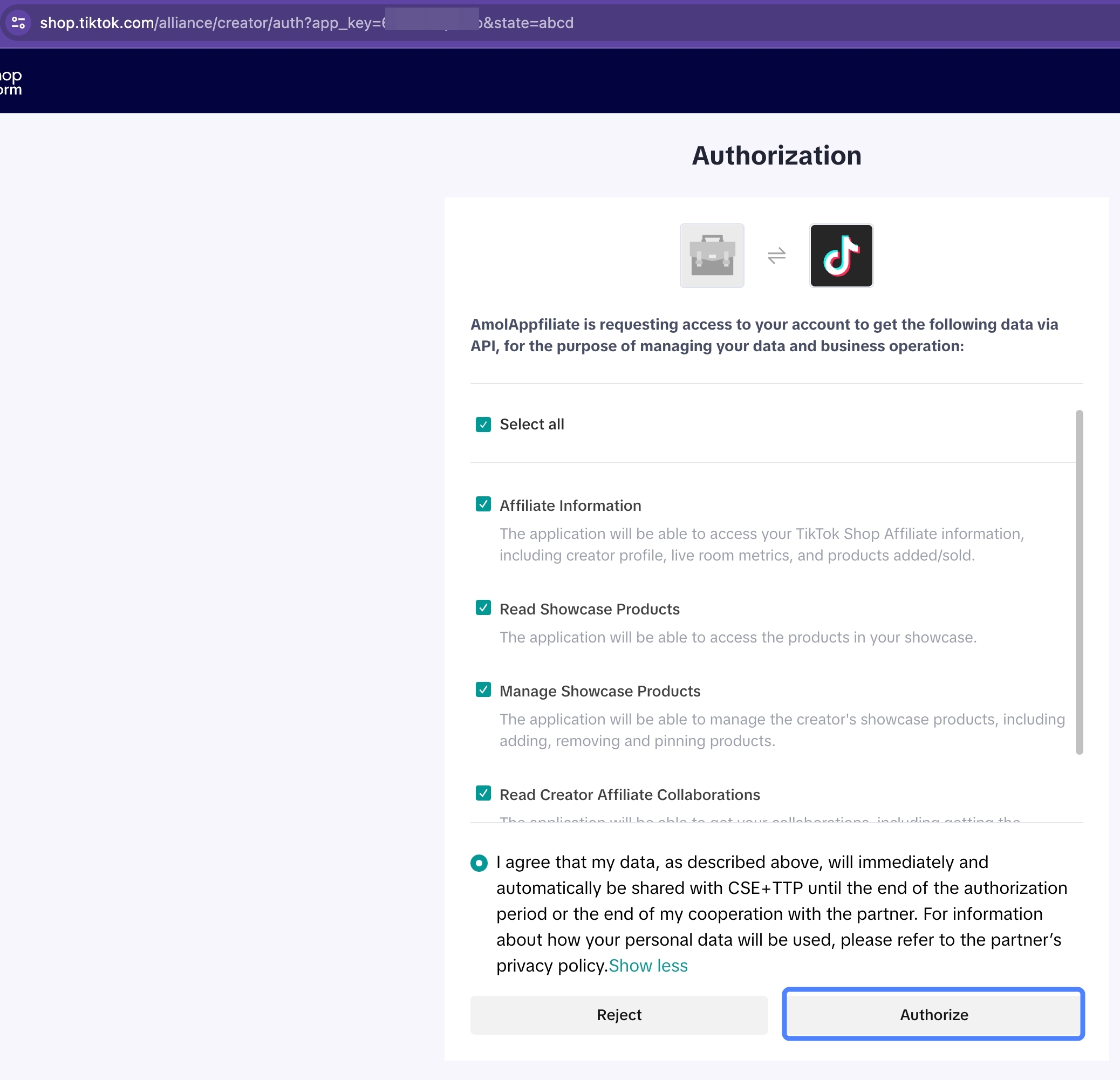
- When they click the Authorize button, TikTok Shop will send you to the redirect link specified in the app settings. For example, if the redirect link is
http://localhost:8000, then the redirect URL will look like:http://localhost:8000?code=<redacted>&state=<state>&app_key=<app_key>. - Use the code from the redirect URL to call the GET Access Token endpoint, which will grant you access to call the Affiliate Creator endpoints.
📌 Note: This process is the same as getting an access token for your Seller Center account, but there are two distinct access tokens, one for the seller account and one for the creator account.
- The GET Creator Profile endpoint will give you the
creator_user_idneeded to successfully call APIs for creating a targeted collaboration.
Please refer to our creator authorization guide in the TikTok Shop Partner Center for detailed information on how to connect these accounts.
API scope mapping
💡 Tip: You can directly search the API name in the Manage API modal by clicking on the dropdown next to Scope Name and selecting one of the items from the lists that are under the API Names column.
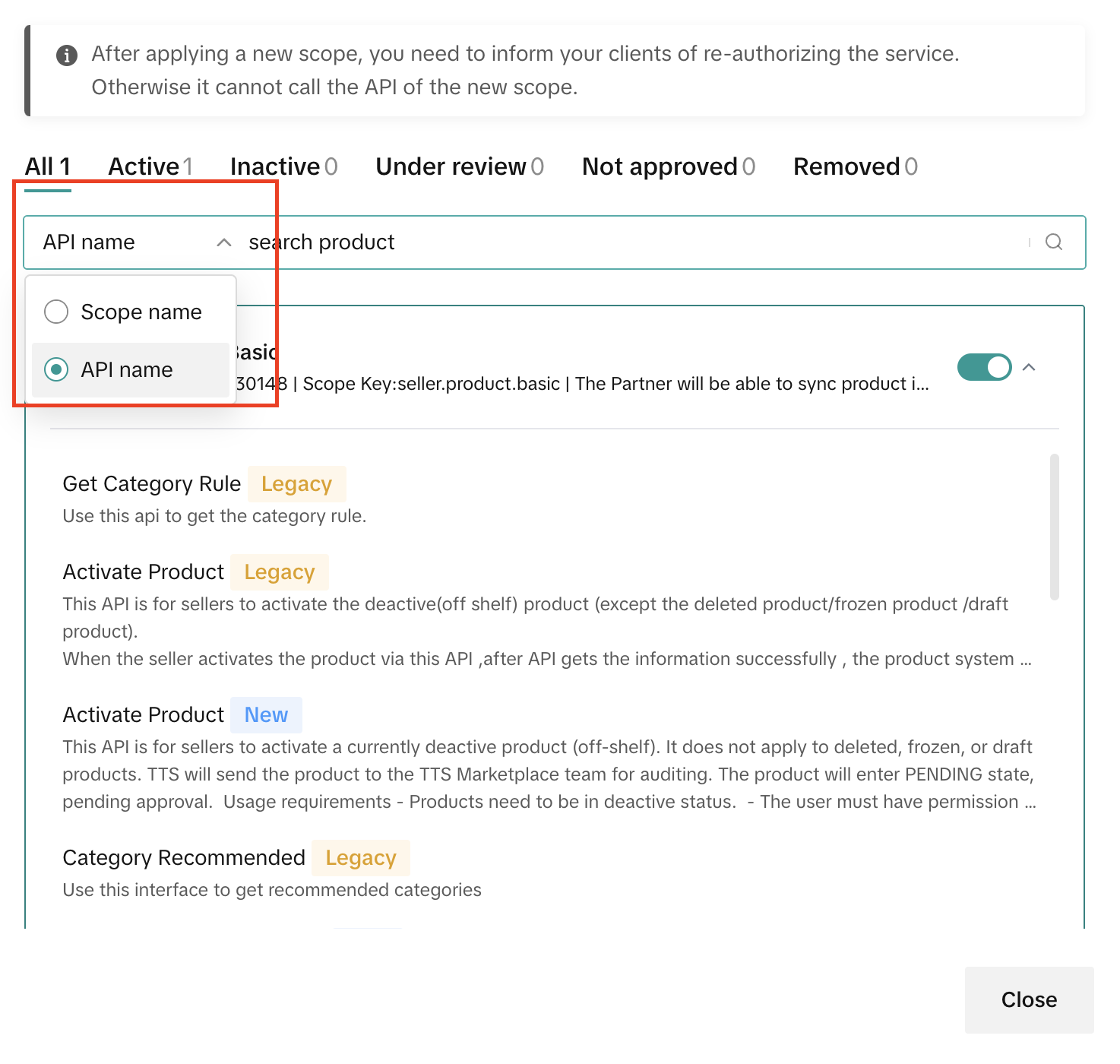
| Scope ID | Scope Name | API Names |
|---|---|---|
| 434372 | Affiliate Information | * Check Anchor Content |
- Check Anchor Prerequisites
- Get Creator Profile
- Get Live Room Info
- Get Shop Products | | 733764 | Read Seller Affiliate Collaborations | * Search Seller Affiliate Orders
- Seller Search Affiliate Open Collaboration Product | | 890884 | Manage Seller Affiliate Collaboration | * Create Open Collaboration
- Create Target Collaboration
- Edit Open Collaboration Settings
- Generate Affiliate Product Promotion Link
- Remove Creator Affiliate from Collaboration | | 1021508 | Read Creator Affiliate Collaborations | * Creator Search Open Collaboration Product
- Search Creator Affiliate Orders
- Search Creator Target Collaborations | | 733508 | Read Affiliate Partner Campaigns | * Get Affiliate Partner Campaign Detail
- Get Affiliate Partner Campaign List
- Get Affiliate Partner Campaign Product List | | 733444 | Manage Affiliate Partner Campaigns | * Create Affiliate Partner Campaign
- Edit Affiliate Partner Campaign
- Publish Affiliate Partner Campaign | | 733572 | Manage Affiliate Partner Campaign Products | * Review Affiliate Partner Campaign Product |
Use cases
Generating an affiliate product promotion link
For products that are live, you can generate product promotion links by calling the Generate Affiliate Product Promotion Link API. You can only create one promotion link per API call as the product ID is part of the path parameter.
CURLWord Wrap
curl --location --globoff --request POST 'https://open-api.tiktokglobalshop.com/affiliate_seller/202405/products/1729570313535393936/promotion_link/generate?app_key=6d0ut2ttps2io&shop_cipher=TTP_YaVduQAAAACwxSc13yKds1NldAZaPw34&sign=c2a149d480ae59b6eaf0ceebe1173d7fbb831a4227406a9008c0565535b42ebe×tamp=1723135734' \
--header 'content-type: application/json' \
--header 'x-tts-access-token: <token>' \
--data ''
{
"code": 0,
"data": {
"product_promotion_link": "https://www.tiktok.com/t/ZTNgEQFGa/"
},
"message": "Success",
"request_id": "20240808165018109CFA6CCA917E04CBAD"
}

❗ Important: You can only add one product to an open collaboration.
To create an open collaboration, follow these steps:
- Add product to open collaboration using a product ID and commission rate (e.g. 1234) by calling the Create Open Collaboration API.
If successful, the response should include effective time, ID (open collaboration ID 87620110221), and the product ID that's part of the collaboration. If you want to edit the commission rate or the approve creator toggle, simply call the API again with the new settings. The ID does not change. Add product to open collaboration using a product ID and commission rate (e.g. 1234) by calling the Create Open Collaboration API
. - If successful, the response should include effective time, ID (open collaboration ID 87620110221), and the product ID that's part of the collaboration.
- If you want to edit the commission rate or the approve creator toggle, simply call the API again with the new settings. The ID does not change.
📌 Note: Free samples cannot be added to open collaboration via API, and must be done in Seller Center.
- You can verify creation success by calling the Seller Search Affiliate Open Collaboration API:
CURLWord Wrap
curl --location --globoff 'https://open-api.tiktokglobalshop.com/affiliate_seller/202405/open_collaborations/products/search?app_key=6d0ut2ttps2io&shop_cipher=TTP_YaVduQAAAACwxSc13yKds1NldAZaPw34&sign=30ce092ba485c189a6c30f856ce771c55c4acddda11c957ecababd5c07435a2d×tamp=1723136505&page_size=10' \
--header 'content-type: application/json' \
--header 'x-tts-access-token: <token>' \
--data '{
"category": {
"id": "601755"
},
"title_keywords": [
"Open Collaboration Pink"
],
"sales_price_range": {
"amount_ge": "3.99",
"amount_lt": "4.99"
},
"commission_rate_range": {
"rate_ge": 1233,
"rate_lt": 1235
}
}'
{
"code": 0,
"data": {
"next_page_token": "",
"products": [
{
"category_chains": [
{
"id": "601755",
"is_leaf": false,
"local_name": "Computers & Office Equipment",
"parent_id": "0"
},
{
"id": "831112",
"is_leaf": false,
"local_name": "Office Stationery & Supplies",
"parent_id": "601755"
},
{
"id": "855560",
"is_leaf": true,
"local_name": "Cards",
"parent_id": "831112"
}
],
"commission": {
"amount": "0.4319",
"currency": "USD",
"rate": 1234
},
"detail_link": "https://shop.tiktok.com/view/product/1729570313535393936?region=US&local=en",
"has_inventory": true,
"id": "1729570313535393936",
"main_image_url": "https://p16-oec-ttp.tiktokcdn-us.com/tos-useast5-i-omjb5zjo8w-tx/c9052b2b9d5248c1a552d5fe15a892d5~tplv-omjb5zjo8w-origin-webp.webp?from=1695864008",
"original_price": {
"currency": "USD",
"maximum_amount": "4.19",
"minimum_amount": "4.19"
},
"sale_region": "US",
"sales_price": {
"currency": "USD",
"maximum_amount": "3.5",
"minimum_amount": "3.5"
},
"shop": {
"name": "SANDBOX7398293016815273770"
},
"title": "Open Collaboration Coffee Pink Color Meme Card Smiling Lady",
"units_sold": 5
}
],
"total_count": 1
},
"message": "Success",
"request_id": "20240808170145A205E014C8878404D59C"
}
📌 Note: You may need to tweak the parameters to filter it down, especially if it's too generic. In the example above, the title keywords are "Open Collaboration Pink", sales price range is between 3.99 and 4.99, and commission rate was between 1233 and 1235.
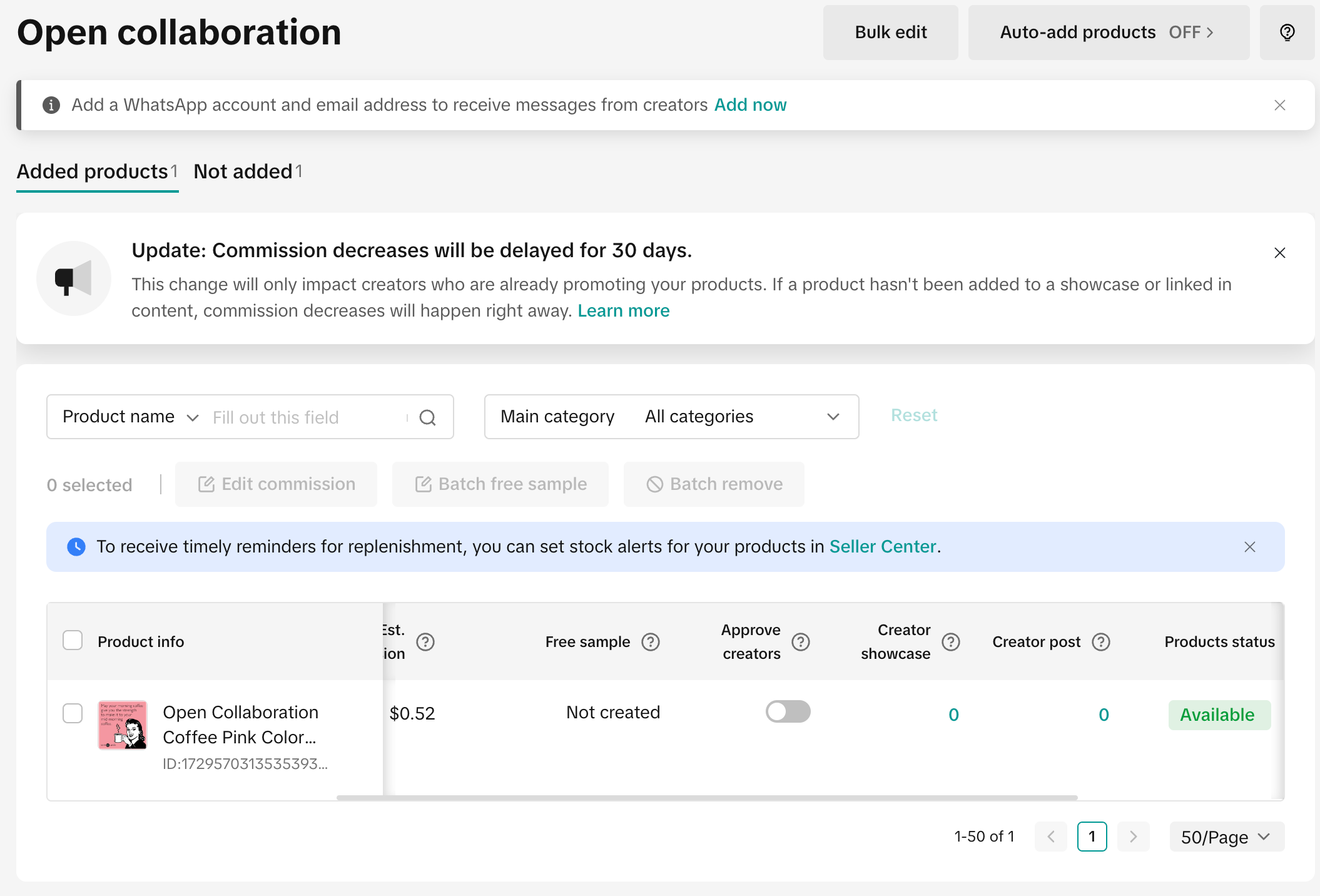
- You can also verify this in Affiliate Center:
Creator actions
Creators that have completed the onboarding steps described above can use your application to find open collaborations. To enable this feature, you must integrate with the Creator Search Open Collaboration Product API (cURL below). The API accepts a product title search, the product's price, the product's category, and the collaboration's commission and returns a list of open collaborations published by that seller, which creators are free to join. Some of them have screening processes where the seller has to approve the creator after review.
CURLWord Wrap
curl --location --globoff 'https://open-api.tiktokglobalshop.com/affiliate_seller/202405/open_collaborations/products/search?app_key=6d0ut2ttps2io&shop_cipher=TTP_bCWokAAAAAA6xm9rY_B9wYFY2QltXcs9&sign={{sign}}×tamp={{timestamp}}&page_size=10' \
--header 'content-type: application/json' \
--header 'x-tts-access-token: <redacted>' \
--data '{
"category": {
"id": "601755"
},
"title_keywords": [
"Open Collaboration Pink"
],
"sales_price_range": {
"amount_ge": "3.99",
"amount_lt": "4.99"
},
"commission_rate_range": {
"rate_ge": 1233,
"rate_lt": 1235
}
}'
{
"code": 0,
"data": {
"next_page_token": "",
"products": [
{
"category_chains": [
{
"id": "601755",
"is_leaf": false,
"local_name": "Computers & Office Equipment",
"parent_id": "0"
},
{
"id": "831112",
"is_leaf": false,
"local_name": "Office Stationery & Supplies",
"parent_id": "601755"
},
{
"id": "855560",
"is_leaf": true,
"local_name": "Cards",
"parent_id": "831112"
}
],
"commission": {
"amount": "0.4319",
"currency": "USD",
"rate": 1234
},
"detail_link": "https://shop.tiktok.com/view/product/1729570313535393936?region=US&local=en",
"has_inventory": true,
"id": "1729570313535393936",
"main_image_url": "https://p16-oec-ttp.tiktokcdn-us.com/tos-useast5-i-omjb5zjo8w-tx/c9052b2b9d5248c1a552d5fe15a892d5~tplv-omjb5zjo8w-origin-webp.webp?from=1695864008",
"original_price": {
"currency": "USD",
"maximum_amount": "4.19",
"minimum_amount": "4.19"
},
"sale_region": "US",
"sales_price": {
"currency": "USD",
"maximum_amount": "3.5",
"minimum_amount": "3.5"
},
"shop": {
"name": "SANDBOX7398293016815273770"
},
"title": "Open Collaboration Coffee Pink Color Meme Card Smiling Lady",
"units_sold": 5
}
],
"total_count": 1
},
"message": "Success",
"request_id": "202408081849481CCE26F7477A910041E1"
}
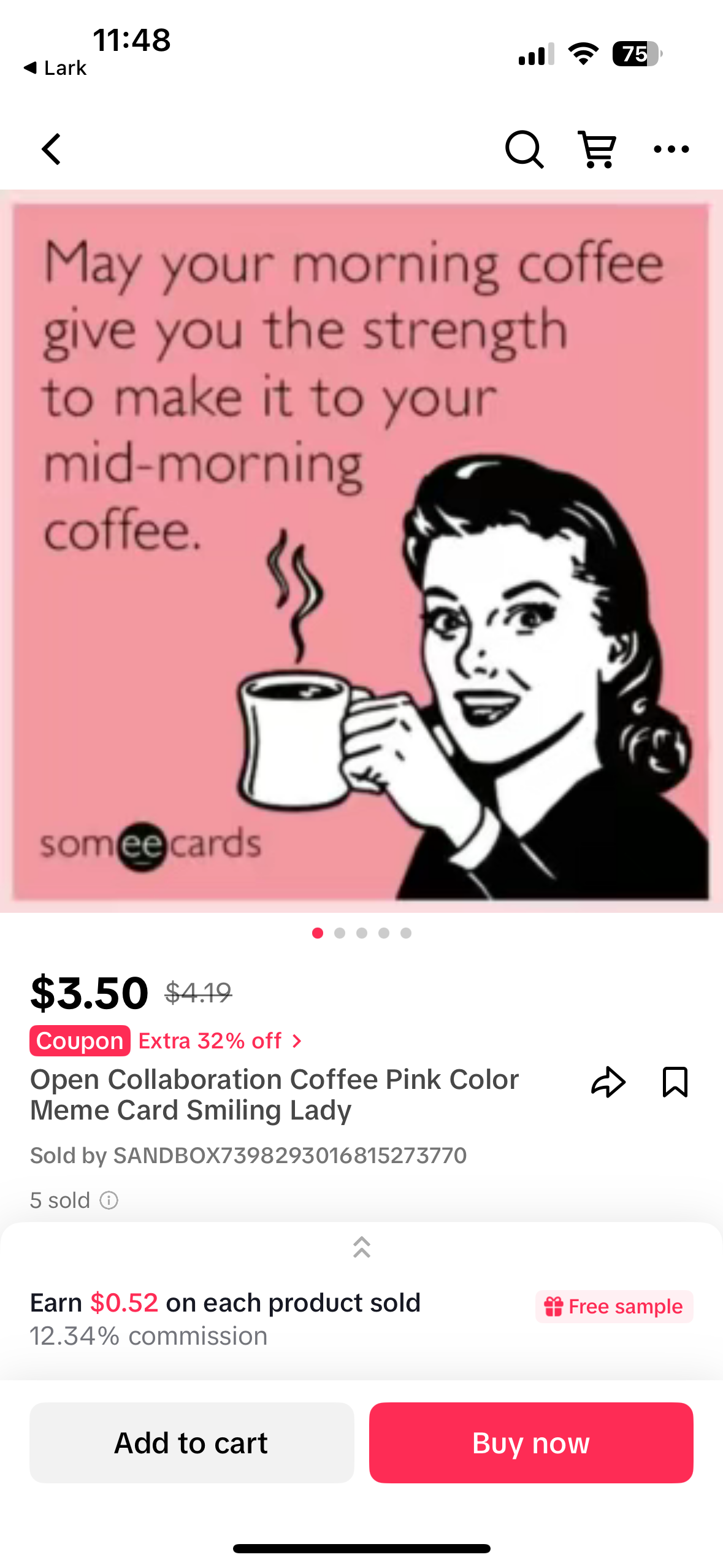
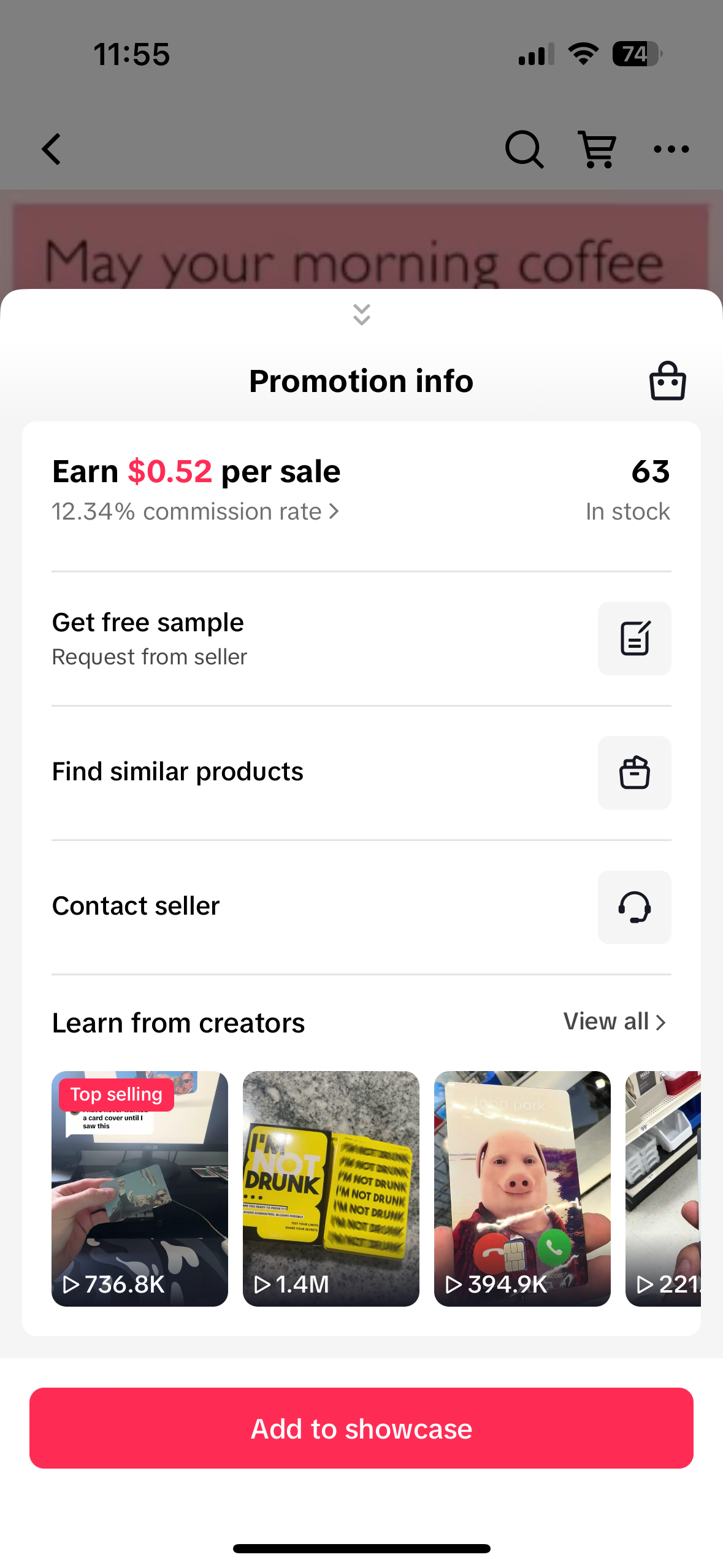
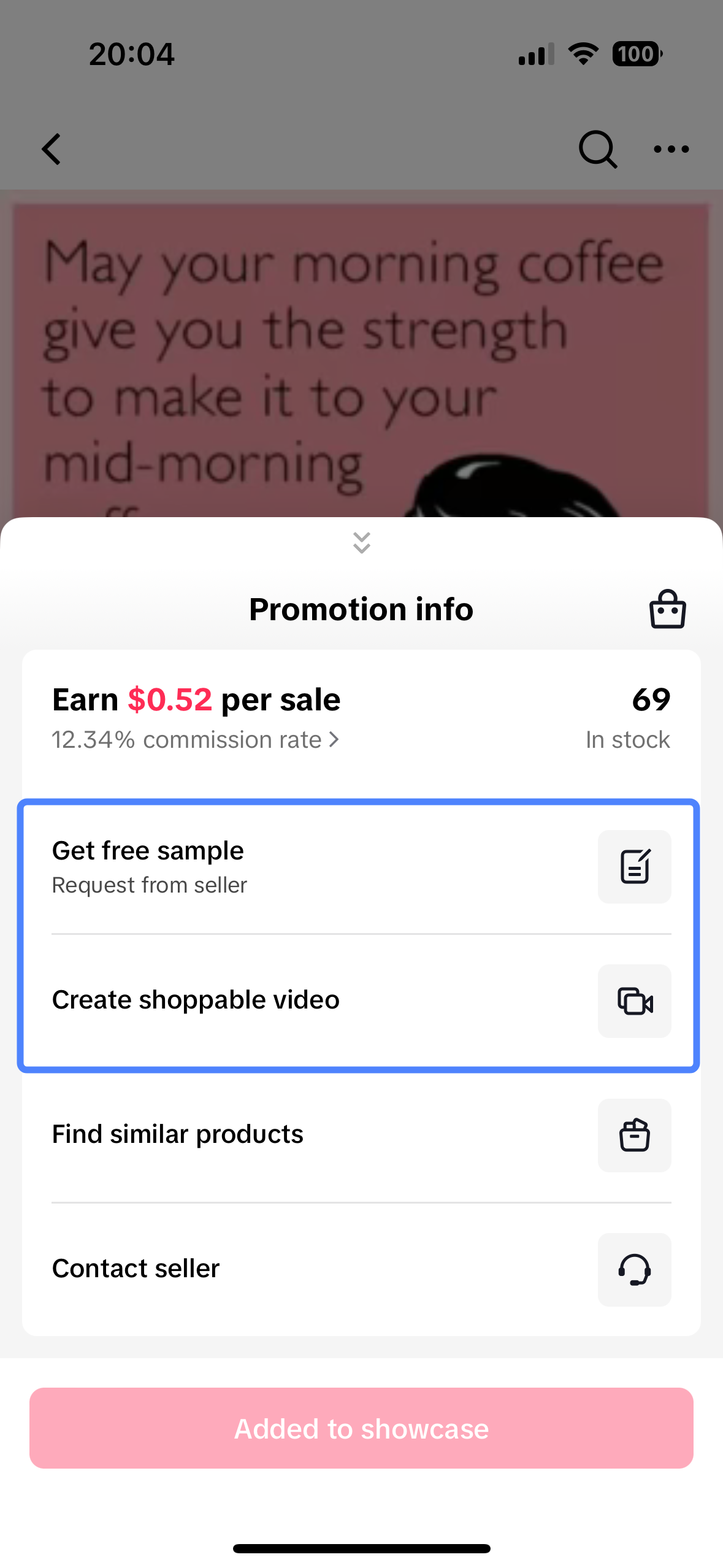
If a creator clicks on the detail_link on their phone under any product, it opens up the TikTok app and shows the product display page (PDP) with the collaboration details under it. In the example below, it is the text "Earn 0.52 on each product sold" right above the Buy Now button.
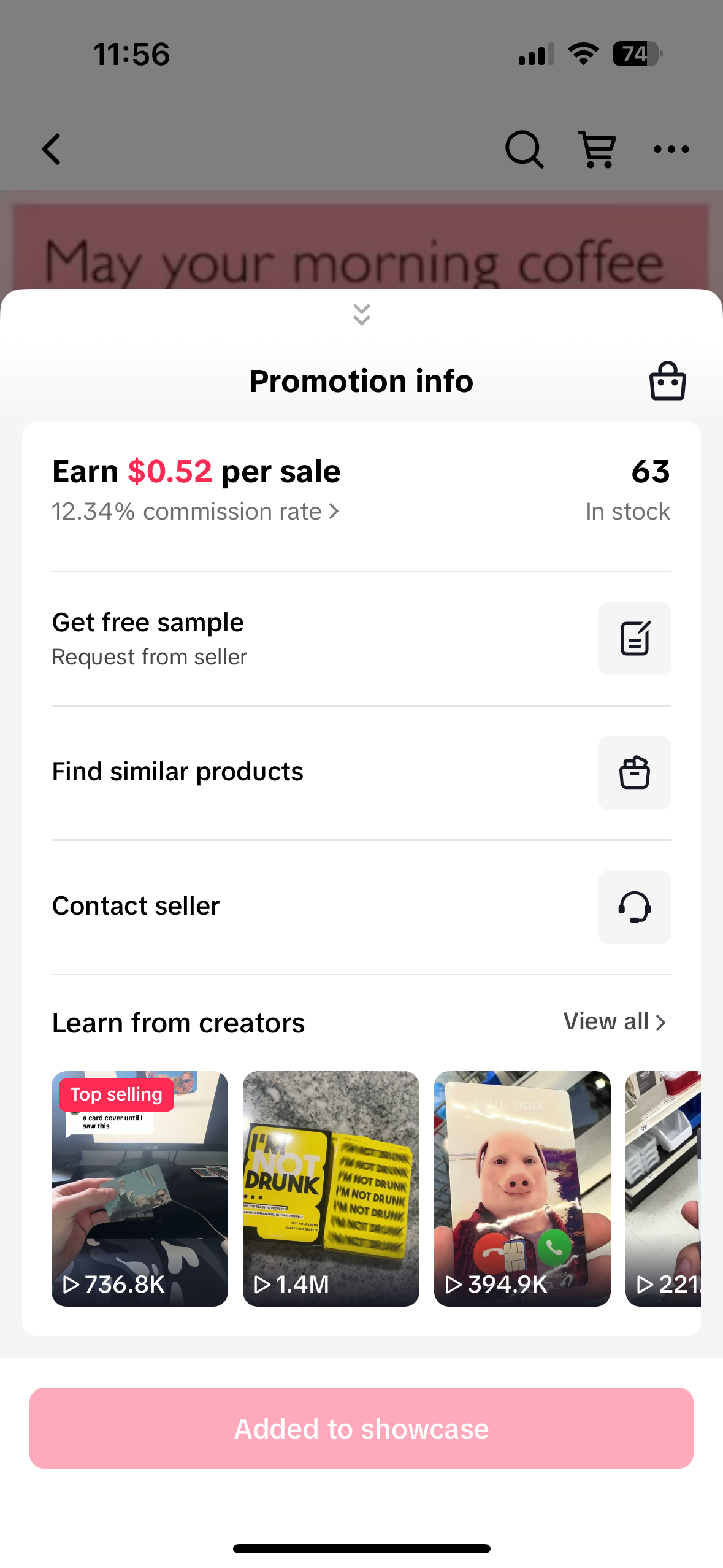
Clicking on this expands the menu with options like requesting a free sample or shoppable video (if applicable), and a main call to action for them to add the product to their showcase. For example, a fashion-based creator can search for open collaborations with sellers that are producing high-quality T-shirts using this API. The creator can enter what commission rate they would like to earn and the style of the T-shirt by passing it to the product's title search.
 |  |  |
Removing a creator from a collaboration
If for any reason you would like to remove a creator from an open collaboration, you can call the Remove Creator Affiliate from Collaboration API.
📌 Note: In the current API version, this will remove the creator but does not prevent them from rejoining with the affiliate link.
CURLWord Wrap
curl --location --globoff 'https://open-api.tiktokglobalshop.com/affiliate_seller/202405/open_collaborations/129916503437/remove_creator?app_key=6d0ut2ttps2io&shop_cipher=TTP_bCWokAAAAAA6xm9rY_B9wYFY2QltXcs9&sign=b61b7a13d73cf242f95d9f8ff8f0d46689af5ceba70749f5a267dac54c370869×tamp=1723143673' \
--header 'content-type: application/json' \
--header 'x-tts-access-token: <redacted' \
--data '{
"creator_user_id": "7400230764149244970",
"product_id": "1729568997216587962"
}'
{
"code": 0,
"data": {},
"message": "Success",
"request_id": "20240808190113870E01A8EAB8AF006987"
}
Creating a targeted collaboration
To successfully invite creators to a targeted collaboration, you will need a list of creator user IDs, and up to 50 creators can be invited per one API call. This means you will need to have creators authorized as per the Creator Authorization link here and have a unique access token to modify the creator's TikTok account.
To create a targeted collaboration, follow these steps:
- Call the Get Creator Profile API with the creator access token to get creator user IDs if you do not have them stored in your database:
CURLWord Wrap
curl --location --globoff 'https://open-api.tiktokglobalshop.com/affiliate_creator/202405/profiles?app_key=6d0ut2ttps2io&sign=4ba5a9531b4c2196cdefde923c270259363398d3fcd05074c0c9302e07f77576×tamp=1723144188' \
--header 'content-type: application/json' \
--header 'x-tts-access-token: <creator_token>' \
--data ''
{
"code": 0,
"data": {
"avatar": {
"url": "https://p16-sign-va.tiktokcdn.com/musically-maliva-obj/1594805258216454~c5_100x100.webp?lk3s=a5d48078&nonce=51354&refresh_token=4cda6b090dcbd9854fe8aa7ec2297662&x-expires=1723312800&x-signature=y9Z7uqPuxLEtzus5m7PBg5CeqH4%3D&shp=a5d48078&shcp=2c5759a5"
},
"creator_user_id": "7400230764149244970",
"permissions": [
"LIVE_STREAM_PERMISSION",
"ADD_AFFILIATE_PERMISSION"
],
"register_region": "US",
"selection_region": "US",
"seller_type": "UNKNOWN",
"user_type": "TIKTOK_SHOP_CREATOR",
"username": "testdziwjtmwbq"
},
"message": "Success",
"request_id": "202408081837124EF0047357C9480005DB"
}
CURLWord Wrap
curl --location --globoff 'https://open-api.tiktokglobalshop.com/affiliate_seller/202405/target_collaborations?app_key=6d0ut2ttps2io&shop_cipher=TTP_bCWokAAAAAA6xm9rY_B9wYFY2QltXcs9&sign=5ddb3f519b3da61f2f959df81fc42b77441df06626f070ae423e3112a932111a×tamp=1723144047' \
--header 'content-type: application/json' \
--header 'x-tts-access-token: <redacted>' \
--data-raw '{
"name": "API Target Collaboration",
"message": "Created via Postman",
"end_time": "1723194000",
"products": [
{
"id": "1729569362021748922",
"target_commission_rate": 2001
}
],
"creator_user_ids": [
"7400230764149244970"
],
"seller_contact_info": {
"email": "test@tiktokshop.com"
},
"free_sample_rule": {
"has_free_sample": true,
"is_sample_approval_exempt": false
}
}'
{
"code": 0,
"data": {
"target_collaboration": {
"id": "7400846837790361387"
},
"target_collaboration_conflicts": []
},
"message": "Success",
"request_id": "202408081907271D8F70256ABB65008443"
}
- It is recommended that the
end_timebe at least a few days from now. - Sometimes the API may return
target_collaboration_conflictsin the response. This means the targeted collaboration has not been created. - If successful, there should be a
target_collaborationobject, with a target collaboration ID.
Common errors include:
invalid_params: Please check the end_time.
test account and non test account can not cross invite: If you are inviting multiple creators, and one or more of them do not match the shop environment, please remove them from the creator list.
If successful, there should be a target_collaboration
object, with a target collaboration ID. - Common errors include:
invalid_params: Please check the end_time.
test account and non test account can not cross invite: If you are inviting multiple creators, and one or more of them do not match the shop environment, please remove them from the creator list.
Common errors include: - invalid_params: Please check the end_time.
- test account and non test account can not cross invite: If you are inviting multiple creators, and one or more of them do not match the shop environment, please remove them from the creator list.
Creator actions
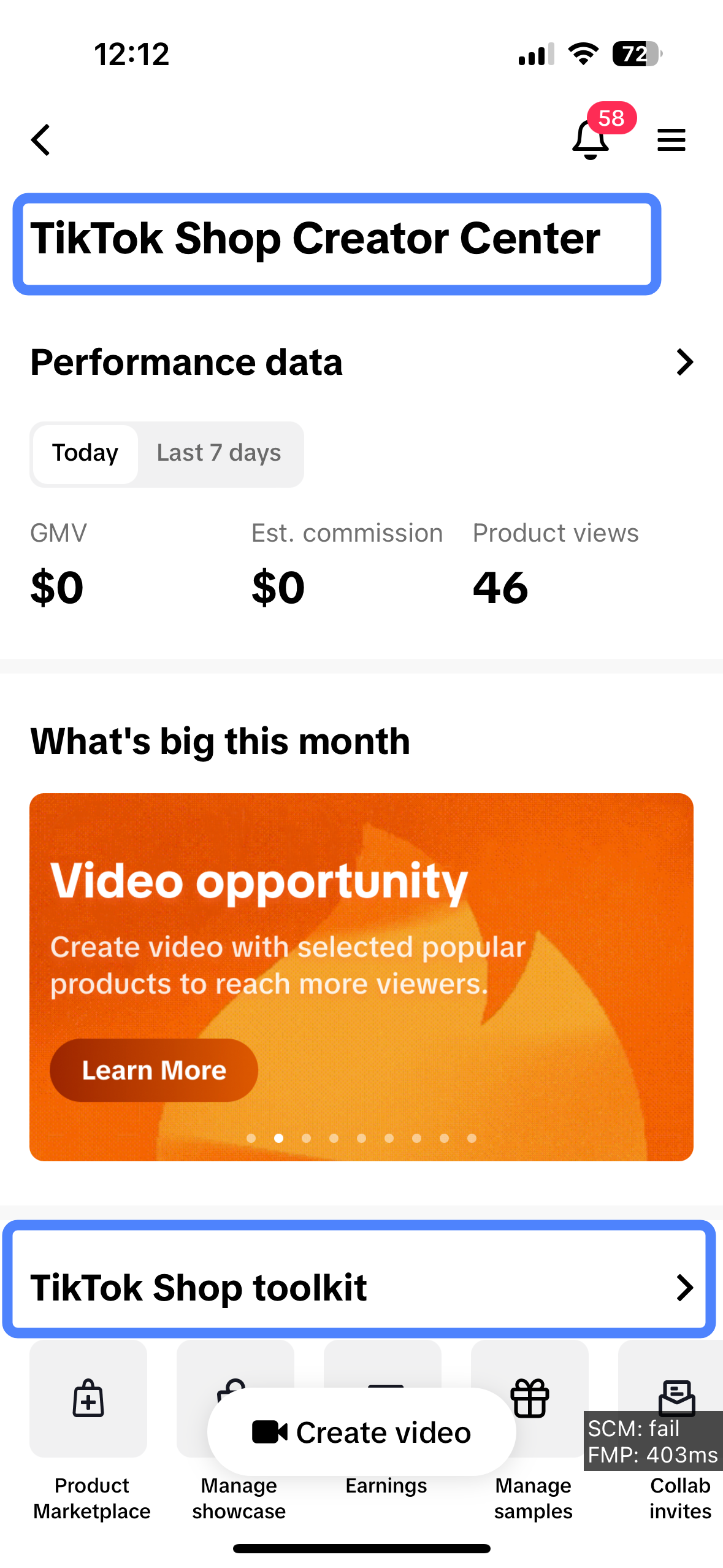
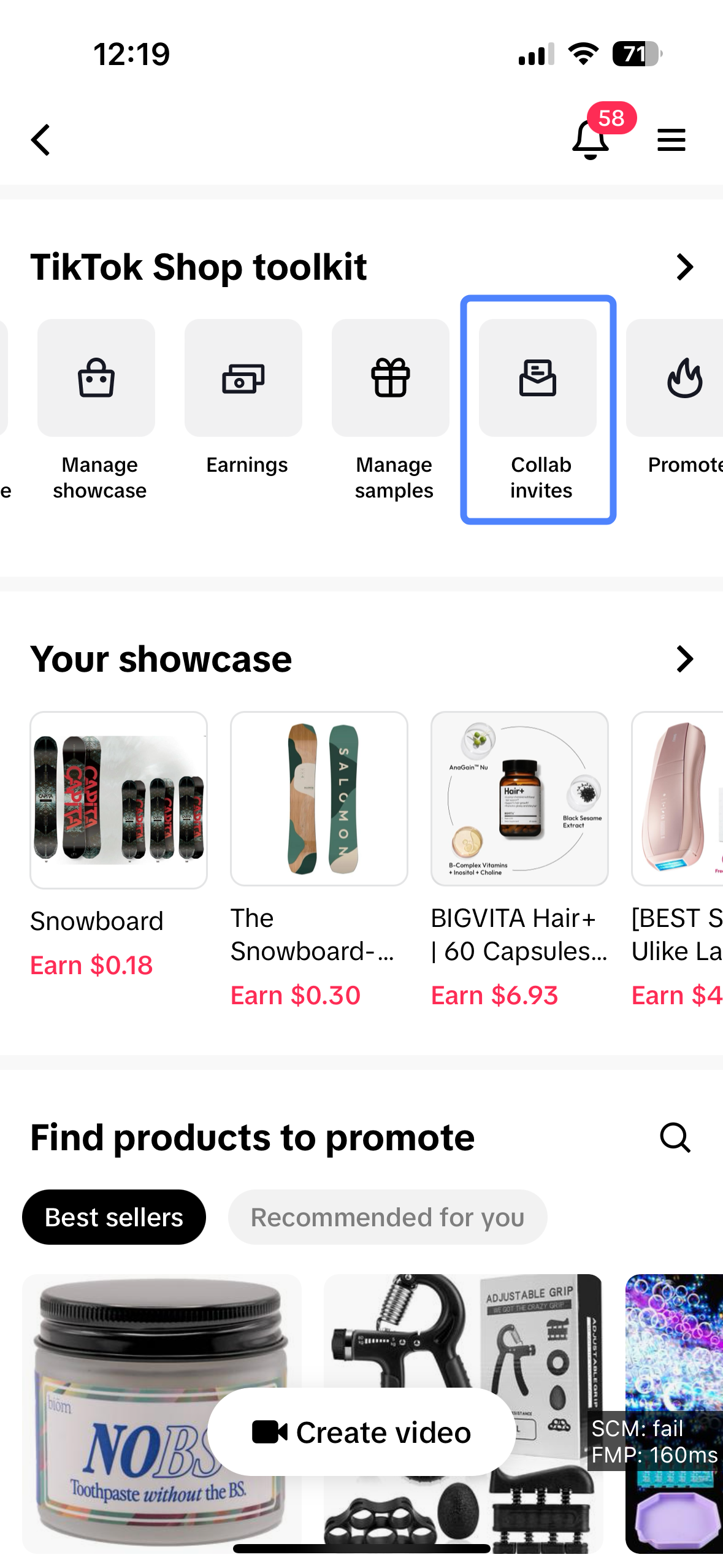
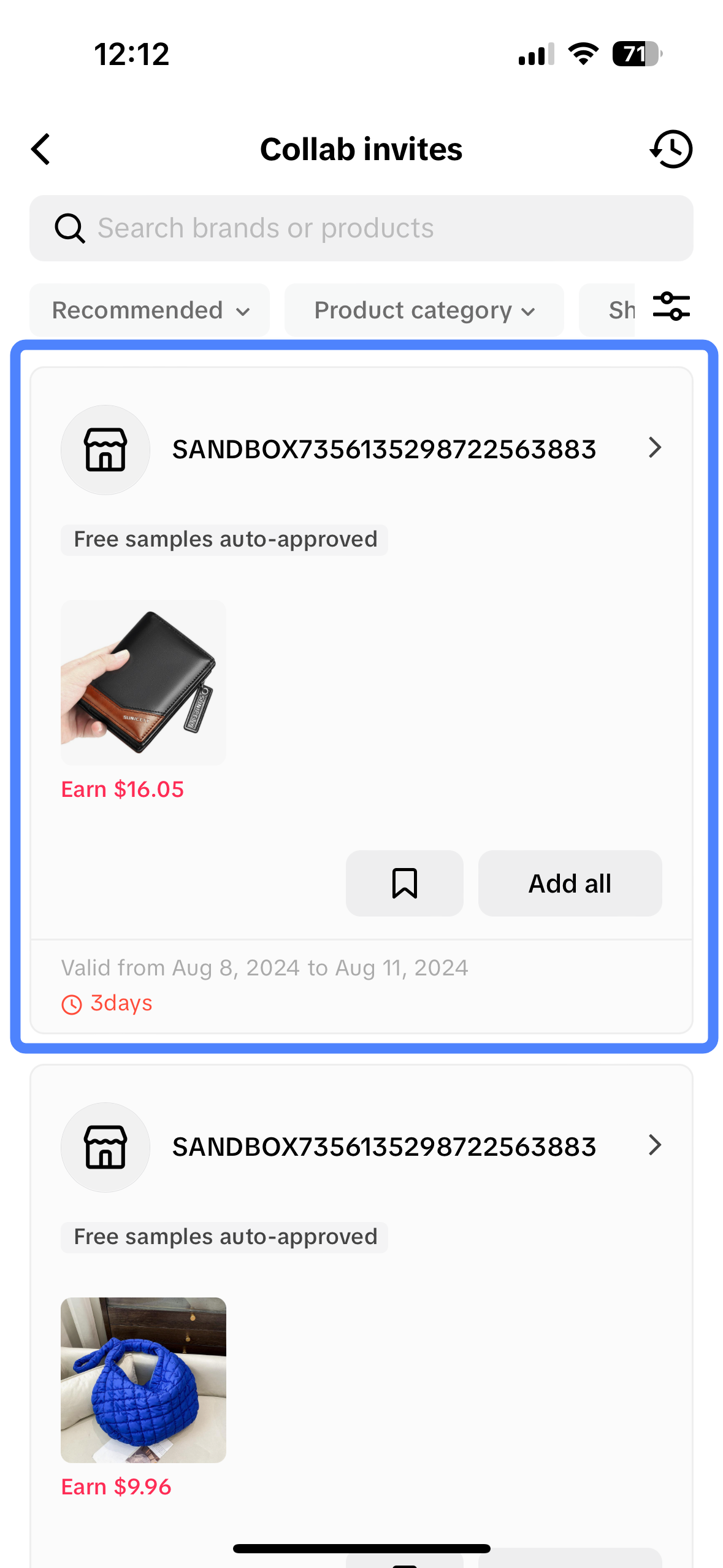
Creators can find collaboration invites by going to Profile > TikTok Studio > TikTok Shop for Creator (under Monetization) > Scroll down to TikTok Shop Toolkit > Collab invites.
- When a creator selects the collaboration they are interested in, it will show all the products that are part of this invite, and they can choose to add the ones they would like to promote to their showcase.
- They can either choose to Add All or click on individual products to add them.
 |  |  |  |
The Search Creator Target Collaborations API lets the application search all the targeted collaborations a creator has with a particular store. This store needs a shop ID that can be retrieved by calling the Get Authorized Shops API as described in the seller onboarding steps above.
CURLWord Wrap
curl --location --globoff 'https://open-api.tiktokglobalshop.com/affiliate_creator/202405/target_collaborations/search?app_key=6d0ut2ttps2io&sign={{sign}}×tamp={{timestamp}}&page_size=20' \
--header 'content-type: application/json' \
--header 'x-tts-access-token: TTP_VfWnMAAAAADpPV2NiWO2_60_59-jq0QxV6beCG1eHCnsQGa3Znh6huRfzsNsfAjCx3sexUeCzQ35Fi8SZfHTTwVnm-dQD_vk_Jh0YTSdfpp2tmWllFw_4g' \
--data '{
"shop_id": "7495792013947799738"
}'
{
"code": 0,
"data": {
"next_page_token": "",
"target_collaborations": [
{
"id": "7400846837790361387",
"name": "API Target Collaboration",
"products": [
{
"commission": {
"amount": "1.0005",
"currency": "USD",
"rate": 2001
},
"id": "1729569362021748922",
"main_image_url": "tos-useast5-i-omjb5zjo8w-tx/b22252c5634c4cf58ab44fd630945cc0",
"title": "I Got A Bridge To Sell You Model Concrete Test Prod"
}
],
"status": "LIVE"
}
],
"total_count": 1
},
"message": "Success",
"request_id": "202408081923125F67CB063F3DF300AF19"
}
Showcase interactions
Creator using the TikTok app
When a creator clicks on the product promotion link on their mobile device, it opens the TikTok app and displays the PDP, which will prompt the creator to add the product to the showcase. This prompt will also let the creator order a free sample if it is enabled in the open collaboration, or prompt them to make a shoppable video if it is a targeted collaboration.
Partner/seller using API
To call any of the APIs listed under Affiliate Creator in the API Reference, you will need to have your creator authorize your application. Follow the Creator Authorization flow in the link here. The following steps assume you have a token to make changes to their TikTok account. For testing purposes, you may use the TikTok Creator Account credentials above if you do not currently have one.
To add a product to a creator's showcase, the product must already exist as part of a collaboration. You may get an error that asks you to contact TikTok if a product collaboration link does not exist. See above on how to create a targeted collaboration.
To add a product to the creator's showcase, you can call the Add Showcase Products API. It is recommended that you add the affiliate link that can be generated as per the use case above.
Once the product is added to their showcase, they can request free samples if enabled.
Creator using API
The application integrating with TikTok APIs can show the current products listed in a particular creator's account by calling Get Showcase Products.
Free samples for creators
Enabling free samples
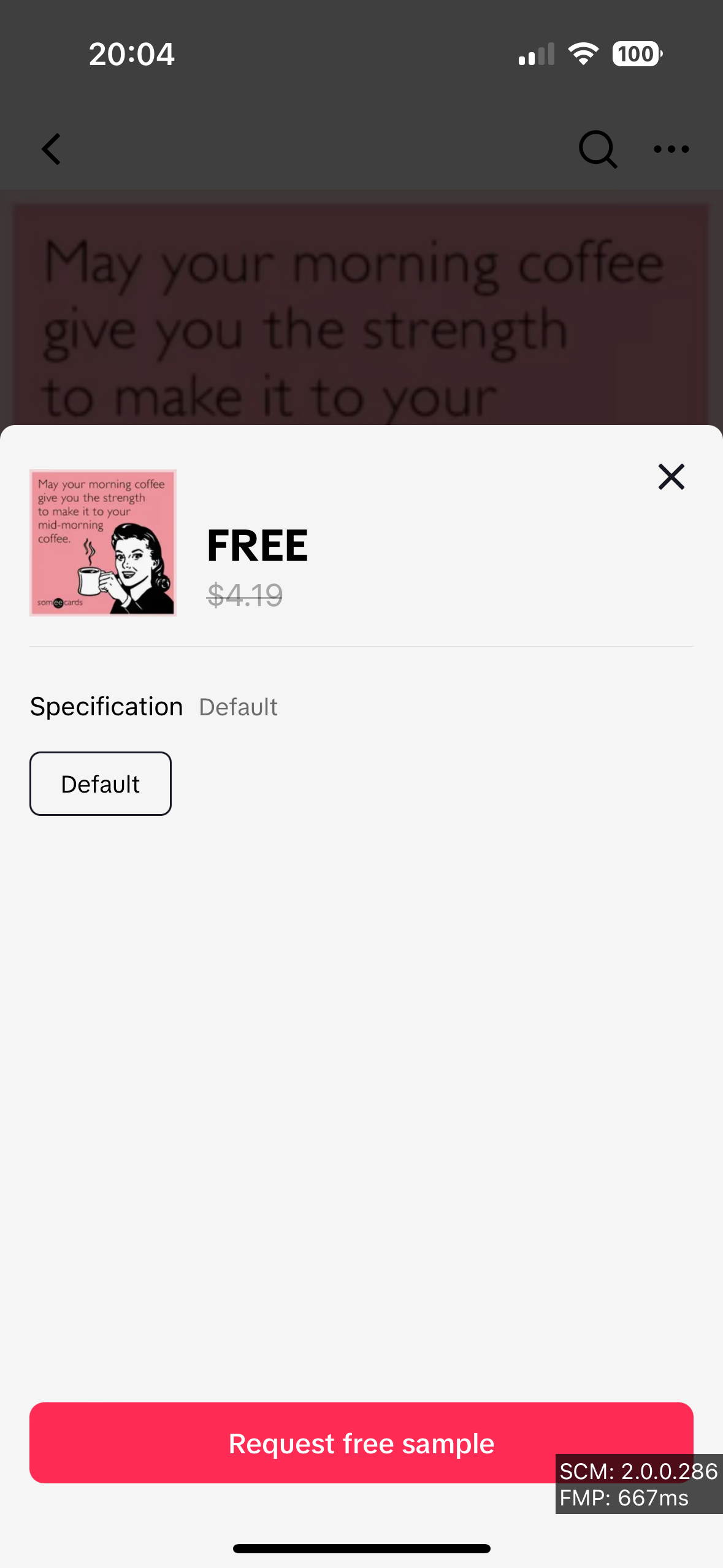
Free samples can only be enabled in the Affiliate Center. Click on Not Created to open a modal that lets you specify rules for free samples. The only required field is quantity, you can tweak the rest to your liking. Once free samples are enabled, you need to generate a product promotion link that can be shared with creators.
Please refer to the above sections: Generate affiliate product promotion link, Creating an open collaboration, and Creating a targeted collaboration on how to generate the link where creators can request samples.
📌 Note: If a product is not added to open collaboration, only the link is generated.
Share this link with a creator so they can add it to showcase as shown below.
Requesting free samples
 |  |  |  |  |
Fulfilling free samples
When a creator adds a product to their showcase, they also have the option to request a free sample if available. Requests for these samples are displayed in Affiliate Center under the Sample Requests page. Sellers can approve or deny these requests if auto-approved is set to false.
Once approved, a sample order is created and should be reflected in Seller Center. Fulfill this order like you would any other order.

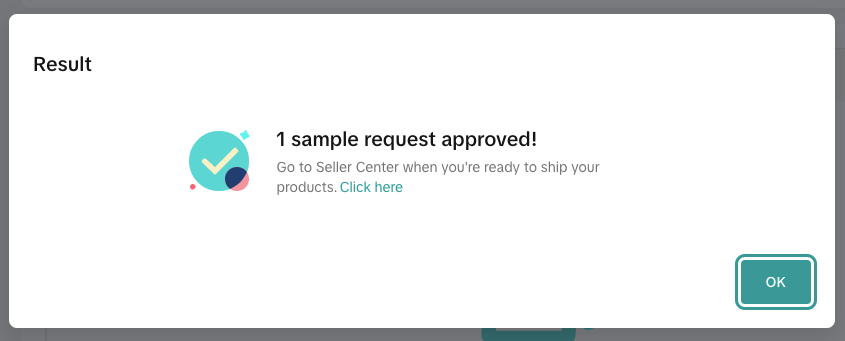

📌 Note: There is no on hold period for free sample orders. Once a tracking number is provided in Seller Center (either via TikTok Shipping or Seller Shipping), the status will change from Ready To Ship (Awaiting Shipment in Seller Center) to Shipped (Awaiting Collection in Seller Center).

A creator can view their sample orders by going to Profile > Your Orders > Samples > Orders.
Affiliate orders
TikTok app purchase flow
Seller Center orders
When a product is purchased using the affiliate process (either the link or the shoppable video), they show up in the Affiliate Orders section.

These orders are also created in Seller Center and are linked in the highlighted area. Clicking the order ID will open the order in Seller Center in a new window. These orders will have a one hour hold period by default.

These orders can also be found by calling the Search Seller Affiliate Orders API.
Creator orders
To look up orders that were generated by the creator, you can call the Search Creator Affiliate Orders API. Partners are able to retrieve a list of affiliate orders from the creator, and partners can use the order ID to measure the conversions generated from the creator.