Connecting shops
Connecting and managing TikTok shops
A core scenario for TikTok Shop API developers is to implement functionality to create, manage, and delete a persistent connection from your local customer account to your customer's TikTok Shop.
Manage TikTok Shop connections
A basic requirement for this use case is indexing your customer data to your customer's TikTok Shop data. This allows you to look up the data necessary to call the TikTok Shop API on your customer's behalf from your own data store.
An important consideration is that must securely store your customer's TikTok Shop access and refresh tokens and associate them with your customer's local data. This is because an access token is the credential you use to access your customer's data, but it doesn't include any identifying information. So it's important for you to associate these tokens with your customer data so you can retrieve them when making calls to the TikTok Shop API.
Another consideration is that you must store the access token expiration date and time so you can check if the access token is expired and request a new token using the refresh token.
If you serve customers with cross-border shops in China, it's also important to store the shop cipher associated with their TikTok Shop as this is a required parameter for TikTok Shops in China that are enabled for cross-border sales. It's optional for local shops of US, UK and SEA markets.
Finally, we recommend that you store all of the data associated with a TikTok Shop as it doesn't change frequently. We also recommend that you implement functionality in your client application or connector that allows your customers to refresh their TikTok Shop data independently, as your customers will most likely know if they've changed any data associated with their TikTok Shop.
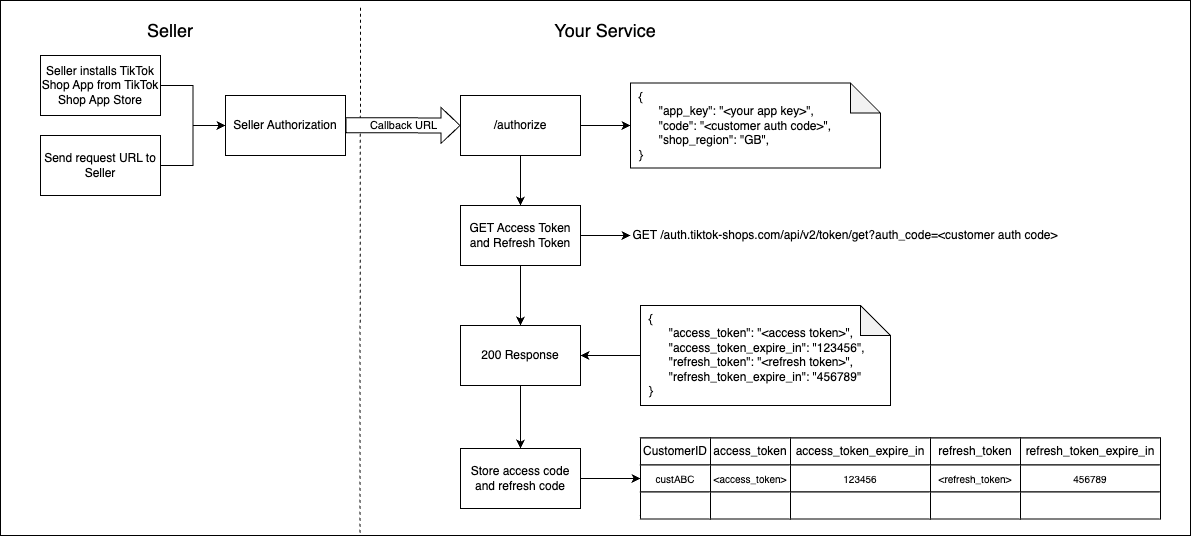
The call flow is:
- Your customer authorizes your TikTok Shop App to access their TikTok Shop Seller data. If your TikTok Shop App is published in the TikTok Shop App Store, your customer authorizes your TikTok Shop App when they click the install button. Otherwise, you provide an authorization link to your customer so they can sign in with their TikTok Shop Seller account and click the button to authorize. In either case, when your customer has authorized, your callback URL is called with several URL parameters, including the
codeparameter. This is an ephemeral value that is valid for a limited time and can only be use one time, so you don't need to store this. - Get an access and refresh token by calling the TiKTok Shop API authentication endpoint, passing the value of the
codeparameter from step 1 in theauth_codequery parameter. - If successful, you'll receive an HTTP
200response with a JSON response body. The JSON response body includesaccess_token, the bearer token you'll use to call the TikTok Shop API,access_token_expire_in, which is the date when theaccess_tokenexpires in Unix epoch time format,refresh_token, the refresh token that you'll pass when theaccess_tokenexpires and you require a new one, and finallyrefresh_token_expire_inwhich is the date when therefresh_tokenexpires and you're required to request that your customer authorize your TikTok Shop App again and repeat this process from step 1. - Store
access_token,access_token_expire_in,refresh_token, andrefresh_token_expire_inin your data store for secrets, indexed to your local customer identifier so you can retrieve this data when you are ready to make a TikTok Shop API call.
Connecting a single shop
In this use case, you connect a customer's single shop in your client application to a single TikTok Shop. Implement this use case if you expect your customers to have one TikTok Shop only and you don't expect to serve customers with multiple TikTok Shops in the future. If you do want to allow your customers to have multiple TikTok Shops, implement the connecting multiple shops use case instead.
To connect a single shop, your local data store schema must include a local customer identifier. In the call flow diagram, this is represented by the CustomerID column in the example database.
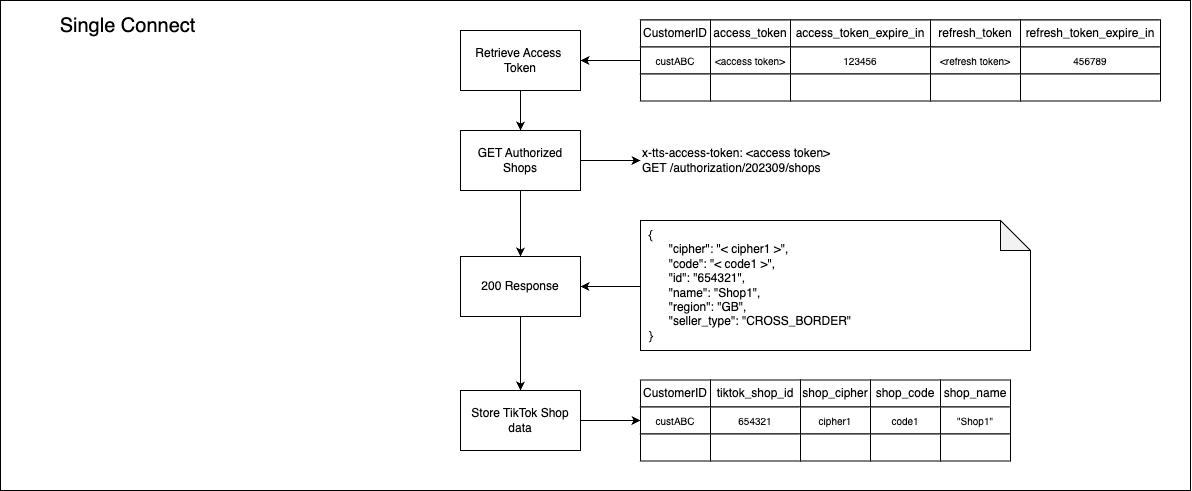
The call flow is:
- Retrieve the
access_tokenvalue. - Call the
Get Authorized Shops API, passing the value of theaccess_tokenfield you retrieved in step1 in thex-tts-access-tokenheader - The response includes a field named
datathat is a list of objects that represent data about a TikTok Shop. In this single shop use case, there will be one object only. - Store the TikTok Shop data from step 3 in your local data store, indexed to the customer's store identifier.
Connecting multiple shops
Implement this use case if you expect your customers to have more than one TikTok Shop associated with their TikTok Seller account.
To connect multiple shops, your local data store schema must include a local customer identifier. In the call flow diagram, this is represented by the CustomerID column in the example database. Note that this column can't be a unique key as it will include multiple rows, one for each TikTok Shop.
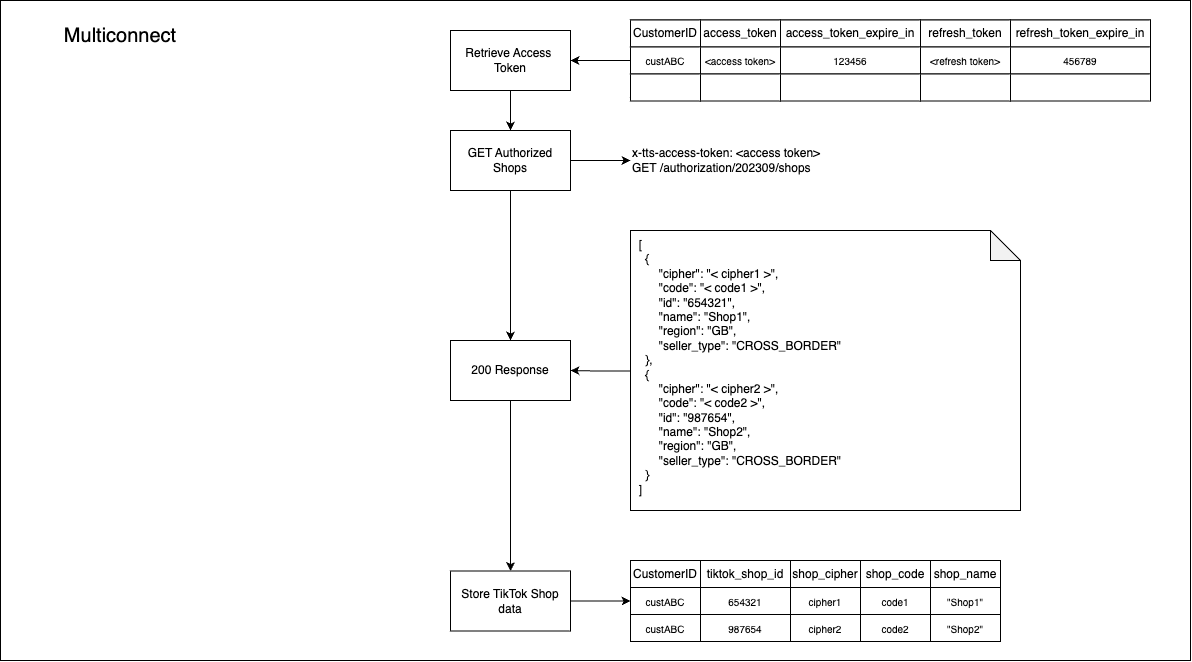
The call flow is:
- Retrieve the
access_tokenvalue. - Call the
Get Authorized Shops API, passing the value of theaccess_tokenfield you retrieved in step1 in thex-tts-access-tokenheader - The response includes a field named
datathat is a list of objects that represent data about a TikTok Shop. Each object represents data about a Tiktok Shop. - Iterate the objects in the list of TikTok Shop data objects from step 3, and store each in a new row in your local data store, indexed to the customer's store identifier.
Next steps
Once you have connected one or more TikTok Shops, you can implement an authorization expiration webhook listener add functionality to disconnect a shop.