Reauthorize shops
Notify TikTok Shop Seller to reauthorize connection
Once you've stored one or more connections to a TikTok Shop, it's important that your client application or connector have functionality to inform your customers that their TiKTok Shop authorization is about to expire and they'll need to reauthorize your TikTok Shop App for continued access to the TikTok Shop Seller data.
There are two methods to determine if your customer's authorization is about to expire. First, you can check the expiration date of the customer's TikTok Shop refresh token. Second, you can use the upcoming authorization expiration webhook.
Check the TikTok Shop refresh token expiration date
In this use case, choose an appropriate time interval to retrieve your customer's refresh_token_expire_in data that you've stored previously. If the refresh_token is set to expire within a predetermined time period, display a user interface to your customer prompting them to authorize your TikTok Shop App.
Implement an upcoming authorization expiration webhook listener
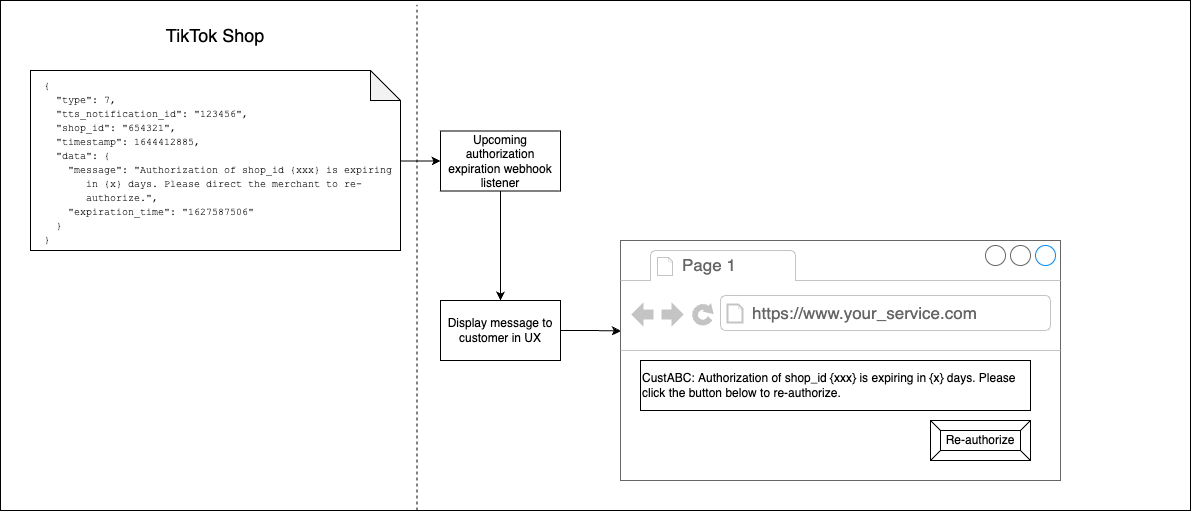
The call flow is:
- Your webhook listener is pinged by the TikTok Shop upcoming authorization expiration webhook listener. The webhook payload includes a
shop_idfield, atimestampfield, and adataobject that includes a formattedmessageand theexpiration_timein Unix epoch format. - Store the data, indexed to your customer identifier associated with the
shop_id. When the customer logs in to your service, display a message informing your customer that their TikTok Shop authorization is expiring soon. You can either direct them to the TikTok Shop Partner Center to reauthorize, or you can implement a button that the customer can click to go directly there.
Next steps
Now that you've implemented an authorization expiration webhook listener, you can add functionality to disconnect a shop.