Order Management
Last Updated: 2025-09-24
Language Supported:
English /
简体中文 /
繁體中文 /
Português (Brasil) /
ไทย
1. Entity
Order: Created after checkout. 1 order can contain multiple items.
Package: Created after the order is generated. It represents the unit for shipment. 1 order can be split into multiple packages, and 1 package can contain multiple items.
Item: The individual products within an order, with quantity and other details. Items are included in packages for shipment.

2. Order Status Flow
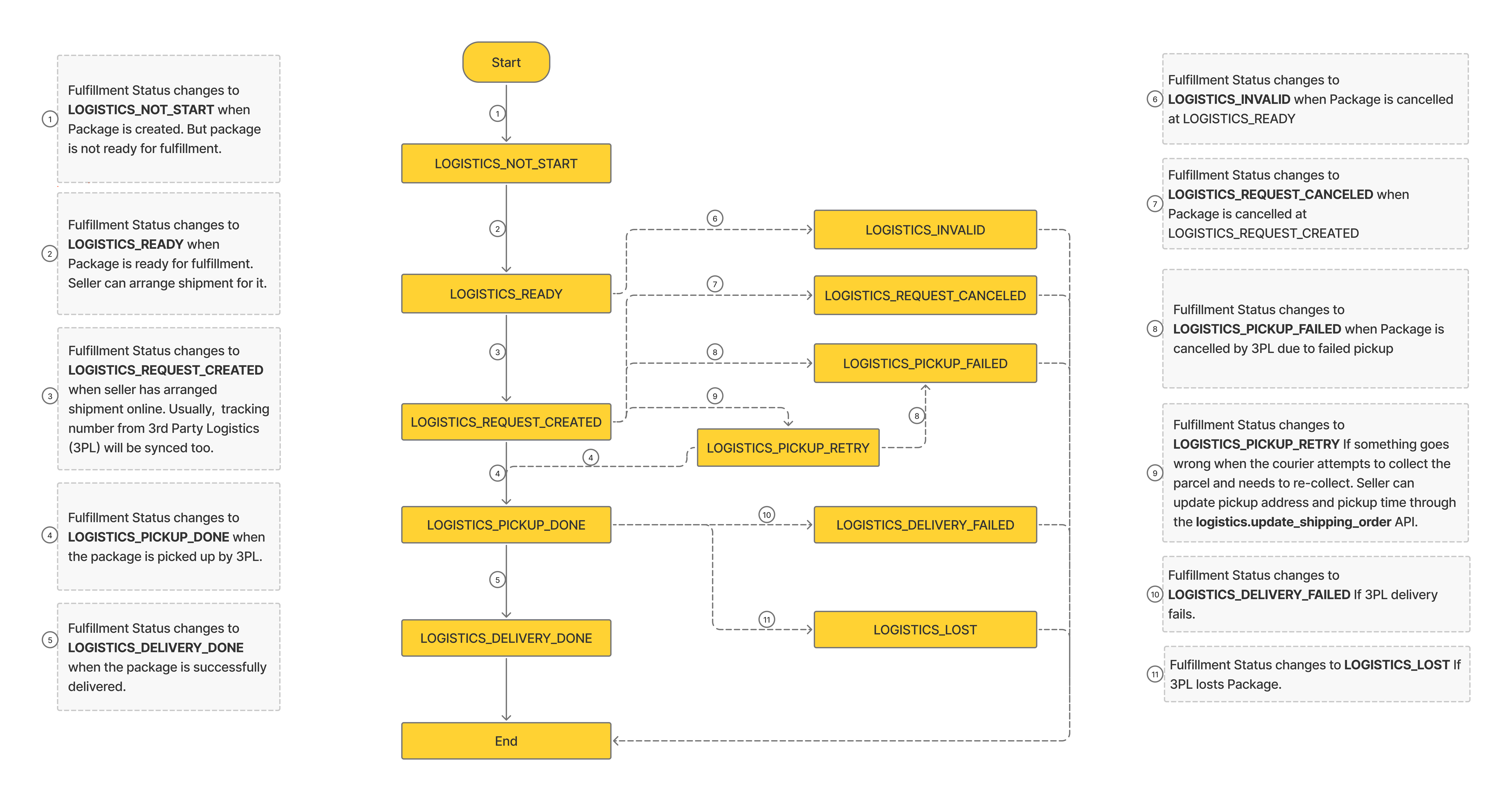
3. Package Fulfillment Status
4. Getting order list and details
v2.order.get_order_list: Get the list of orders with different order status.
v2.order.get_order_detail: View order details.
5. Canceling Order
v2.order.cancel_order: Used for sellers to cancel orders.
v2.order.handle_buyer_cancellation: Used to handle buyer’s cancellation requests.
6. Splitting Order
6.1 Splitting
v2.order.split_order: When an order contains multiple items, the split order function can help you arrange shipping for each item separately according to its readiness or location. Orders can be split only when the order status is "READY_TO_SHIP"
API request example
In this example, the order contains 6 items and is divided into two packages
Json
{

    "order_sn": "2204215JYEEFW0",

    "package_list": [

        {

            "item_list": [

                {

                    "item_id": 1220089094,

                    "model_id": 0,

                    "order_item_id": 1220089094,

                    "promotion_group_id": 1051400341536827267

                }

            ]

        },

        {

            "item_list": [

                {

                    "item_id": 2436030646,

                    "model_id": 5074620257,

                    "order_item_id": 2436030646,

                    "promotion_group_id": 0

                },

                {

                    "item_id": 7348262532,

                    "model_id": 0,

                    "order_item_id": 7348262532,

                    "promotion_group_id": 0

                },

                {

                    "item_id": 13772515222,

                    "model_id": 0,

                    "order_item_id": 13772515222,

                    "promotion_group_id": 0

                },

                {

                    "item_id": 1229323224,

                    "model_id": 1434025516,

                    "order_item_id": 1229323224,

                    "promotion_group_id": 0

                },

                {

                    "item_id": 1229323224,

                    "model_id": 1434025517,

                    "order_item_id": 1229323224,

                    "promotion_group_id": 0

                }

            ]

        }

    ]

}
Tips
-
Split order permission for the shop level, If you get the error "You don't have the permission to split order." when calling the v2.order.split_order api, please contact Shopee business manager to apply.
-
Items under the same Bundle deal and add on deal promotion cannot be split into different packages. Only for selected sellers can support split bundle deal or add on deal promotions.
-
The order_item_id of the items in the V2.order.get_order_detail API is the same, indicating that they are in the same Bundle deal, and the add_on_deal_id is the same, indicating that they are in the same add on deal.
-
If buyers buy more than one items of the same item_id and model_id, the order can not be split. It means we only support item level and model level splitting.Only for selected sellers can support split the same items.
eg: For example, if a buyer buys a cell phone A (blue) and a cell phone A (red), the order can be split into two packages. If you buy two cell phones A (blue), you can not split them.
4.When splitting an order, there should be at least two parcels in an order, it means at least two item_list request. You can split the order into 30 parcels at most in TW and 5 parcels at most in other regions.
5.When splitting an order, the requested item must contain all the items in the order.
6.2 Cancel Splitting
v2.order.unsplit_order: The order status is "READY_TO_SHIP" before the order can be canceled splitting, if any parcel has been shipped, the order can not be splitting anymore.
7. Getting package list and details for shipment
v2.order.search_package_list: Search package list that have not been SHIPPED to arrange shipment, with various filters and sort fields. This api is preferred to fetch packages for shipment.
v2.order.get_package_detail: View package details.

8. Shipment API Call Flow
8.1 Basic Shipping Logic
- Get the list of packages to be shipped with package_status of 2 (ToProcess) through v2.order.search_package_list API.
2.Call v2.logistics.get_shipping_parameter API to get the shipping parameters for single package (or call v2.logistics.get_mass_shipping_parameter API to batch get the shipping parameters for multiple packages under same logistics channel and warehouse), seller choose any one of pickup/dropoff/non_integrated shipping method to ship. Call v2.logistics.ship_order to ship single package (or call v2.logistics.mass_ship_order to batch ship multiple packages under same logistics channel and warehouse), for non_integrated channel orders, the developer should prepare the tracking number and upload it in the request body. After the API call is successful, the package fulfillment status of pickup / dropoff mode will automatically update from LOGISTICS_READY to LOGISTICS_REQUEST_CREATED, and for the non_integrated mode, package fulfillment status will be immediately updated to LOGISTICS_PICKUP_DONE.
3.After successful shipment using the Shopee integration channel, you can call v2.logistics.get_tracking_number API to get the tracking number for single package (or call v2.logistics.get_mass_tracking_number API to batch get the tracking number for multiple packages.
4.After getting the tracking number, you can print the airway bill. You can choose two ways: self-print or Shopee generated. The airway bill can only be printed after the package is arranged shipment successfully and before the package fulfillment status is LOGISTICS_PICKUP_DONE.
5.To get the Shopee generated airway bill, you need to call these four APIs one by one. v2.logistics.get_shipping_document_parameter,v2.logistics.create_shipping_document,v2.logistics.get_shippping_document_result,v2.logistics.download_shipping_document.
6.TW shipping special logic:
a.When calling the v2.logistics.get_shipping_parameter API to get the shipping parameters, the slug parameter is returned, and the slug parameter must be uploaded when calling the v2.logistics.ship_order API, otherwise the shipment will fail.
b.For the channel 黑猫宅急便(30001), there is no need to print airway bill. 3PL will provide the airway bill and complete the pickup. Calling v2.logistics.create_shipping_document will report an error: "The package can not print now."
8.2 Related APIs for order shipment
| API | Description |
|---|---|
| v2.order.search_package_list | Get a list of packages which not shipped yet |
| v2.order.get_package_detail | Get package details |
| v2.logistics.get_shipping_parameterv2.logistics.get_mass_shipping_parameter | Get shipping parameters |
| v2.logistics.ship_orderv2.logistics.mass_ship_order | Arrange shipment |
| v2.logistics.get_tracking_numberv2.logistics.get_mass_tracking_number | Get tracking number |
| v2.logistics.get_shipping_document_data_info | Get the information you need to self print airway bill |
| v2.logistics.get_shipping_document_parameter | Access to selectable and recommended airway bill types |
| v2.logistics.create_shipping_document | Create airway bill task |
| v2.logistics.get_shippping_document_result | Get airway bill task result |
| v2.logistics.download_shipping_document | Download Shopee generated airway bill |
8.3 API request example
8.3.1 v2.logistics.get_shipping_parameter
Response example:
Json
{

    "error": "",

    "message": "",

    "response": {

        "info_needed": {

            "dropoff": [],

            "pickup": [

                "address_id",

                "pickup_time_id"

            ]

        },

        "dropoff": {

            "branch_list": null

        },

        "pickup": {

            "address_list": [

                {

                    "address_id": 2826,

                    "region": "TH",

                    "state": "จังหวัดบึงกาฬ",

                    "city": "อำเภอเมืองบึงกาฬ",

                    "district": "",

                    "town": "",

                    "address": "222/58",

                    "zipcode": "38000",

                    "address_flag": [

                        "default_address",

                        "pickup_address",

                        "return_address"

                    ],

                    "time_slot_list": [

                        {

                            "date": 1639472400,

                            "pickup_time_id": "1639472400"

                        },

                        {

                            "date": 1639558800,

                            "pickup_time_id": "1639558800"

                        }

                    ]

                },

                {

                    "address_id": 3019,

                    "region": "TH",

                    "state": "จังหวัดกระบี่",

                    "city": "อำเภอคลองท่อม",

                    "district": "",

                    "town": "",

                    "address": "home 1234",

                    "zipcode": "81120",

                    "address_flag": [],

                    "time_slot_list": [

                        {

                            "date": 1639472400,

                            "pickup_time_id": "1639472400"

                        },

                        {

                            "date": 1639558800,

                            "pickup_time_id": "1639558800"

                        }

                    ]

                }

            ]

        }

    },

    "request_id": "33d8460efcd7313ac5b8337b54ff4b07"

}
Note: The info_needed field indicates the shipping method supported by the order and the parameters that need to be uploaded when you ship order. This example order supports dropoff or pickup method. If dropoff method is selected, there is no need to upload relevant parameters. If pickup is selected, you need to upload address_id and pickup_time_id parameters. If info_needed only returns dropoff, it means that the order only supports dropoff.
8.3.2. v2.logistics.ship_order
- Selecting the pickup method:
When the pickup parameter returned by info_needed in v2.logistics.get_shipping_parameter contains address_id and pickup_time_id.
Json
{

    "order_sn": "2112132KQ1MK9N",

    "pickup": {

        "address_id": 2826,

        "pickup_time_id": "1639472400"

    }

}
- Selecting the dropoff method
When the dropoff parameter returned by info_needed in v2.logistics.get_shipping_parameter is empty
Json
{

    "order_sn": "220301QQY0WASP",

    "dropoff": {}

}
Note: some channels for drop
off methods have a direct return of empty fields, you need to pass in the empty field, such as the example. If other parameters are returned, upload other parameters, for example:
Json
{
    "order_sn": "220301QQY0WASP",
    "dropoff": {
          "sender_real_name": "ABC"
  }
}
- Selecting the non_integrated method
When the non_integrated parameter returned by info_needed in v2.logistics.get_shipping_parameter is tracking_number
Json
{
    "order_sn": "220301QQY0WASP",
    "non_integrated": {
        "tracking_number": "AK224200239740W"
    }
}
8.3.3 v2.logistics.update_shipping_order
Json
{
    "order_sn": "2112132KQ1MK9N",
    "pickup": {
        "address_id": 11178,
        "pickup_time_id": "1658563200"
    }
}
Used for pickup order to update address_id and pickup_time_id. Applicable to orders in RETRY_SHIP status.
9.
Order related
Q: Call v2.order.get_order_detail API and report error "Wrong parameters, detail: the order is not found.
A: Can check this FAQ.
Q:Call v2.order.get_order_detail API, many response fields are missing, what should I do?
A Please check whether the response_optional_fields field is selected to upload the corresponding field, please refer to the API documentation for details.
Shipping related
Q: Why I can't get the time slot?
A: If you can't get it, the order may have been shipped or ship_by_day has passed.
Q: I got the error "logistic status not ready to ship". How to check?
A:Please call v2.order.get_order_detail API to get the order status. Only orders with READY_TO_SHIP status can be shipped.
Q: Call v2.logistics.get_tracking_number API but no first_mile_tracking_number is returned, what do I need to do?
A: Please check whether the response_optional_fields field is selected to upload the corresponding field, please refer to the API documentation for details.
Airway Bill related
Q: Call v2.logistics.create_shipping_document API, prompt error "Order status does not support awb printing".
A: Please call v2.order.get_order_detail API to get order_status, only supports to get under order_status is PROCESSED.
Q: Call v2.logistics.get_shipping_document_result API and get the status of "PROCESSING" how to deal with it?
A: It is recommended to call the API cyclically until you get to the "READY" status.
Q: How many types of Airway bill files are there?
A: There are three formats:
- Most orders' airway bill are PDF file.
- TW C2C channels all return airway bills is html format, B2C channels except 7-ELEVEN (channel_id: 30005), Family Family (channel_id: 30006), Lai Erfu (channel_id: 30007), Family Family Frozen Super Pickup (not sent to outlying islands) ( channel_id: 30011), OK Mart (channel_id: 30014) are printed in pdf format, and others are returned html.
- If the printing method set in the seller center is thermal printing, the zip format folder is returned.
10. Data Definition
Order Status
- UNPAID:Order is created, buyer has not paid yet.
- READY_TO_SHIP:Seller can arrange shipment.
- PROCESSED:Seller has arranged shipment online and got tracking number from 3PL.
- SHIPPED:The parcel has been drop to 3PL or picked up by 3PL.
- TO_CONFIRM_RECEIVE:The order has been received by buyer.
- COMPLETED:The order has been completed.
- RETRY_SHIP:3PL pickup parcel fail. Need to re arrange shipment.
- IN_CANCEL:The order's cancelation is under processing.
- CANCELLED:The order has been canceled.
- TO_RETURN:The buyer requested to return the order and order's return is processing.
Package Status
- All: Fetch all packages that are Pending, ToProcess, or Processed, value 0.
- Pending: Fetch packages that are not ready for shipment, value 1.
- ToProcess: Fetch packages that need to arrange shipment, value 2.
- Processed: Fetch packages that have been arranged shipment, value 3.
Note:
Package Status takes the same effect as Order Status filter under To Ship tab in Seller Center, the mapping between Package Status, Package Fulfillment Status and Seller Center Order Status filter is as follows:
| Package Status | Package Fulfillment Status | Order Status filter under To Ship tab in Seller Center |
|---|---|---|
| All (0) | LOGISTICS_NOT_START, LOGISTICS_READY, LOGISTICS_PICKUP_RETRY, or LOGISTICS_REQUEST_CREATED | All |
| Pending (1) | LOGISTICS_NOT_START | Pending |
| ToProcess (2) | LOGISTICS_READY or LOGISTICS_PICKUP_RETRY | To Process |
| Processed (3) | LOGISTICS_REQUEST_CREATED | Processed |
Package Fulfillment Status / Logistics Status
- LOGISTICS_NOT_START: Initial status, package not ready for fulfillment
- LOGISTICS_READY: Package ready for fulfillment from payment perspective. For non-COD: paid; forCOD: passed COD screening
- LOGISTICS_REQUEST_CREATED: Package arranged shipment
- LOGISTICS_PICKUP_DONE: Package handed over to 3PL
- LOGISTICS_DELIVERY_DONE: Package successfully delivered
- LOGISTICS_INVALID: Order cancelled when package at LOGISTICS_READY
- LOGISTICS_REQUEST_CANCELED: Order cancelled when package at LOGISTICS_REQUEST_CREATED
- LOGISTICS_PICKUP_FAILED: Order cancelled by 3PL due to failed pickup or picked up but not able to proceed with delivery
- LOGISTICS_PICKUP_RETRY: Package pending 3PL retry pickup
- LOGISTICS_DELIVERY_FAILED: Order cancelled due to 3PL delivery failed
- LOGISTICS_LOST: Order cancelled due to 3PL lost the Package
Note: Due to legacy logic, the package logistics status in get_order_detail will return 2 additional values:
- LOGISTICS_PENDING_ARRANGE:order logistics pending arrangement
- LOGISTICS_COD_REJECTED:Integrated logistics COD: Order rejected for COD
Order cancellation reason
- OUT_OF_STOCK
- UNDELIVERABLE_AREA
Cancel reason
- Out of Stock
- Buyer Request to Cancel
- Undeliverable Area
- COD Unsupported
- Parcel is Lost
- Game Completed
- Unpaid Order
- Underpaid Order
- Unsuccessful / Rejected Payment
- Logistics Request is Cancelled
- 3PL pickup Fail
- Failed Delivery
- COD Rejected
- Seller did not Ship
- Transit Warehouse Cancelled
- Other
- Inactive Seller
- Seller did not Ship
- Auto Cancel
- Logistic Issue
- Your approver did not approve order on time.
- You are unable to place order at the moment.
- TBC
Buyer cancel reason
- Seller is not Responsive to buyer's Inquires
- Seller ask Buyer to Cancel
- Modify Existing Order
- Product has Bad Reviews
- Seller Takes too Long to Ship The Order
- Seller is Untrustworthy
- Others
- Forgot to Input Voucher Code
- Need to change delivery address
- Need to Change Delivery Address
- Need to input / Change Voucher Code
- Need to Modify Order
- Payment Procedure too Troublesome
- Found Cheaper Elsewhere
- Don't Want to Buy Anymore
- Your approver rejected the order.
- You are unable to place order at the moment.
- Need to change delivery address
- Too long delivery time
- Modify existing order (color, size, voucher, etc)
- Change of mind / others
Shipping document type
- NORMAL_AIR_WAYBILL
- THERMAL_AIR_WAYBILL
- NORMAL_JOB_AIR_WAYBILL
- THERMAL_JOB_AIR_WAYBILL
Package logistics track status
(for get_tracking_info api)
- INITIAL
- ORDER_INIT
- ORDER_SUBMITTED
- ORDER_FINALIZED
- ORDER_CREATED
- PICKUP_REQUESTED
- PICKUP_PENDING
- PICKED_UP
- DELIVERY_PENDING
- DELIVERED
- PICKUP_RETRY
- TIMEOUT
- LOST
- UPDATE
- UPDATE_SUBMITTED
- UPDATE_CREATED
- RETURN_STARTED
- RETURNED
- RETURN_PENDING
- RETURN_INITIATED
- EXPIRED
- CANCEL
- CANCEL_CREATED
- CANCELED
- FAILED_ORDER_INIT
- FAILED_ORDER_SUBMITTED
- FAILED_ORDER_CREATED
- FAILED_PICKUP_REQUESTED
- FAILED_PICKED_UP
- FAILED_DELIVERED
- FAILED_UPDATE_SUBMITTED
- FAILED_UPDATE_CREATED
- FAILED_RETURN_STARTED
- FAILED_RETURNED
- FAILED_CANCEL_CREATED
- FAILED_CANCELED