Instant Mart Integration Guide
Last Updated: 2026-02-13
Language Supported:
English /
Português (Brasil)
This document introduces the process for product listing, order management, income reporting, and OpenAPI integration/testing flow on Instant Mart.
Instruction of the Instant Mart Project
Background:
Instant Mart is a special shop structure designed to support retailers who operate both central management and branch-level operations. Under this model:
- Each Mart Shop (Official Shop) acts as the headquarters, responsible for managing global SKUs, creating items, and viewing financial reports.
- Multiple Outlets (Branch Shops) exist under the mart, representing individual shop locations. Outlets are responsible for handling day-to-day operations, such as managing orders, maintaining stock, and packing parcels for riders to pick up.
With the Open API integration, Mart retailers can choose whether to manage SKUs at the merchant level (shared across all outlets) or at the outlet level (independent per branch).
Before integrating with Open API, retailers must onboard both the mart merchant and its outlet shops in the BDC portal, ensuring they are registered as Instant Mart Shops. This setup allows developers to build API solutions that support the full operational flow of Instant Mart retailers.
1. Sandbox Test Account Setup
1.1 Create Sandbox Test Account
You can start by accessing the Test Account page on Shopee Open Platform Console >Select Mart&Outlet shops module to create test shops.
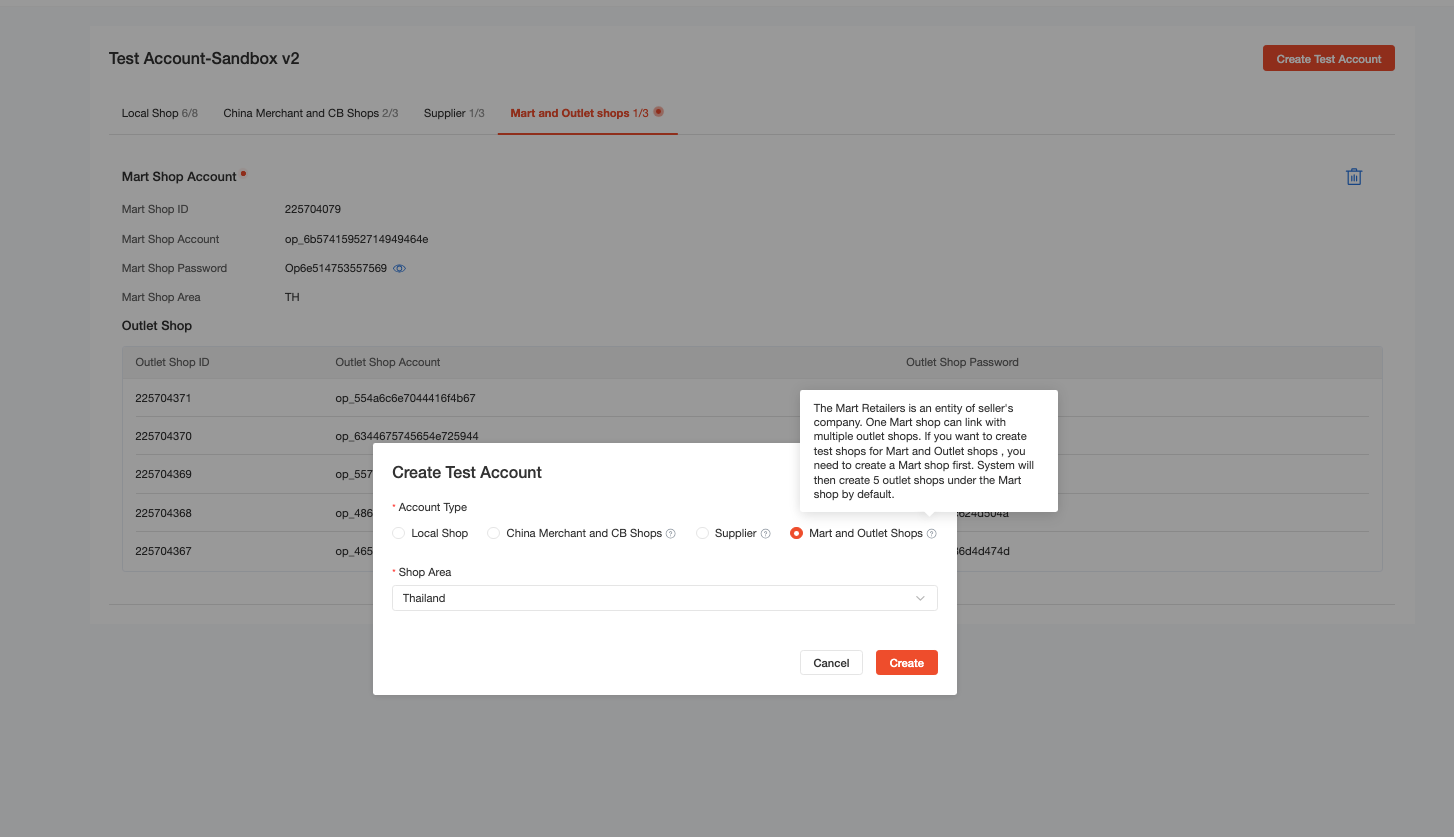
Note: Instant Mart sandbox testing requires a two-step whitelist: Sandbox V2 must be enabled before Mart & Outlet Shop whitelist.
2. Grant authorization
2.1 Shop Authorization
Find the test Partner_id on the App List page:
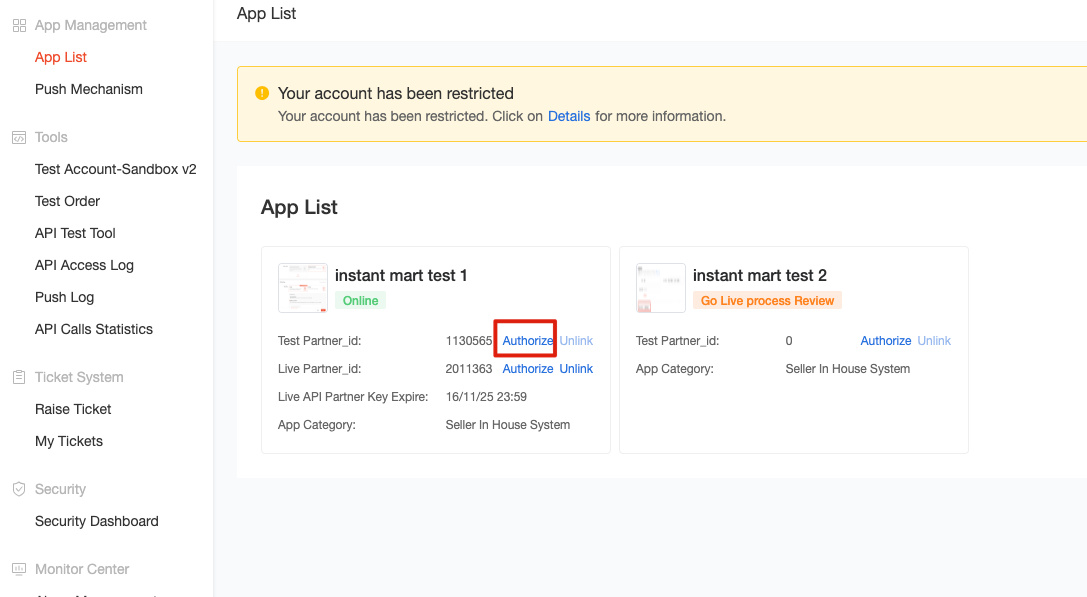
Click Authorize → log in with Mart account to complete authorization for Mart and Outlet shop at the same time.
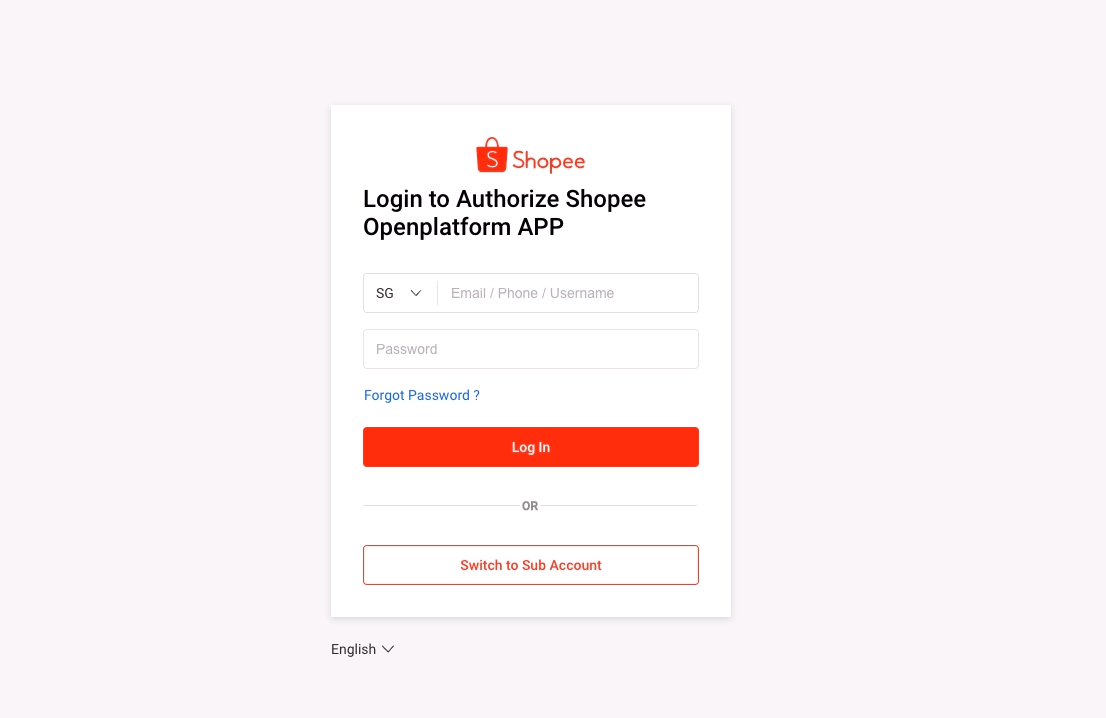
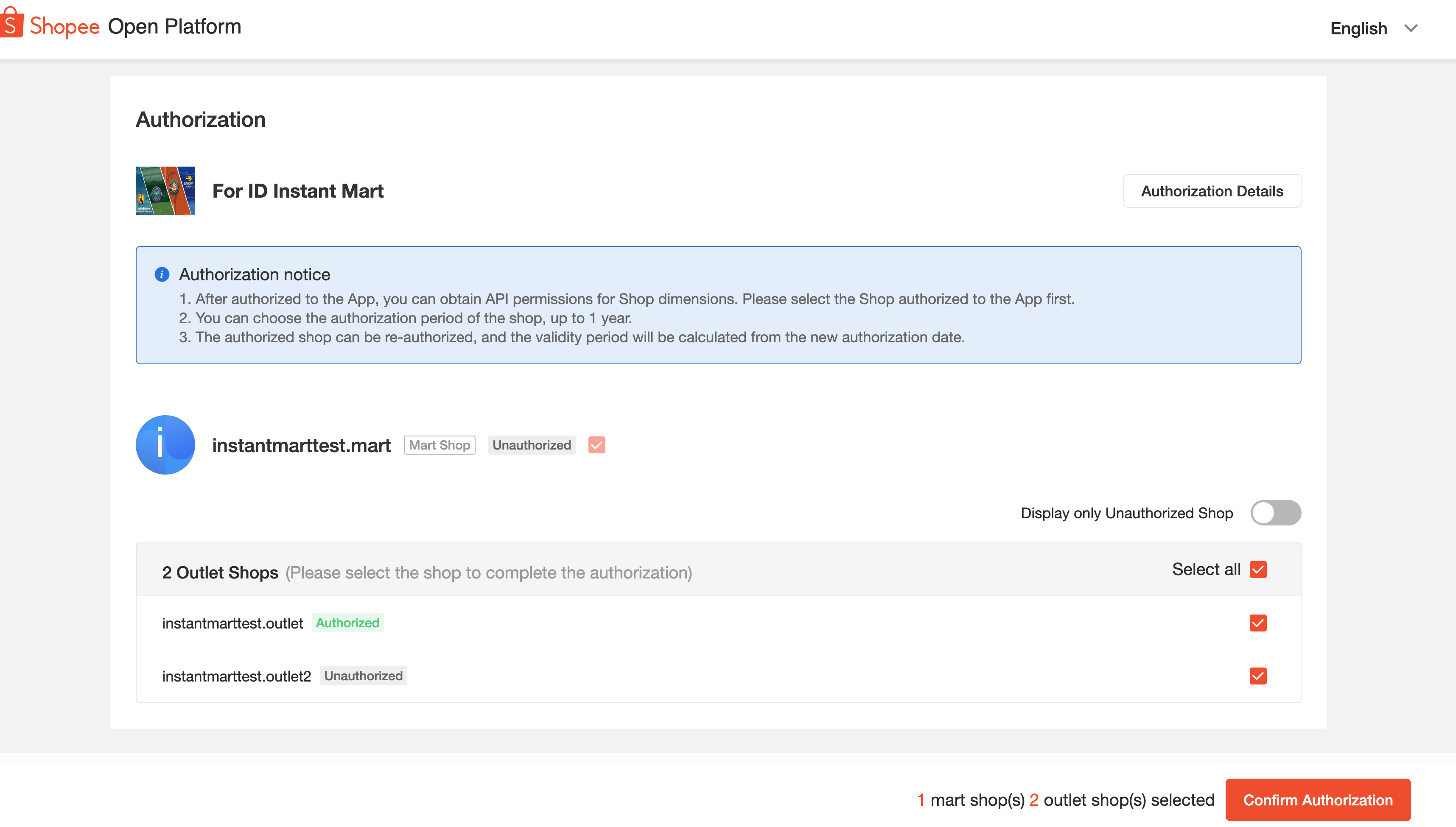
Refer to the Authorization and authentication article for more information.
3. Testing Process
3.1 Open API Testing
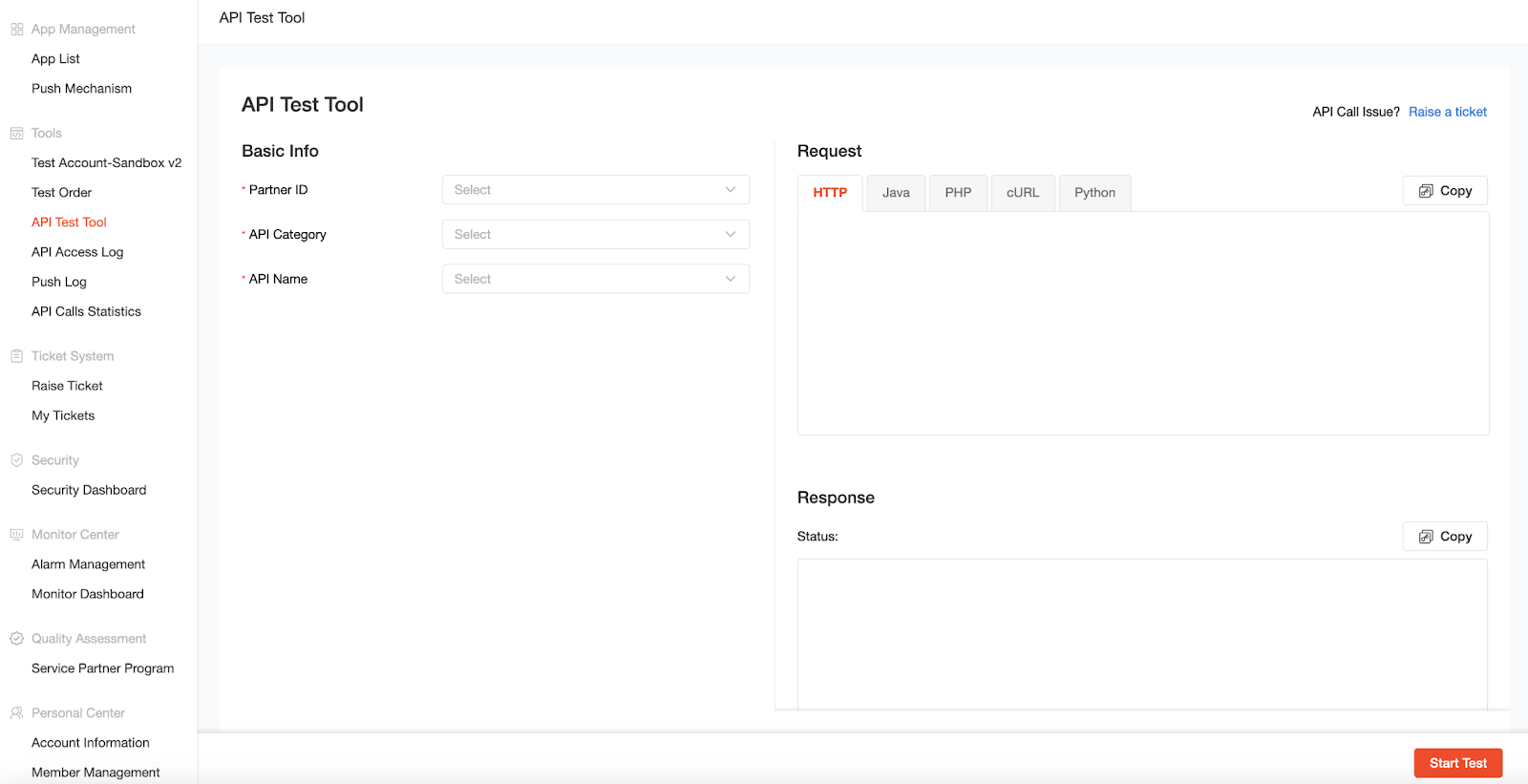
Use the API Test Tool or use Postman to test open API.
3.2 Key Open API Functions
Key API functionalities required for ID Mart Project:
| Section | Sub_Section |
| Product | Preparation for New SKU |
| Creating New SKU | |
| Update Existing SKU | |
| Creating SKU Variants | |
| Stock & Price Management | |
| General SKU Management | |
| Order | Get Order List & Details |
| Cancelling Order | |
| Request Shipment | |
| Generate Tracking Number | |
| Generate Airway Bill | |
| Return & Refund | Get Return List & Details |
| Accept Return/Refund | |
| Dispute Return/Refund | |
| Financials | Get Escrow Detail |
| Get Wallet Transaction | |
| Generate Income Statement | |
| Generate Income Report | |
| Shop Setting | Shop Profile Update |
| Shop Operational Hours |
3.2.1 Mart&Outlet shop relationship
Check relationship: v2.shop.get_shop_info
With mart_shop_id → returns all outlet shop IDs under the Mart.
With outlet_shop_id → returns the corresponding Mart shop ID.
3.2.1.1 Use v2.shop.get_shop_info with a Mart Shop
When calling v2.shop.get_shop_info with a mart_shop_id, it will return a list of all Outlet shop IDs under that Mart shop.
Response example:
{
"auth_time": 1755082218,
"error": "",
"expire_time": 1786636799,
"is_cb": false,
"is_direct_shop": false,
"is_main_shop": false,
"is_mart_shop": true,
"is_one_awb": false,
"is_outlet_shop": false,
"is_sip": false,
"is_upgraded_cbsc": false,
"linked_direct_shop_list": [],
"linked_main_shop_id": 0,
"merchant_id": null,
"message": "",
"outlet_shop_info_list": [
{
"outlet_shop_id": 225622030
},
{
"outlet_shop_id": 225622031
},
{
"outlet_shop_id": 225622032
},
{
"outlet_shop_id": 225622033
},
{
"outlet_shop_id": 225622034
}
],
"region": "TH",
"request_id": "e3e3e7f33c4e6283bc127a54263d8c01",
"shop_fulfillment_flag": "Others",
"shop_name": "op_64564962416254514c64",
"status": "NORMAL"
}
3.2.1.2 Use v2.shop.get_shop_info with a Outlet Shop
When calling v2.shop.get_shop_info with an outlet_shop_id, it will return the corresponding Mart shop ID.
Response sample:
{
"auth_time": 1755158035,
"error": "",
"expire_time": 1786723199,
"is_cb": false,
"is_direct_shop": false,
"is_main_shop": false,
"is_mart_shop": false,
"is_one_awb": false,
"is_outlet_shop": true,
"is_sip": false,
"is_upgraded_cbsc": false,
"linked_direct_shop_list": [],
"linked_main_shop_id": 0,
"mart_shop_id": 225621997,
"merchant_id": null,
"message": "",
"region": "TH",
"request_id": "e3e3e7f33c4e97dc9f31cfda55db5101",
"shop_fulfillment_flag": "Others",
"shop_name": "op_51505343495178456857",
"status": "NORMAL"
}
3.2.2 Product Management
Fields distinguish between Mart SKU vs Outlet SKU
| Module | Field | MART SKU Management | Outlet SKU Management |
| Basic information | title | Yes | No |
| video | Yes | No | |
| image | Yes | No | |
| status | Yes | Yes | |
| category | Yes | No | |
| Specification | brand | Yes | No |
| attribute | Yes | No | |
| size chart | Yes | No | |
| Specification | variation name | Yes | No |
| variation option | Yes | No | |
| variation image | Yes | No | |
| price | No | Yes | |
| purchase limit | No | Yes | |
| wholesales | No | Yes | |
| stock | No | Yes | |
| model status | Yes | Yes | |
| module seller SKU | Yes | No | |
| weight | Yes | No | |
| dimension | Yes | No | |
| Shipping | logistics channel | No | Yes |
| installation channel | No | Yes | |
| Others | DTS | No | Yes |
| seller SKU | Yes | No | |
| condition | Yes | No |
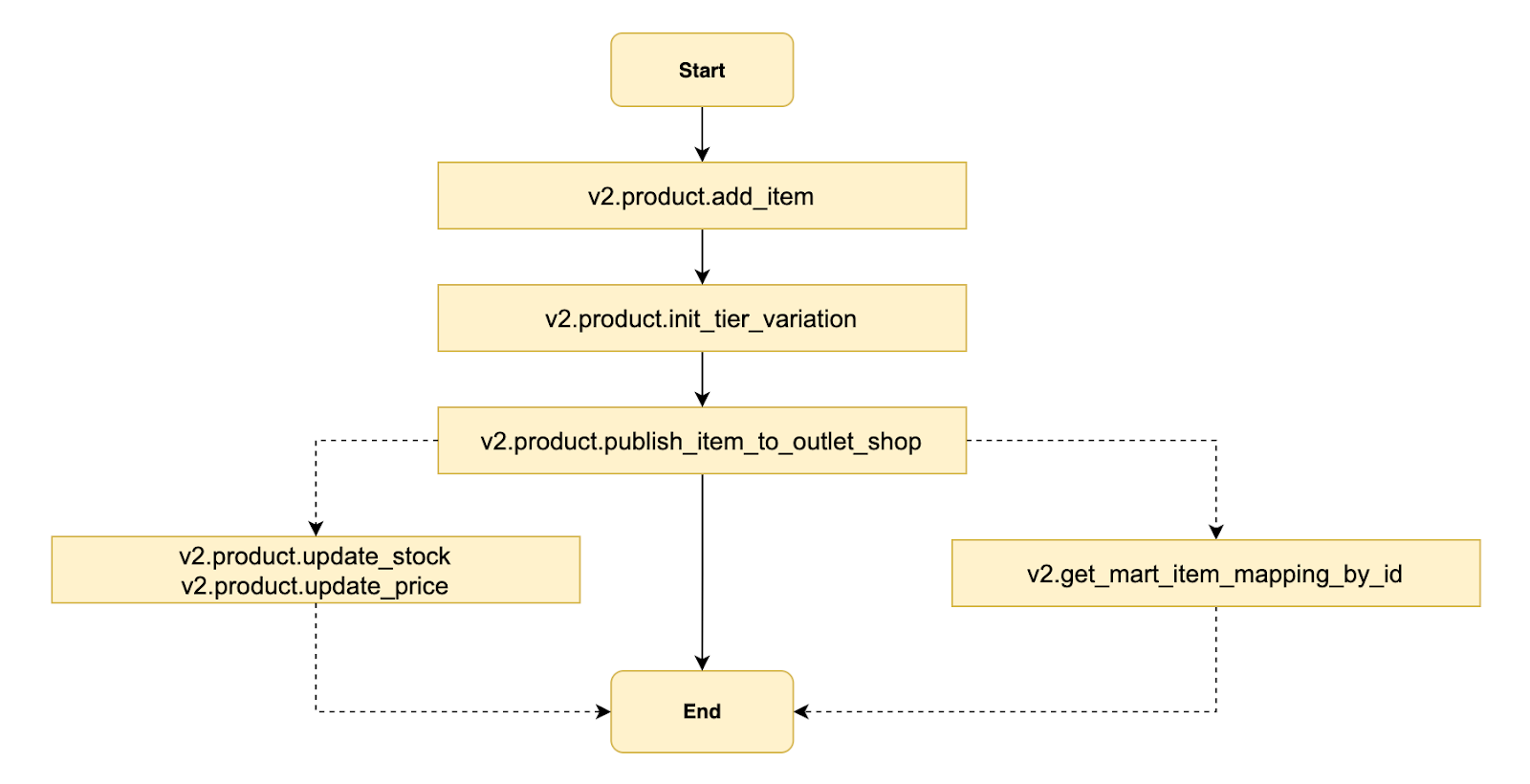
Key operations include:
1.Add Mart SKU → v2.product.add_item
2.Update SKU stock/price → v2.product.update_stock, v2.product.update_price (only at outlet level)
3.Publish Outlet SKU → v2.product.publish_item_to_outlet_shop
4.Sync Mart SKU to Outlet SKU → v2.product.update_item
3.2.2.1 Add Mart SKU
Add mart SKU by calling v2.product.add_item using mart shop_id.
Refer to the Creating Product article for more information.
Calling sample:
{
"original_price": 123.3,
"description": "rachel add item from openapi 002",
"weight": 1.1,
"item_name": "rachel add item from openapi item 001",
"item_status": "NORMAL",
"dimension": {
"package_height": 2,
"package_length": 3,
"package_width": 4
},
"category_id": 400091,
"logistic_info": [{
"size_id": 0,
"shipping_fee": 2.5,
"enabled": true,
"logistic_id": 80018,
"is_free": false
},
{
"size_id": 0,
"shipping_fee": 2.5,
"enabled": true,
"logistic_id": 81014,
"is_free": false
}],
"image": {
"image_id_list": ["c54265d475b85e00ffb2404585e32b6f", "6fb33d484f232510b5f9b169f2758322", "591ab15ea954b9879374765854595600", "00a2258551b5a2f0a7c283f877330f93", "abf02b19b42e4aa964ef0725491ca9e3", "730f45972377cd4eb9813c6e53e60e9a"]
},
"pre_order": {
"is_pre_order": false,
"days_to_ship": 2
},
"item_sku": "item sku 001",
"condition": "NEW",
"brand": {
"brand_id": 0,
"original_brand_name": "no brand"
},
"item_dangerous": 0,
"description_info": {
"extended_description": {
"field_list": [{
"field_type": "text",
"text": "rachel add item from openapi 001",
"image_info": {
"image_id": "-"
}
},
{
"field_type": "image",
"text": "-",
"image_info": {
"image_id": "c54265d475b85e00ffb2404585e32b6f"
}
}]
}
},
"description_type": "extended",
"seller_stock": [{
"location_id": "IDZ",
"stock": 555
}]
}
3.2.2.2 Update Mart SKU Stock/Price
Update Mart SKU stock and price by calling v2.product.update_stock or v2.product.update_price.
Refer to the Stock & Price Management article for more information.
Note: Stock and price can only be managed at the outlet shop level. You must provide the shop_id of the outlet shop when calling the API to update stock or price.
3.2.2.3 Publish Outlet SKU
Call v2.product.publish_item_to_outlet_shop to publish outlet SKU.
Calling sample:
{
"mart_item_id": 1234,
"outlet_shop_id": 2345,
"publish_item": {
"model": [
{
"relate_mart_model_id": 1234,
"original_price": 123,
"seller_stock": [
{
"location_id": "IDZ",
"stock": 100
}
],
"pre_order": {
"is_pre_order": false,
"days_to_ship": 3
}
}
],
"logistic_info": [
{
"logistic_id": 12345,
"enabled": true,
"shipping_fee": 3.45,
"size_id": 0,
"is_free": false
}
]
}
}
call v2.product.get_item_base_info to check if outlet item info sync correctly.
Refer to the Product base info management article to check the item information.
3.2.2.4 Get the Item Mapping Info
When the mart SKU has a published outlet SKU, call v2.get_mart_item_mapping_by_id to get the item mapping info.
Calling sample:
{
"mart_item_id": 844087076,
"outlet_shop_id_list": [
225034791
]
}
3.2.2.5 Sync Mart SKU to Outlet SKU
Sync the mart sku field to the outlet sku.
1.Call v2.product.update_item to update the mart item field.
2.Call v2.product.get_item_base_info/enter outlet shop seller center to check that the outlet item info syncs correctly.
Note:Only fields managed by mart sku can be sync to outlet sku.
3.2.3 Instant Channel Dependency In ID
3.2.3.1Channel Structure Overview
| Mask Channel | Logistics Channel |
| 8000 - Instant | 80012 - GoSend Instant 80019 - GrabExpress Instant 80044 - SPX Instant |
| 8008 - Instant 2 hours | 80054 - SPX Instant - 2 Jam80061- GrabExpress Instant - 2 Jam80063- GoSend Instant - 2 Jam |
| 8007 - Instant 4 hours | 80053 -SPX Instant - 4 Jam80062- GrabExpress Instant - 4 Jam80064-GoSend Instant - 4 Jam |
*Developers should understand that sellers are whitelisted separately for these channels.
3.2.3.2 Summary of the limitation about ID Instant Channels
Instant 2-hours (8008) and Instant 4-hours (8007) should always be toggled on/off together.
| Case | Current Condition | Action | Errors |
| 1 | 8000 Instant: ON - 80044 SPX Instant: ON - 80012 GoSend Instant: OFF - 80019 GrabExpress Instant: OFF 8008 Instant 2-hours: OFF - 80054- SPX Instant - 2 Jam: OFF - 80061-GrabExpress Instant - 2 Jam:OFF - 80063-GoSend Instant - 2 Jam:OFF 8007 Instant 4-hours: OFF - 80053-SPX Instant - 4 Jam: OFF - 80062-GrabExpress Instant - 4 Jam: OFF - 80064-Gosend Instant - 4 Jam: OFF | Turn off 80044 | SPX Instant cannot be turned off. Please enable at least 1 of the following channel(s): {GoSend Instant, GrabExpress Instant, SPX Instant - 2 Jam, GrabExpress Instant - 2 Jam,GoSend Instant - 2 Jam,SPX Instant - 4 Jam,GrabExpress Instant - 4 Jam,GoSend Instant - 4 Jam} |
| 2 | 8000 Instant: OFF - 80044 SPX Instant: OFF - 80012 GoSend Instant: OFF - 80019 GrabExpress Instant: OFF 8008 Instant 2-hours: ON - 80054- SPX Instant - 2 Jam: ON - 80061-GrabExpress Instant - 2 Jam:OFF - 80063-GoSend Instant - 2 Jam:OFF 8007 Instant 4-hours: ON - 80053- SPX Instant - 4 Jam: ON - 80062-GrabExpress Instant - 4 Jam: OFF - 80064-Gosend Instant - 4 Jam: OFF | Turn off 80054 | SPX Instant - 2 Jam channel cannot be turned off. Please enable at least 1 of the following channel(s). {SPX Instant, GoSend Instant, GrabExpress Instant, GrabExpress Instant - 2 Jam, GrabExpress Instant - 4 Jam, GoSend Instant - 2 Jam, GoSend Instant - 4 Jam} |
| 3 | 8000 Instant: OFF - 80044 SPX Instant: OFF - 80012 GoSend Instant: OFF - 80019 GrabExpress Instant: OFF 8008 Instant 2-hours: ON - 80054-SPX Instant - 2 Jam : ON - 80061-GrabExpress Instant - 2 Jam:OFF - 80063-GoSend Instant - 2 Jam:OFF 8007 Instant 4-hours: ON - 80053-SPX Instant - 4 Jam: ON - 80062-GrabExpress Instant - 4 Jam: OFF - 80064-Gosend Instant - 4 Jam: OFF | Turn off 80053 | SPX Instant - 4 Jam channel cannot be turned off. Please enable at least 1 of the following channel(s). {SPX Instant, GoSend Instant, GrabExpress Instant, GrabExpress Instant - 2 Jam, GrabExpress Instant - 4 Jam, GoSend Instant - 2 Jam, GoSend Instant - 4 Jam,SPX Instant - 2 Jam} |
| 4 | Seller is only whitelisted for Channel in 8000 Instant 8000 Instant: ON - 80044 SPX Instant: ON - 80012 GoSend Instant: OFF - 80019 GrabExpress Instant: OFF | Turn off 80044 | SPX Instant channel cannot be turned off. Please enable the following channel(s). GoSend Instant, GrabExpress Instant |
3.2.4 Instant Channel Dependency In TH
3.2.4.1Channel Structure Overview
| Mask Channel | Logistics Channel |
| 0 | 70124-Instant Delivery - ส่งทันที (แพ็ก 30 นาที) |
| 0 | 70125-Instant Delivery - ส่งทันที (แพ็ก 10 นาทีจากสาขา) |
3.2.5 Instant Channel Dependency In VN
3.2.5.1Channel Structure Overview
| Mask Channel | Logistics Channel |
| 5115 | 50040-SPX Instant - Hỏa Tốc - Ưu Tiên |
3.2.6 Order Management
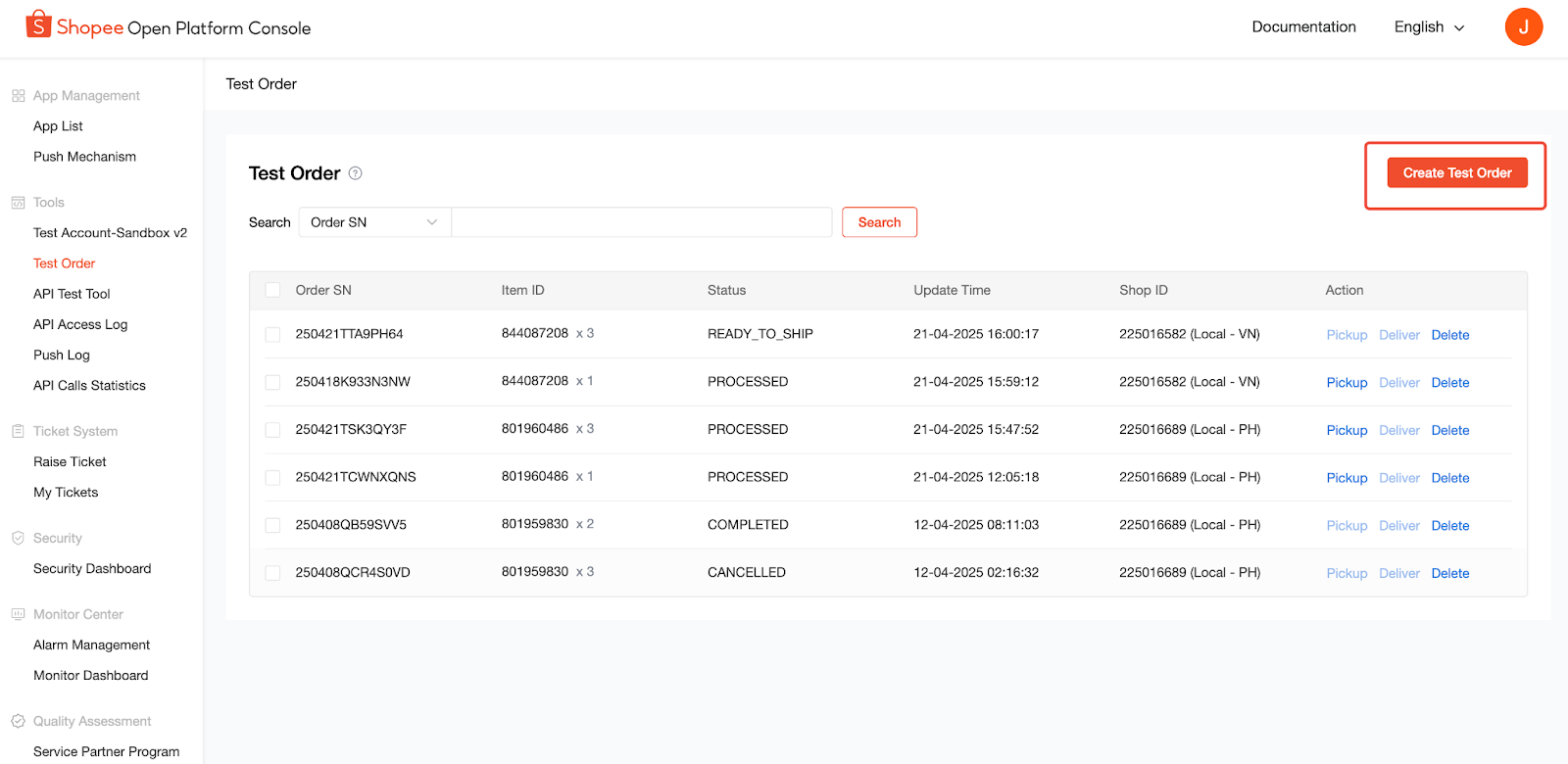
To create a test order, go to the Test Order page on the Shopee Open Platform Console and select Create Test Order.
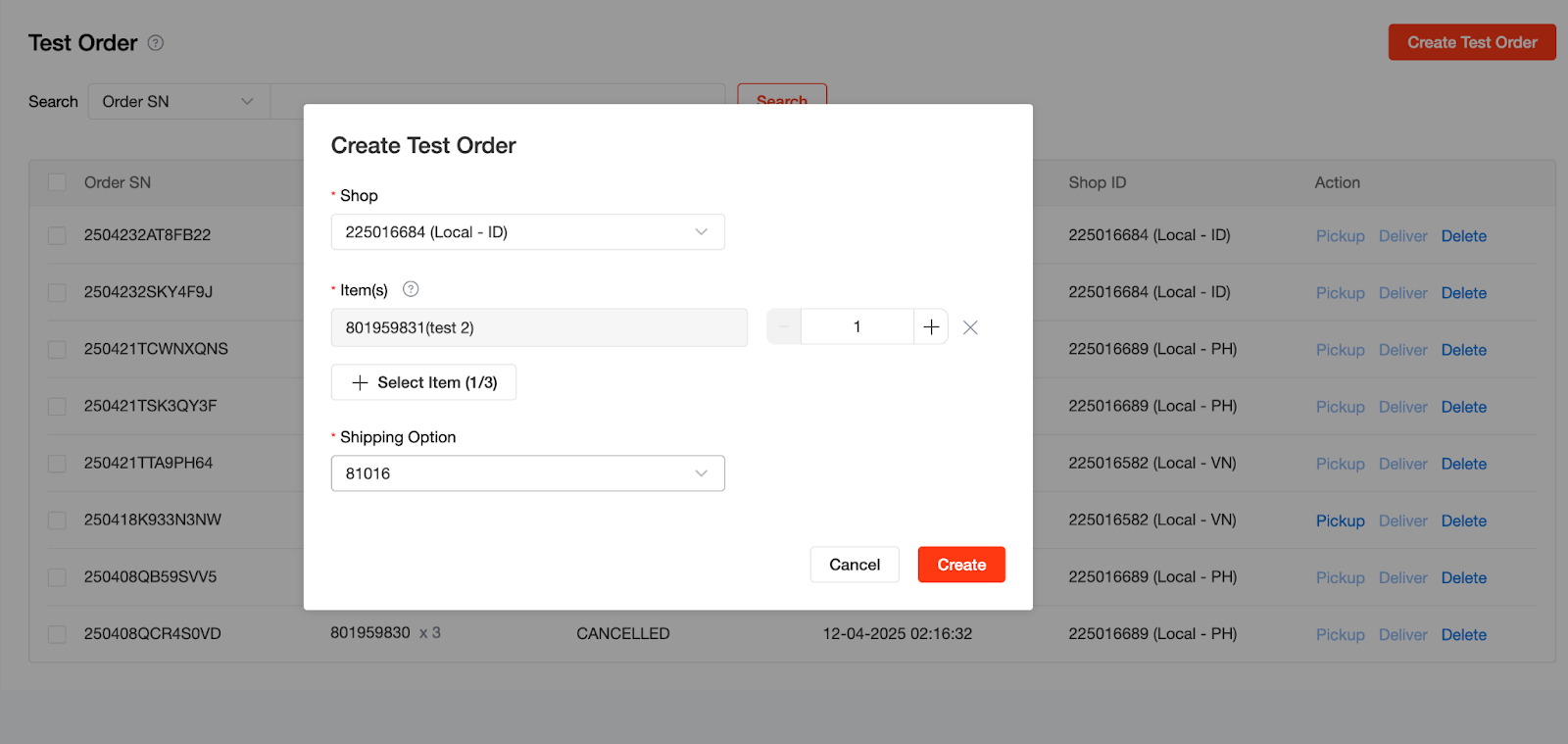
Choose the shop, items, and shipping option, then click Create to generate the order.
The order information includes Order SN, Item ID, Status, Update Time, and Shop ID. You can also pick up, deliver, or delete the order from this page.
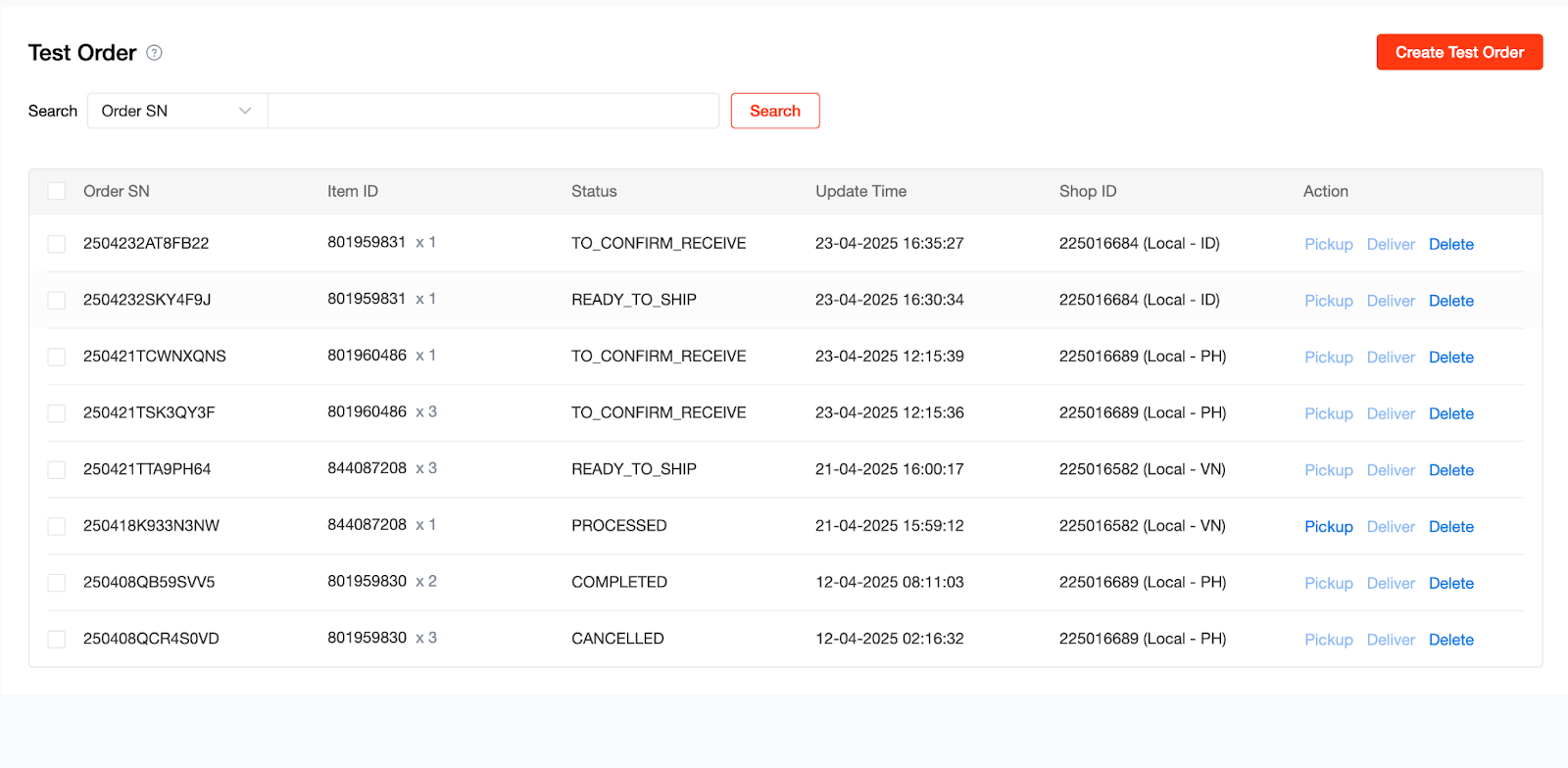
Refer to the Order Management article for more information about following steps.
3.2.7 Return & Refund Management
Refer to the Return Refund Management article for more information.
3.2.8 Finance: Get Income and wallet transactions
You can generate and retrieve the income statement, income report, or wallet transactions by calling the APIs with a Mart shop_id. When using a Mart shop_id, the response will return an aggregated document that includes all outlet shops under the Mart shop.
| Function | Open API | Remark |
| generate income report | v2.payment.generate_income_report | Request Parameter: release_time_from and release_time_to. |
| get income report | v2.payment.get_income_report | To query income report status and provide file link by passing income_report_id. |
| generate income statement | v2.payment.generate_income_statement | Request Parameter:statement_type=1 means weakly statement;statement_type=2 means monthly statement |
| get income statement | v2.payment.get_income_statement | To query income statement status and provide a file link by passing income_statement_id |
| get wallet transaction | v2.payment.get_wallet_transaction_list | Get the transaction records of the wallet. |
3.2.9 Shop Setting
1.You can update the shop name, logo, and description by calling v2.shop.update_profile.
2.You can update the operating hours by calling v2.logistics.update_operating_hours.
Note:
- The values provided must comply with the restrictions retrieved from v2.logistics.get_operating_hour_restrictions.
- This API performs overwriting updates. When updating pickup operating hours, you must include all segments, even those that remain unchanged.
4.
The push mechanism is a dictionary of system notifications from Shopee, covering product, order, return, marketing, stability, and general marketplace updates.
For Instant Mart, it is recommended to connect toorder_status_push. For more details, please refer to the order_status_push article.
5. FAQ & Raise for Help
For common questions, please refer to the FAQs.
If you encounter any issues related to Instant Mart APIs (e.g. onboarding, logistics channel configuration, order sync, etc.), please raise a ticket to the Shopee Product Support team [here].
When submitting the ticket, kindly select: L1 Question Category → Instant Mart
Selecting the correct category helps us identify and prioritize your request more efficiently.