Livestream API Integration Guide
Last Updated: 2026-01-09
Language Supported:
English /
简体中文 /
繁體中文
1. Introduction to Shopee Livestream
Shopee Livestream is a real-time marketing tool provided by the platform that allows streamers to showcase and promote products through live video while interacting with their audience. During the livestream, viewers can engage with the streamer, ask questions about products, and place orders in real time. Shopee Livestream supports various roles such as seller streamers and affiliate streamers, making it suitable for a wide range of business scenarios.
Shopee Open Platform offers a suite of livestream-related Open APIs, covering livestream session management, product management, comment interaction, and real-time data retrieval. Developers can leverage these API capabilities to build livestream management systems for streamers.
2. App Management
- Supported Sites: Currently, Livestream OpenAPI is available for Taiwan (TW), Indonesia (ID), Thailand (TH), Philippines (PH), Malaysia (MY), Singapore (SG), Vietnam (VN).
- Supported Roles: Supports two types of roles — Seller Streamers and Affiliate Streamers.
- Application Type: Only Livestream Management applications are eligible to access the Livestream OpenAPI. Please create a Livestream Management type of application in the Console before integration.
3. Authorization & Authentication
3.1 Authorization
3.1.1 Generate Authorization Link
For Livestream Management apps, developers need to generate the authorization link, which consists of Fixed Authorization URL and Required Parameters:
Fixed Authorization URL:
-
Live Environment:
-
Sandbox Environment:
Required Parameters:
| Name | Type | Required | Description |
|---|---|---|---|
| partner_id | int64 | True | The partner_id of your application, assigned by Shopee Open Platform. |
| auth_type | string | True | The type of roles need to authorize, the enumeration values are as follows:- seller: If you need to authorize seller with their own shops, please select "seller";- user: If you need to authorize affiliate streamer, please select "user". |
| redirect_uri | string | True | The URL used for receiving the code after seller completes the authorization.The domain of redirect_uri must be consistent with the domain declared when you create and go live the application on Shopee Open Platform. |
| response_type | string | True | The authorization type, with the value of "code". |
| state | string | False | An unguessable random string for protecting against cross-site request forgery attacks. |
Note:If the authorized role is seller streamer, set auth_type to "seller". If the authorized role is affiliate streamer, set auth_type to "user".
Example Authorization Links:
-
Live Environment:https://open.shopee.com/auth?partner\_id=10090&auth\_type=seller&redirect\_uri=https://open.shopee.com&response\_type=code
-
Sandbox Environment:https://open.test-stable.shopee.com/auth?partner\_id=1000016&auth\_type=seller&redirect\_uri=https://open.test-stable.shopee.com&response\_type=code
3.1.2 Login for Authorization
Developers need to share the authorization link with seller or affiliate streamers. After logging in, they will be redirected to the authorization page where they can proceed.
3.1.3 Retrieve Authorization Code
After successful authorization, Shopee will return the authorization code to the callback URL (redirect_uri). Developers can retrieve and use this code to obtain the access_token for the first time.
| Name | Type | Description |
|---|---|---|
| code | string | This code is used to obtain access_token and refresh_token. It is valid for only once and expires after 10 minutes. |
3.1.4 Retrieve access_token
The access_token is a dynamic token. Developers must include the access_token when calling non-public APIs.
After successful authorization, use the authorization code from the callback URL to call the v2.public.get_access_token API to obtain the access_token and refresh_token.
Common Request Parameters:
| Name | Type | Required | Description |
|---|---|---|---|
| partner_id | int64 | True | The partner_id obtained from the App. This partner_id is put into the query. |
| timestamp | timestamp | True | Timestamp, valid for 5 minutes. |
| sign | string | True | The signature obtained by sign base string (order: partner_id, api_path, timestamp) HMAC-SHA256 hashing with partner_key. |
Business Request Parameters:
| Name | Type | Required | Description |
|---|---|---|---|
| code | string | True | The code in the redirect URL after authorization. It is only valid once and expires after 10 minutes. |
Response Parameters:
| Name | Type | Description |
|---|---|---|
| error | string | Error code for API requests; always returned.When the API call is successful, the error code returned is empty. |
| message | string | Provides Detailed error information for API requests; always returned.When the API call is successful, the error message returned is empty. |
| request_id | string | ID of API requests; always returned. Used to diagnose problems. |
| shop_id_list | int64[] | If the authorized role is seller, return all shop_id under this authorization.If the authorized role is affiliate streamer, return empty. |
| user_id_list | int64[] | If the authorized role is seller, return all user_id corresponding to shop_id under this authorization.The shop_id_list and user_id_list are in a one-to-one order, which means that the first user_id in user_id_list corresponds to the first shop_id in shop_id_list.Note: All APIs under Livestream module require user_id (not shop_id) as Common Request Parameter. |
| access_token | string | Returned when the API call is successful.A dynamic token that can be used multiple times and expires after 4 hours. |
| refresh_token | string | Returned when the API call is successful.Use refresh_token to get a new access_token. Valid for each shop_id and user_id respectively, for 30 days. |
| expire_in | timestamp | Returned when the API call is successful.The validity period of the access_token, in seconds. |
Note: All livestream-related Open APIs require user_id as a common request parameter Therefore, after successful authorization:
- For seller streamers, please securely store both the shop_id and corresponding user_id.
- For affiliate streamers, please securely store the user_id.
3.1.5 Refresh access_token
Each access_token is valid for 4 hours and can be used multiple times within that period. Developers need to refresh the access_token before it expires by calling the v2.public.refresh_access_token API using the refresh_token. The refresh_token is used specifically for refreshing the access_token, and each refresh_token is valid for 30 days. After the call, a new pair of access_token and refresh_token will be returned. Be sure to use the new refresh_token for the next refresh request.
Common Request Parameters:
| Name | Type | Required | Description |
|---|---|---|---|
| partner_id | int64 | True | The partner_id obtained from the App. This partner_id is put into the query. |
| timestamp | timestamp | True | Timestamp, valid for 5 minutes. |
| sign | string | True | The signature obtained by sign base string (order: partner_id, api_path, timestamp) HMAC-SHA256 hashing with partner_key. |
Business Request Parameters:
| Name | Type | Required | Description |
|---|---|---|---|
| refresh_token | string | True | Use refresh_token to get a new access_token. Each refresh_token is valid for 30 days, and can only be used once by each user_id. |
| partner_id | int64 | True | The partner_id obtained from the App. This partner_id is inserted into the body. |
| user_id | int64 | True | Shopee's unique identifier for a user. |
Response Parameters:
| Name | Type | Description |
|---|---|---|
| error | string | Error code for API requests; always returned.When the API call is successful, the error code returned is empty. |
| message | string | Provides Detailed error information for API requests; always returned.When the API call is successful, the error message returned is empty. |
| request_id | string | ID of API requests; always returned. Used to diagnose problems. |
| partner_id | int64 | Returned when the API call is successful.The partner_id you used for this refresh. |
| user_id | int64 | Returned when the API call is successful.The user_id for this refresh. |
| access_token | string | Returned when the API call is successful.New access_token. A dynamic token that can be used multiple times and expires after 4 hours. |
| refresh_token | string | Returned when the API call is successful.New refresh_token. Use refresh_token to get a new access_token. Valid for each shop_id and user_id respectively, for 30 days. |
| expire_in | timestamp | Returned when the API call is successful.The validity period of the access_token, in seconds. |
3.2 Cancel Authorization
3.2.1 Via Cancel Authorization Link
Cancel authorization link generation is similar to authorization, but with different Fixed Cancel Authorization URL:
Fixed Cancel Authorization URL:
-
Live Environment:
-
Sandbox Environment:
Example Cancel Authorization Link:
-
Live Environment:https://open.shopee.com/cancel\_auth?partner\_id=10090&auth\_type=seller&redirect\_uri=https://open.shopee.com&response\_type=code
-
Sandbox Environment:https://open.test-stable.shopee.com/cancel\_auth?partner\_id=1000016&auth\_type=seller&redirect\_uri=https://open.test-stable.shopee.com&response\_type=code
After generating the unauthorization link, developer should share it with the seller or affiliate streamer. Once they log in to their account and access the cancel authorization page, they can proceed to cancel the authorization.
3.2.2 Via Livestream PC Backend
Seller streamers and affiliate streamers can also visit the Live Partner Management page in the Livestream PC Backend to view which Livestream-type Apps their account has authorized and the corresponding expiration dates. They can also directly unlink any authorization on that page.
Note: Seller streamers can additionally access the Partner Platform page in Seller Center to view all Apps their account has authorized (including but not limited to Livestream-type Apps) and unlink authorizations from there as well.
3.3 API Authentication
Livestream APIs are User-type APIs, meaning:
- Use user_id in common parameters
- The sign base string differs from Shop-type APIs (includes user_id and corresponding access_token)
Common Request Parameters:
| Name | Description |
|---|---|
| partner_id | Partner ID is assigned upon registration is successful. Required for all requests. |
| timestamp | This is to indicate the timestamp of the request. Required for all requests. Expires in 5 minutes. |
| access_token | The token for API access, using to identify your permission to the api. Valid for multiple use and expires in 4 hours. |
| user_id | Shopee's unique identifier for a user. |
| sign | Signature generated by (depends on different APIs) partner_id, api path, timestamp, access_token, user_id and partner_key via HMAC-SHA256 hashing algorithm. |
4. API Categories & Capabilities
Below is a list of currently available livestream-related APIs and their functional overviews:
| Category | API Name | API Description |
|---|---|---|
| Livestream Session Management | v2.livestream.upload_image | Upload an image as the livestream cover and get the image URL. |
| v2.livestream.create_session | Create a new livestream session, including cover, title, description, and type (test live or normal live). | |
| v2.livestream.update_session | Update livestream session information, including cover, title, description, and type (test live or normal live). | |
| v2.livestream.start_session | Start the livestream. | |
| v2.livestream.end_session | End the livestream. | |
| v2.livestream.get_session_detail | Get livestream session details (including cover, title, description, type, creation time, update time, and push stream URL). | |
| Product Management | v2.livestream.add_item_list | Add products to the livestream. |
| v2.livestream.delete_item_list | Remove products from the livestream. | |
| v2.livestream.update_item_list | Reorder products in the livestream. | |
| v2.livestream.get_item_count | Get the number of products in the livestream, including the current number of products, the upper limit of the number. | |
| v2.livestream.get_item_list | Get product list in the livestream, including item id, item serial number, etc. | |
| v2.livestream.update_show_item | Set a product as showing product. | |
| v2.livestream.delete_show_item | Remove showing product. | |
| v2.livestream.get_show_item | Get current showing product. | |
| v2.livestream.get_like_item_list | Get the "My Likes" product list (the list of products liked by the seller streamer or affiliate streamer). | |
| v2.livestream.get_recent_item_list | Get the "Recently" product list (the list of products used by the seller streamer or affiliate streamer in their most recent livestream). | |
| Product Set Management | v2.livestream.get_item_set_list | Get product set list, including the product set name, id, and item number. |
| v2.livestream.get_item_set_item_list | Get products in a product set. | |
| v2.livestream.apply_item_set | Add entire product set to the livestream. | |
| Real-Time Data Retrieval | v2.livestream.get_session_metric | Get real-time indicator data of the livestream session, including the number of likes, comments, shares, views, etc. |
| v2.livestream.get_session_item_metric | Get real-time indicator data of livestream products, including product clicks, add-to-cart, etc. | |
| Comment Interaction | v2.livestream.get_latest_comment_list | Get livestream comments within a certain period of time, including user id, user name, comment id, comment content, and comment time. |
| v2.livestream.post_comment | Post comment in the livestream as streamer. | |
| v2.livestream.ban_user_comment | Ban the user from posting comments. | |
| v2.livestream.unban_user_comment | Unban the user from posting comments. |
5. API Call Flow
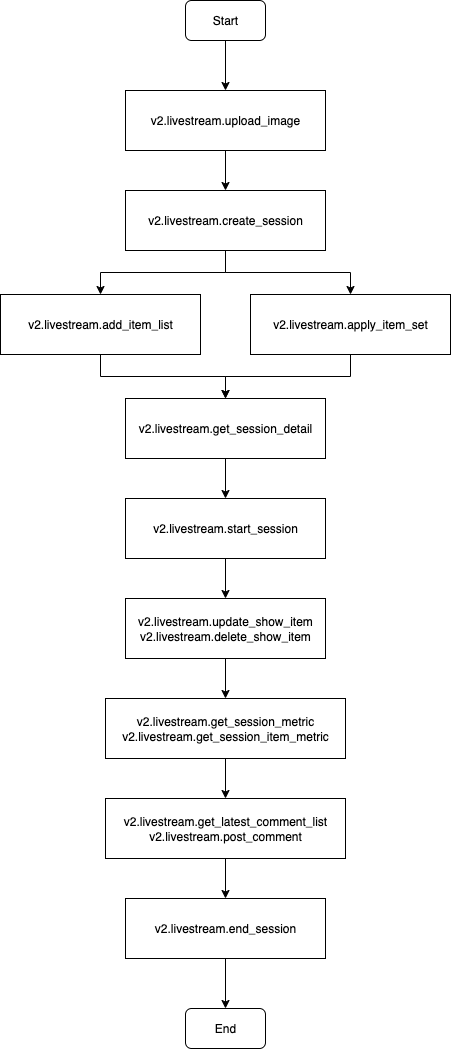
Below is the recommended API call sequence for a typical livestream operation:
Step 1:Upload livestream cover image → v2.livestream.upload_image
Step 2:Create livestream session → v2.livestream.create_session
Step 3:Add products to the livestream → v2.livestream.add_item_list (Add specific products to the livestream by item_id) / v2.livestream.apply_item_set (Add all products from a product set to the livestream)
Step 4:Retrieve push stream URL → v2.livestream.get_session_detail
Step 5:Start streaming via OBS → Use OBS streaming software to broadcast the livestream
Step 6:Officially start the livestream → v2.livestream.start_session
Step 7:Manage show product → v2.livestream.update_show_item / v2.livestream.delete_show_item
Step 8:Get real-time data → v2.livestream.get_session_metric / v2.livestream.get_session_item_metric
Step 9:Get and manage comments → v2.livestream.get_latest_comment_list / v2.livestream.post_comment
Step 10:End the livestream → v2.livestream.end_session
Note:
1)For affiliate streamers, there are three ways to add products to the livestream:
- My Likes:Call v2.livestream.get_like_item_list to retrieve the list of liked products, select desired products, then call v2.livestream.add_item_list to add them to the livestream in batch.
- Recently:Call v2.livestream.get_recent_item_list to get the list of products used in their most recent livestream, select desired products, then call v2.livestream.add_item_list to add them to the livestream in batch.
- Product Set:Call v2.livestream.get_item_set_list to get all created product sets, then call v2.livestream.get_item_set_item_list to get the products under a specific set, and finally use v2.livestream.apply_item_set to add all products from that set to the livestream.
2)For seller streamers, n addition to the three methods above, they can also add products via:
- My Shop:Call v2.product.get_item_list to get the product list from their shop, select desired items, then call v2.livestream.add_item_list to add them to the livestream in batch.