Product creation preparation
Last Updated: 2025-09-19
Language Supported:
English /
简体中文 /
繁體中文 /
Português (Brasil) /
ไทย
Before creating a product, you need to get the category, attributes, brand,days to ship, whether the category supports size chart and other information through API to get prepared for creating products.
1. Category
Each product must have a unique category, please get Shopee category data by v2.product.get_category API. Each node's category has a unique category_id.
1.1 Global category data
Shopee's category tree data applies to all markets, but according to the local policies of the market, some of the categories we set to market prohibited. That is, when you call v2.product.get_category API with a Malaysian shop, you can get category A, but through a Singapore shop, you can not get it.Policies for cross-border and domestic sales are also different, so category data will also vary. For different types of sellers, there are also small differences in the supported category data.
So, in order for you to get the most accurate category data, it is recommended to obtain it according to shop_id.
1.2 Category tree
v2.product.get_category API returns all available categories for the shop.
parent_category_id=0, it means this is the first level category, otherwise, it will return the parent category id of this category.
has_children=false means the last level category, otherwise, it means that this category has children. Please note that only the category_id with has_children=false can be used to create or update products.
For example, if the category tree path is Level 1 category→Level 2 category→Level 3 category, the API return will be
"category_list": [
{
"display_category_name": "Level 1 category",
"has_children":true,
"category_id": 105899,
"original_category_name": "Level 1 category",
"parent_category_id": 0
},
{
"display_category_name": "Level 2 category",
"has_children": true,
"category_id":109889,
"original_category_name": "Level 2 category",
"parent_category_id":105899
},
{
"display_category_name": "Level 3 category",
"has_children":false,
"category_id":107839,
"original_category_name": "Level 3 category",
"parent_category_id":109889
}
]
1.3 Recommend categories
In order to help sellers quickly find the category of the product, you can also call v2.product.category_recommend API, API will return a list of recommended categories based on the product name and product image.
2. Attribute
Each product category has different attribute data. The “v2.product.get_attribute_tree” API will return the attribute data for the given “category_id”. However, please note that only last-level categories can retrieve attribute data. A last-level category is defined as one where the value of the “has_children” field under the “category_list” section returned via the “v2.product.get_category” API is false.
2.1 Required and optional Attributes
When creating or updating products, all required attributes must be uploaded, while optional attributes can be provided based on your needs. In the “v2.product.get_attribute_tree” API response, “is_mandatory”: true indicates a required attribute, and “is_mandatory”: false indicates an optional attribute.
2.2 Type of attributes
We classify attribute types based on factors such as whether the attribute value supports multiple selections, whether it allows custom input, and whether the attribute value is provided. You can check the “input_type” field in the “v2.product.get_attribute_tree” API response for relevant information.
| input_type | Type | Definition | Description | Custom value is allowed | Attribute values are provided |
| 1 | int | SINGLE_DROP_DOWN | Single-select dropdown; Sellers can only choose one option from the list of attribute values (“attribute_value_list”) returned by the API to upload. | No | Yes |
| 2 | int | SINGLE_COMBO_BOX | Single-select dropdown + text input field; Sellers can either choose one option from the list of attribute values (“attribute_value_list”) returned by the API to upload, or set a custom value. | Yes | Yes |
| 3 | int | FREE_TEXT_FILED | Text input field; Sellers can set a custom value. | Yes | No |
| 4 | int | MULTI_DROP_DOWN | Multi-select dropdown; Sellers can select multiple options from the list of attribute values (“attribute_value_list”) returned by the API to upload. | No | Yes |
| 5 | int | MULTI_COMBO_BOX | Multi-select dropdown + text input field; Sellers can select multiple options from the list of attribute values (“attribute_value_list”) returned by the API to upload, or set a custom value. | Yes | Yes |
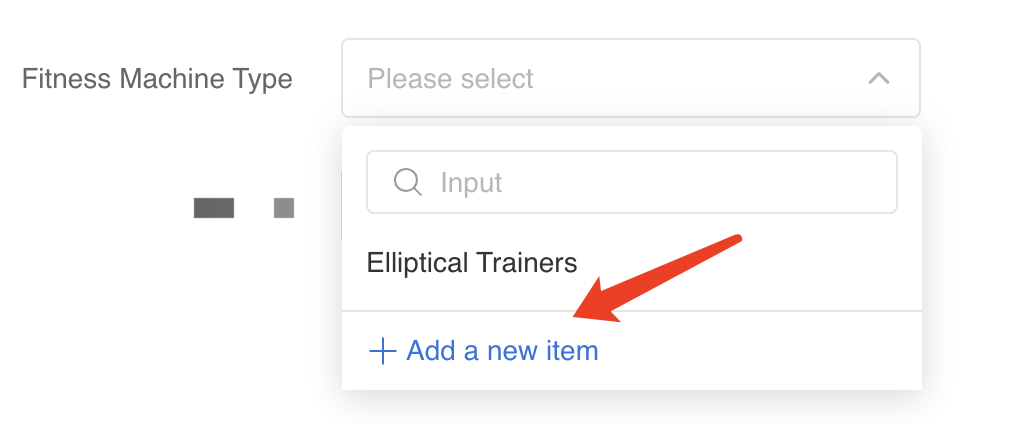
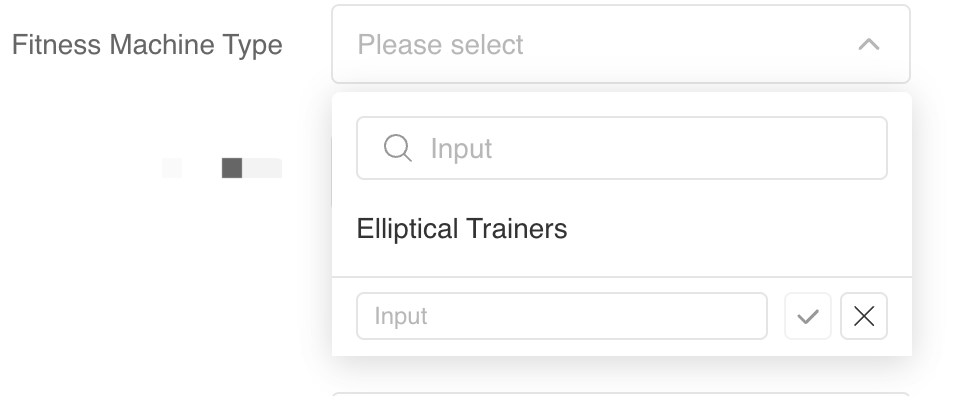
*The following figure shows an example with “input_type”: 2 (SINGLE_COMBO_BOX). Sellers can select a value from the attribute list (Elliptical Trainers), or set a custom value by clicking the 'Add a new item' button and filling it in.
Please note:
- For product attributes that support multi-select dropdowns, you can get the maximum number of attribute values that can be uploaded through the “max_value_count” parameter.
- You can get the list of attribute values provided by Shopee for upload through the “attribute_value_list” parameter.
2.3 Data types of attribute values
Attribute values have defined data types, and you need to upload the attribute values according to the required data type. You can obtain the data type of the attribute value through the “input_validation_type” field returned by the “v2.product.get_attribute_tree” API.
| input_validation_type | Type | Description | Remarks |
| 0 | int | VALIDATOR_NO_VALIDATE_TYPE | |
| 1 | int | VALIDATOR_INT_TYPE | |
| 2 | int | VALIDATOR_STRING_TYPE | |
| 3 | int | VALIDATOR_FLOAT_TYPE | |
| 4 | int | VALIDATOR_DATE_TYPE, including two formats: - DD/MM/YYYYY, e.g. 31/06/2021 - MM/YYYYY, e.g. 06/2021 | When adding or editing a product, for attributes with a date data type, please enter the timestamp in Unix timestamp format. However, when retrieving detailed product attribute values, the “original_value_name” will return the value in a readable date format. |
Please note:
- For the date type attribute, there are two formats: one is MONTH/YEAR (06/2021) and the other is DAY/MONTH/YEAR (31/06/2021). You can check the “date_format_type” field in the “v2.product.get_attribute_tree” API response for details.
- When creating or updating a product, you need to upload the attribute value as a Unix timestamp in the “original_value_name” field. However, when retrieving product information, the “original_value_name” field in the “v2.product.get_item_base_info” API response will return the date in a format such as 06/2021 or 31/06/2021.
2.4 Attribute value units
For example, for the length attribute, we provide sellers with options to choose units such as “cm” and “m”. Therefore, you need to first understand which attribute values require a unit and which units are available for these attribute values. You can call the ” v2.product.get_attribute_tree” API to obtain this information.
When the returned parameter “format_type”: 2 (FORMAT_QUANTITATIVE_WITH_UNIT) is present, it means the attribute value requires a unit, and the” attribute_unit_list” parameter will return the available units for that attribute value. When the returned parameter “format_type”: 1 (FORMAT_NORMAL) is present, it means the attribute value does not require a unit.
*In the attribute value list provided by Shopee, we display the value and the unit separately. Specifically, the “name” field in the “attribute_value_list” will return the value of the attribute (i.e. 5kg), while the “value_unit” field will return the unit of the attribute value (i.e. kg).
2.5 Parent attribute and parent brand
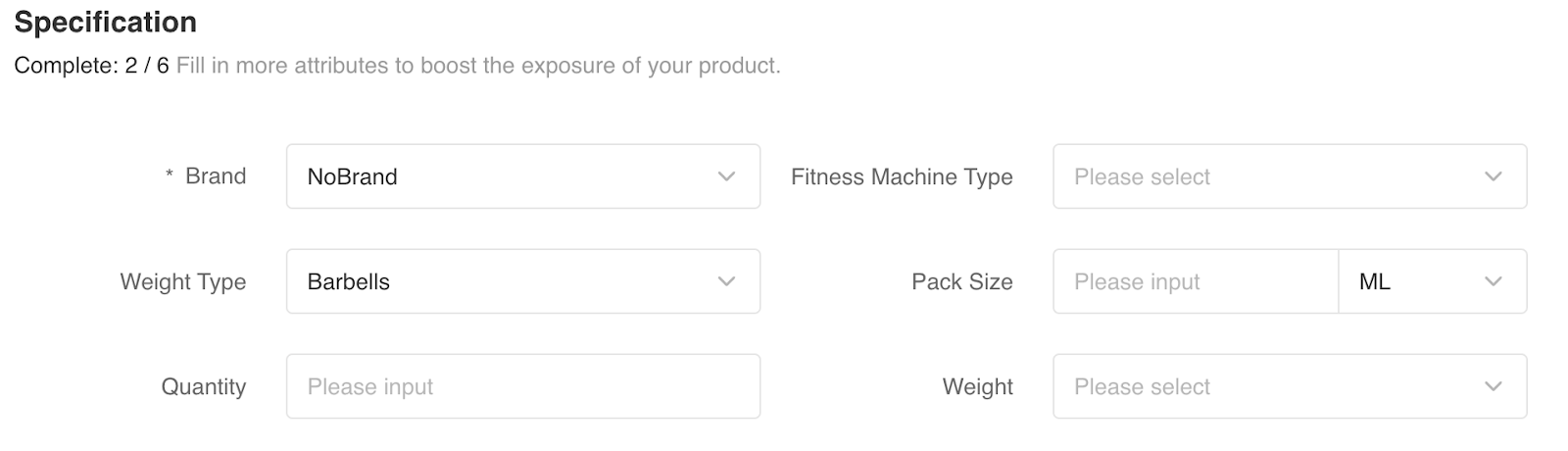
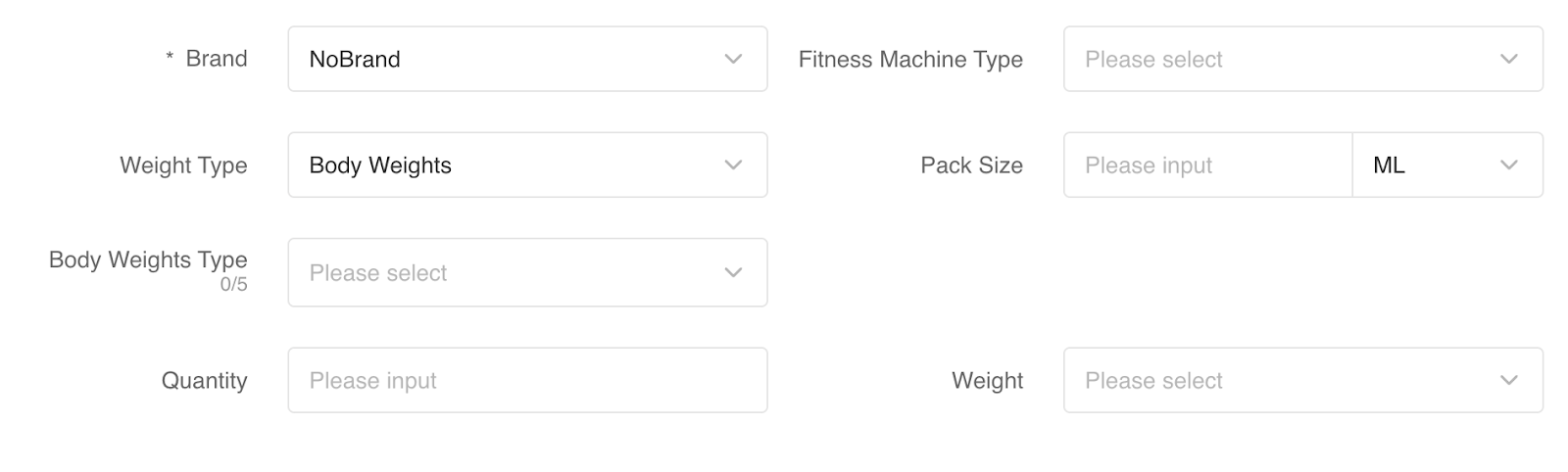
For example, for the “Weight Type” attribute, the available attribute values are “Body Weights” and “Barbells”. The “Body Weights Type” attribute is associated with the “Body Weights” value. Therefore, when the seller selects “Body Weights” for the “Weight Type” attribute, the “Body Weights Type” attribute will be displayed, and we recommend that the seller fill in the corresponding value.
*Selecting “Barbells” value does not show the Body Weights Type attribute
*Selecting “Body Weights” value displays the Body Weights Type attribute
”v2.product.get_attribute_tree” API partial response
Json
{
    "attribute_id": 100643,
    "mandatory": false,
    "name": "Weight Type",
    "attribute_value_list": [
        {
            "value_id": 3300,
            "name": "Barbells",
            "multi_lang": [
                {
                    "language": "zh-Hant",
                    "value": "槓鈴"
                }
            ]
        },
        {
            "value_id": 3341,
            "name": "Body Weights",
            "child_attribute_list": [
                {
                    "attribute_id": 100602,
                    "mandatory": false,
                    "name": "Body Weights Type",
                    "attribute_value_list": [
                        {
                            "value_id": 3164,
                            "name": "Ankle",
                            "multi_lang": [
                                {
                                    "language": "zh-Hant",
                                    "value": "腳踝"
                                }
                            ]
                        }
                    ],
                    "attribute_info": {
                        "input_type": 5,
                        "input_validation_type": 2,
                        "format_type": 1,
                        "max_value_count": 5,
                        "is_oem": false,
                        "support_search_value": false
                    },
                    "multi_lang": [
                        {
                            "language": "zh-Hant",
                            "value": "重訓輔助配件類型"
                        }
                    ]
                }
            ],
            "multi_lang": [
                {
                    "language": "zh-Hant",
                    "value": "穿戴負重器材"
                }
            ]
        }
    ],
    "attribute_info": {
        "input_type": 2,
        "input_validation_type": 2,
        "format_type": 1,
        "is_oem": false,
        "support_search_value": false
    },
    "multi_lang": [
        {
            "language": "zh-Hant",
            "value": "重訓器材種類"
        }
    ]
}
In this example, “Weight Type” is the parent attribute, and “Body Weights Type” is the child attribute. To upload the child attribute, you must also upload the associated parent attribute.
2.6 Recommend attributes
To help sellers quickly find the recommended attributes for the product, you can call v2.product.get_recommend_attribute API, sellers can upload the product name and product image, the API will return a list of recommended attributes. Note that this API may not return the required attributes.
3. Brand
You can upload the brand information for the product, but we will require certain categories to fill in the brand information, and each category supports a different list of brands, so please call v2.product.get_brand_list API to get the brand list data supported by a category (can only be requested with the last level category).
is_mandatory: true true means that this category must be filled with brand information.
* If the brand list provided by Shopee does not contain the brand you need, you can submit a registered brand application to Shopee, please call v2.product.register_brand API and refer to FAQ for QC process.
*If your product does not have a registered brand, Shopee provides a list of brands, including No Brand option (brand_id: 0) , you can choose this option to upload.
status: 1 for the list of brands provided by Shopee, status: 2 the list of brands waiting for review after you submit your registration.
4. Days to ship
We have shipping days requirements for different categories and different seller types, sellers need to fulfill orders within the shipping days, for specific categories, we support you to set the goods as pre-sale goods, shipping time will be longer. You can get the shipping days information through the v2.product.get_item_limit API.
If days_to_ship_limit min_limit and max_limit return a value of -1, it means that the category does not support pre-sale, when the return value is greater than 0, this category can fill in the range of pre-sale days. If the category does not support pre-sales, The non_pre_order_days_to_ship parameter will return the shipping days set by Shopee for this category.
5. Size chart
For some categories,we support sellers uploading one size chart image for a product, you can use v2.product.support_size_chart API to check whether the category (leaf category) supports size chart.
*Please note that we are rolling out the size chart of table type, and now only some whitelisted sellers can add through the seller center, open api does not support returning the categories that support the table size chart and uploading. So whitelisted sellers please ignore the results from the v2.product.support_size_chart API.
6. Product restrictions
We have certain restrictions on product information, such as the length of characters that can be filled in the product name, the range of product price, etc. We have different restrictions for different markets and different types of sellers. You can get the limits we set through v2.product.get_item_limit API.
7. Product logistics
You can get the logistics_channel_id through v2.logistics.get_channel_list API, you can only choose the channel with enabled=true and mask_channel_id=0 for product.