Shopee AMS API Integration Guide
Last Updated: 2025-10-22
Language Supported:
English /
简体中文
1. Introduction to Shopee AMS
Shopee Affiliate Marketing Solutions (AMS) is an integrated marketing and partnership management platform that empowers brands and sellers to expand their reach and boost sales through Shopee’s extensive affiliate network. Meanwhile, sellers only need to pay for successful orders brought by affiliates.
By leveraging AMS, sellers can collaborate with affiliates — from content creators on Shopee Live and Shopee Video, to key opinion leaders (KOLs) and social media partners — enabling them to promote products across multiple high-impact channels with measurable results.
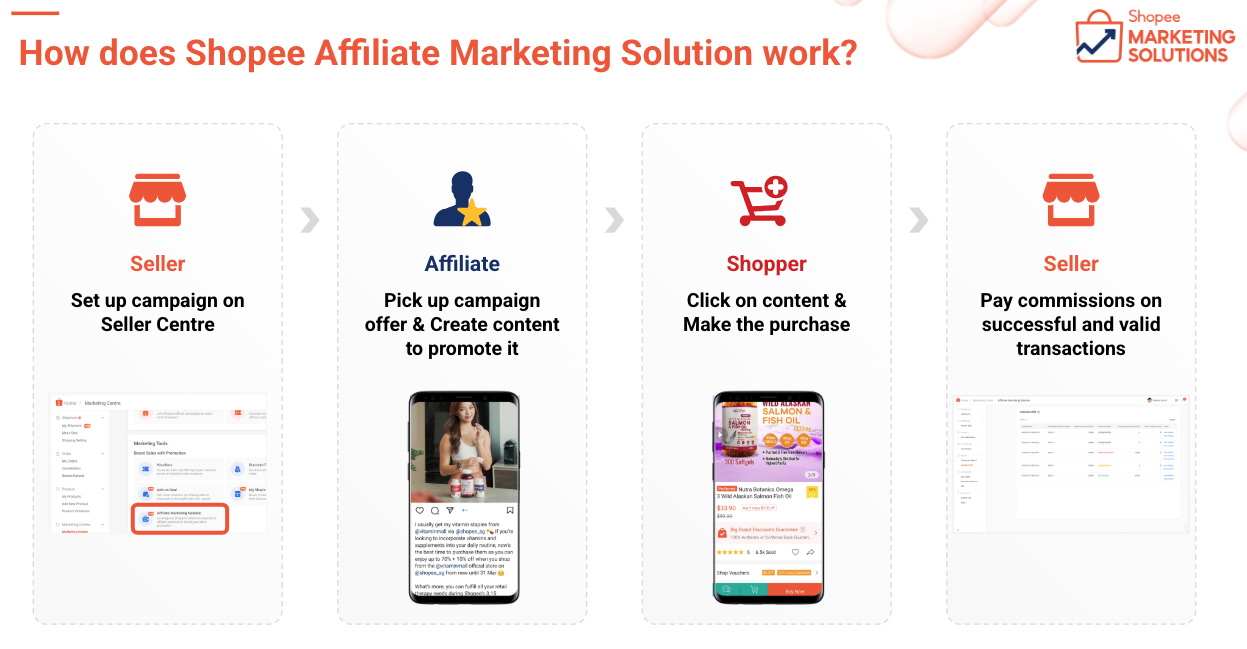
More introduction: Shopee Affiliate Marketing Solution (AMS) 2025
AMS provides two main collaboration models:
● Open Campaigns: Sellers can open their shop’s products for public affiliate promotion, allowing creators to freely select and promote items.
● Targeted Campaigns: Sellers can invite specific affiliates for tailored collaborations with customized commission settings.
AMS also provides comprehensive data dashboards covering traffic, conversion, and sales performance, helping sellers monitor effectiveness, identify top-performing affiliates, and optimize ROI.
This Open API enables external developers to automate AMS operations — including campaign setup, campaign management, performance tracking, and bill review — enhancing sellers’ efficiency and integration flexibility.
2. API Categories Overview
AMS APIs are grouped into four main categories:
1. Open Campaign Management – Manage shop-level Open Campaigns and products.
2. Targeted Campaign Management – Manage affiliate-specific Targeted Campaigns and products.
3. Performance Dashboard – Retrieve performance metrics and reports.
4. Validation & Conversion Reports – Check AMS validation bills and related order details.
3. Open Campaign Management APIs
Open Campaign allows sellers to flexibly promote selected products by engaging with an extensive affiliate network. The following APIs manage Open Campaign creation, product inclusion, commission setup, and auto-add rules.
3.1 Retrieve added / not added products under Open Campaign
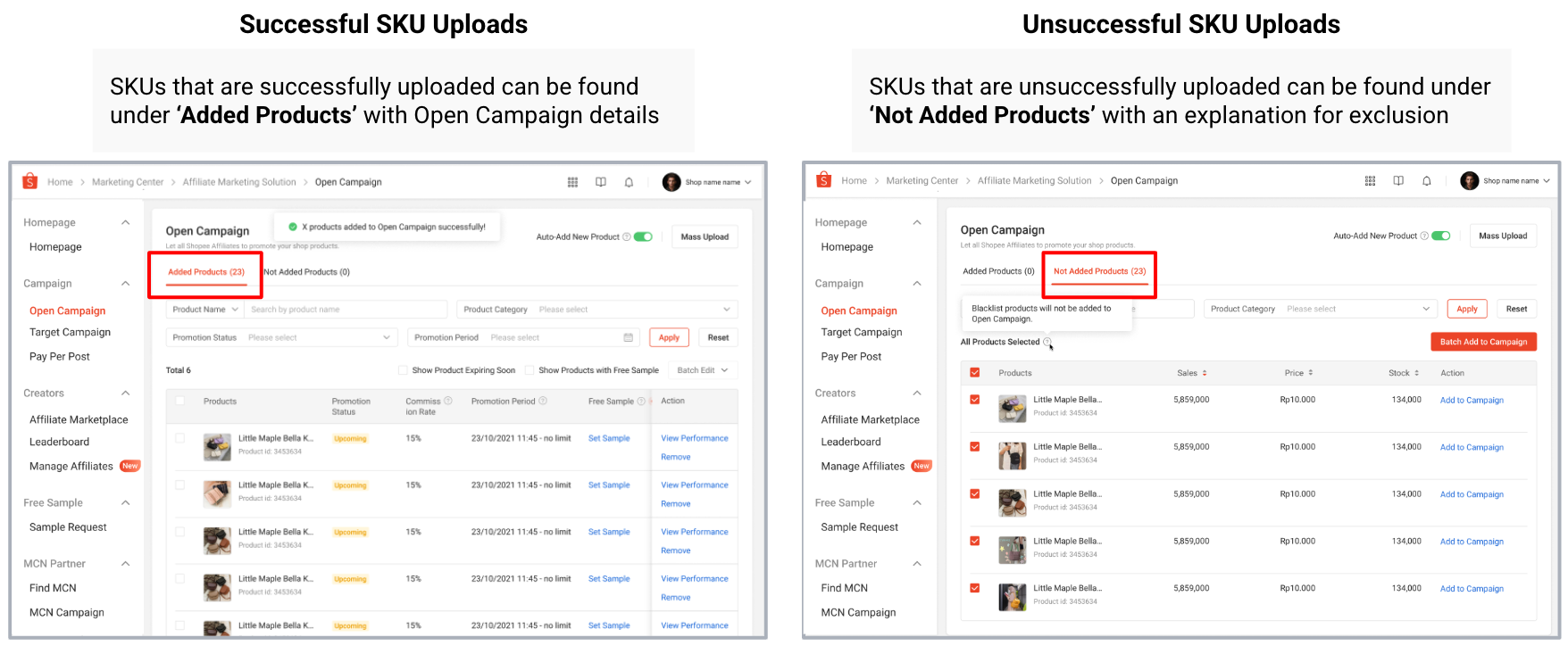
● v2.ams.get_open_campaign_added_product: Retrieve all products currently in the Open Campaign and ready to be picked up by any affiliates to promote at any time.
● v2.ams.get_open_campaign_not_added_product: Retrieve eligible products not yet added to the Open Campaign.
3.2 Add products to Open Campaign
With a valid commission rate and promotion period, products can be added to the Open Campaign for affiliate promotion immediately. Using the provided APIs, you may choose to add specific products by Product ID, or directly include all products in your shop in the Open Campaign.
Additionally, you can enable the Auto-Add feature to let the system automatically add newly launched products to the Open Campaign once they go live in your shop.
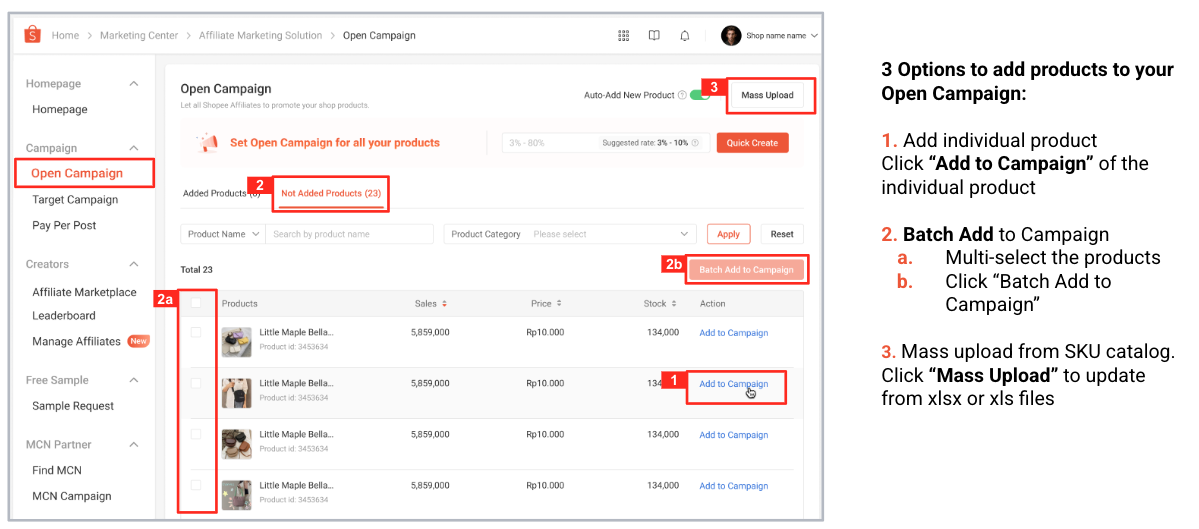
● v2.ams.batch_add_products_to_open_campaign: Add selected products to Open Campaign by product id.
● v2.ams.add_all_products_to_open_campaign: Add all eligible shop products to the Open Campaign.
● v2.ams.get_auto_add_new_product_toggle_status: Check if auto-add new product toggle is enabled and its current default commission rate.
● v2.ams.update_auto_add_new_product_setting: Update the auto-add toggle and its default commission rate.
● v2.ams.get_open_campaign_batch_task_result: Retrieve batch task results for Open Campaign.
3.3 Edit product settings in Open Campaign
Edit commission rate: The commission rate can be adjusted for products in promotion. But please be aware that if there are affiliates promoting the products, the original commission rate will still continue to take effect for 7 full days. Meanwhile, increased commission rates will take effect immediately.
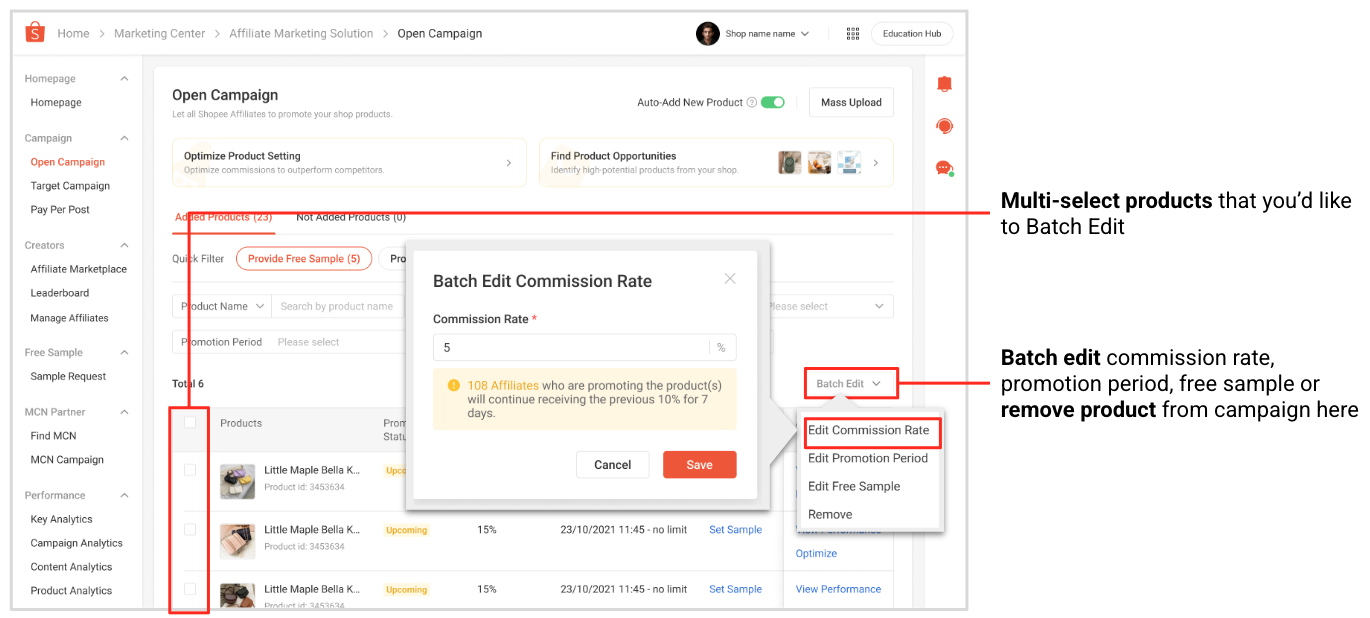
Edit promotion period: To maximize exposure and sustain order growth, you are encouraged to set a longer promotion period so that affiliates can continuously promote your products.
Please note that the promotion period cannot be shortened once a campaign is active, to ensure a fair and consistent experience for all affiliates.
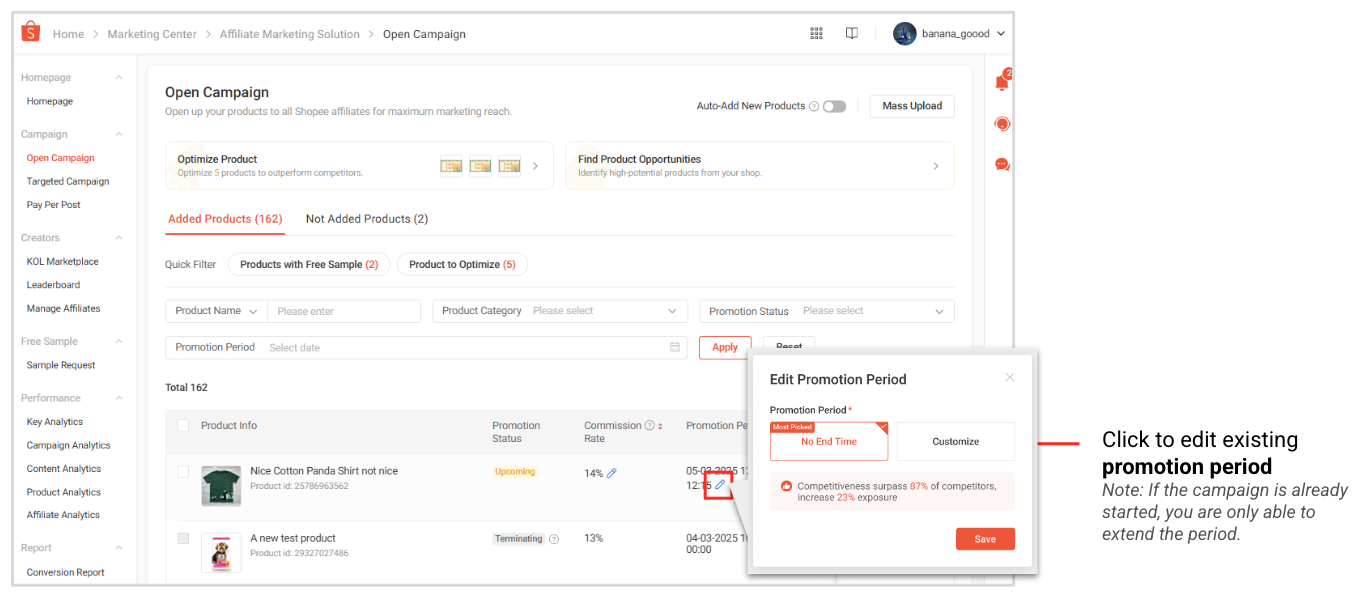
● v2.ams.batch_edit_products_open_campaign_setting: Batch update multiple product campaign settings.
● v2.ams.edit_all_products_open_campaign_setting: Update settings for all products in the campaign.
● v2.ams.get_open_campaign_batch_task_result: Retrieve batch task results for Open Campaign.
3.4 Remove products from Open Campaign
You may remove products from your Open Campaign using the provided APIs — either by specifying product IDs to remove selected items, or by clearing all products at once.
Please note that products removed from an Open Campaign will remain commission-eligible for 7 additional full days to ensure fair attribution for ongoing affiliate promotions.
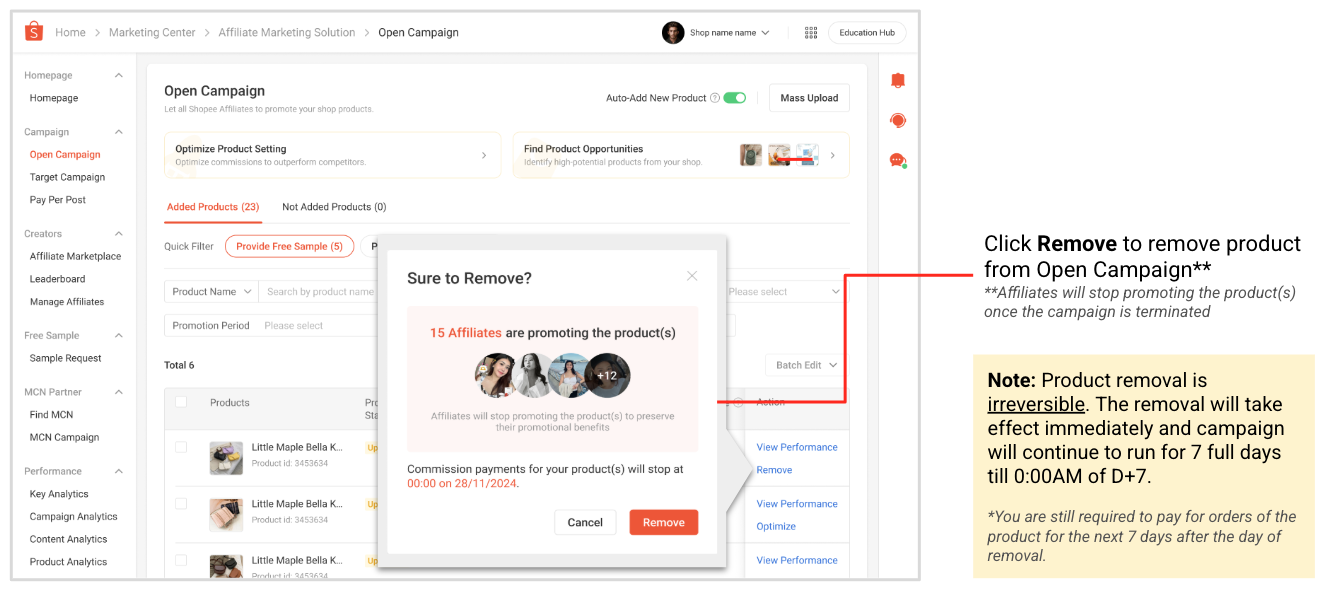
● v2.ams.batch_remove_products_open_campaign_setting: Remove multiple products at once.
● v2.ams.remove_all_products_open_campaign_setting: Clear all products in the Open Campaign.
● v2.ams.get_open_campaign_batch_task_result: Retrieve batch task results for Open Campaign.
3.5 Get product recommendation suggestions for Open Campaign
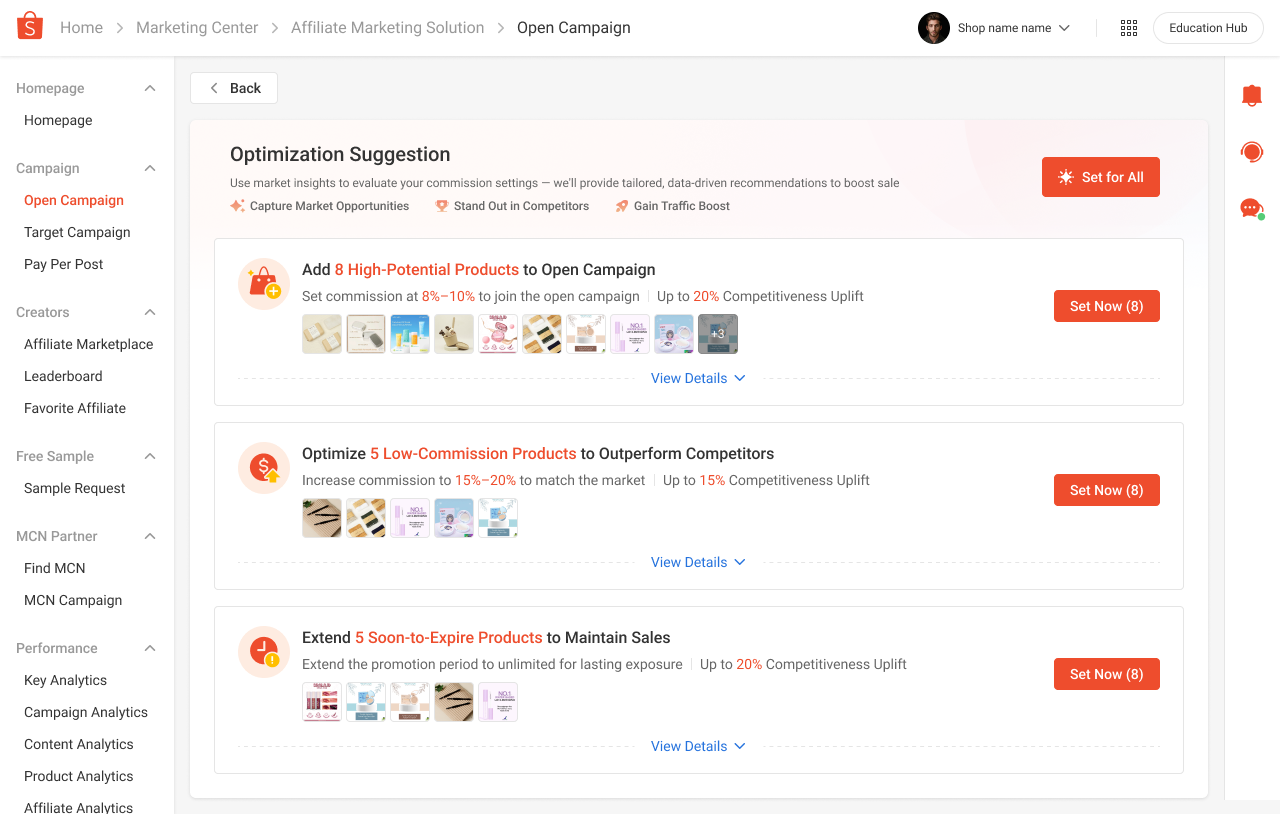
● v2.ams.get_optimization_suggestion_product: The APIs provide 3 types of product optimization suggestions to help sellers improve campaign performance and affiliate engagement:
○ Add High-Potential Products – Recommend best-selling, trending, or high-order-potential products in categories with low AMS supply relative to marketplace demand.
○ Optimize Commission Rate – Suggest commission rate adjustments for products with competitiveness scores below the 60th percentile in their category to attract more affiliates.
○ Extend Promotion Period – Recommend extending the campaign period for products in campaigns with less than 30 days remaining, enabling affiliates to continue driving conversions.
3.6 Get product’s suggested commission rate
● v2.ams.batch_get_products_suggested_rate: Following each product’s suggested commission rate will significantly enhance the competitiveness of your product and drive product visibility among affiliates.
● v2.ams.get_shop_suggested_rate: When setting Open Campaign for whole shop products, you may refer to this API to get a unified suggested commission rate that can be used for the entire shop products.
4. Targeted Campaign Management APIs
Targeted Campaigns allow sellers to collaborate with specific affiliates for tailored, performance-driven promotions. The corresponding APIs enable developers to create, edit, and monitor these Targeted Campaigns, including product selection, affiliate selection, and campaign settings.
4.1 Create new Targeted Campaign
Get product list:
● v2.ams.get_targeted_campaign_addable_product_list: Retrieve shop products that can be added to Targeted Campaign.
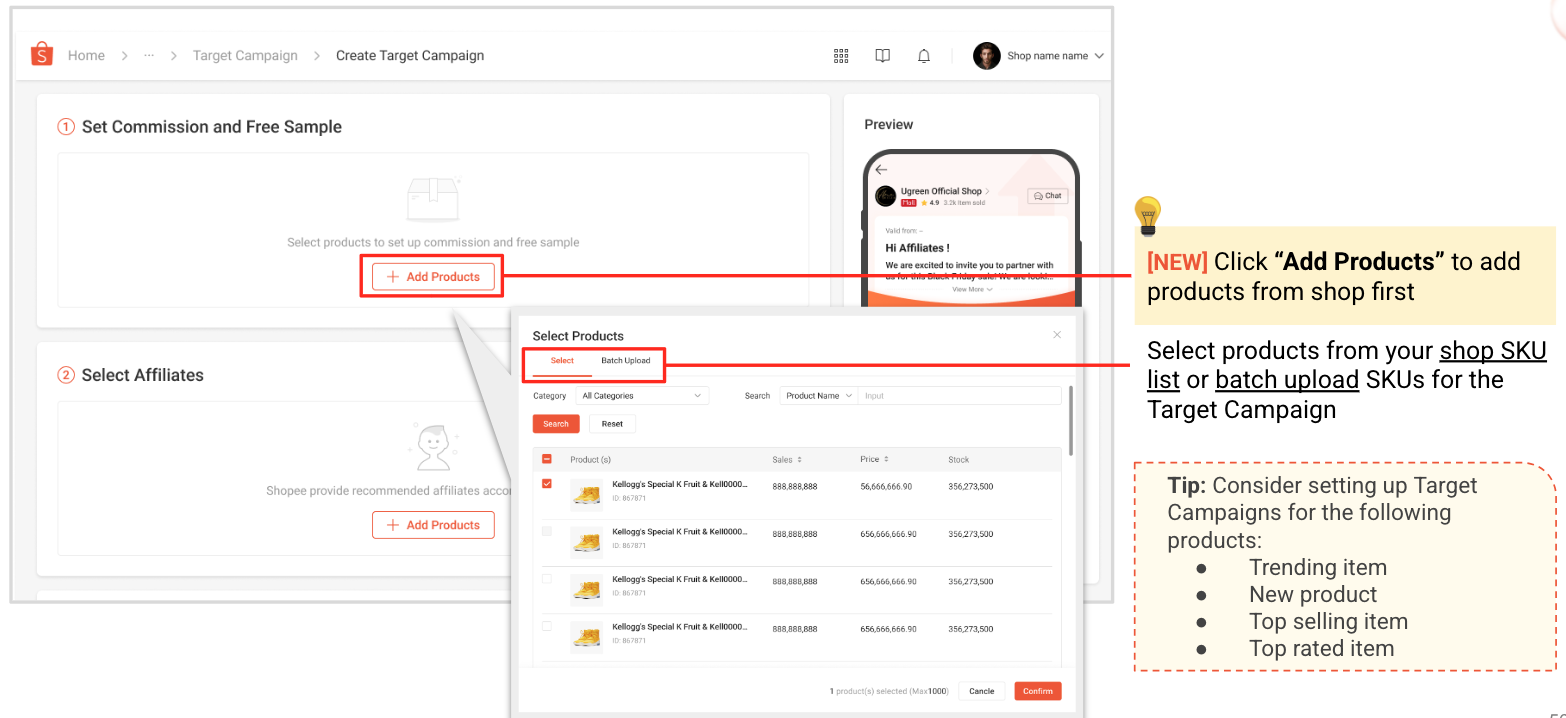
Get affiliate list:
● v2.ams.get_recommended_affiliate_list: Retrieve top recommended affiliates for Targeted Campaigns.
● v2.ams.get_managed_affiliate_list: Retrieve affiliates saved to the shop’s managed affiliate list (available function in AMS in Seller Center).
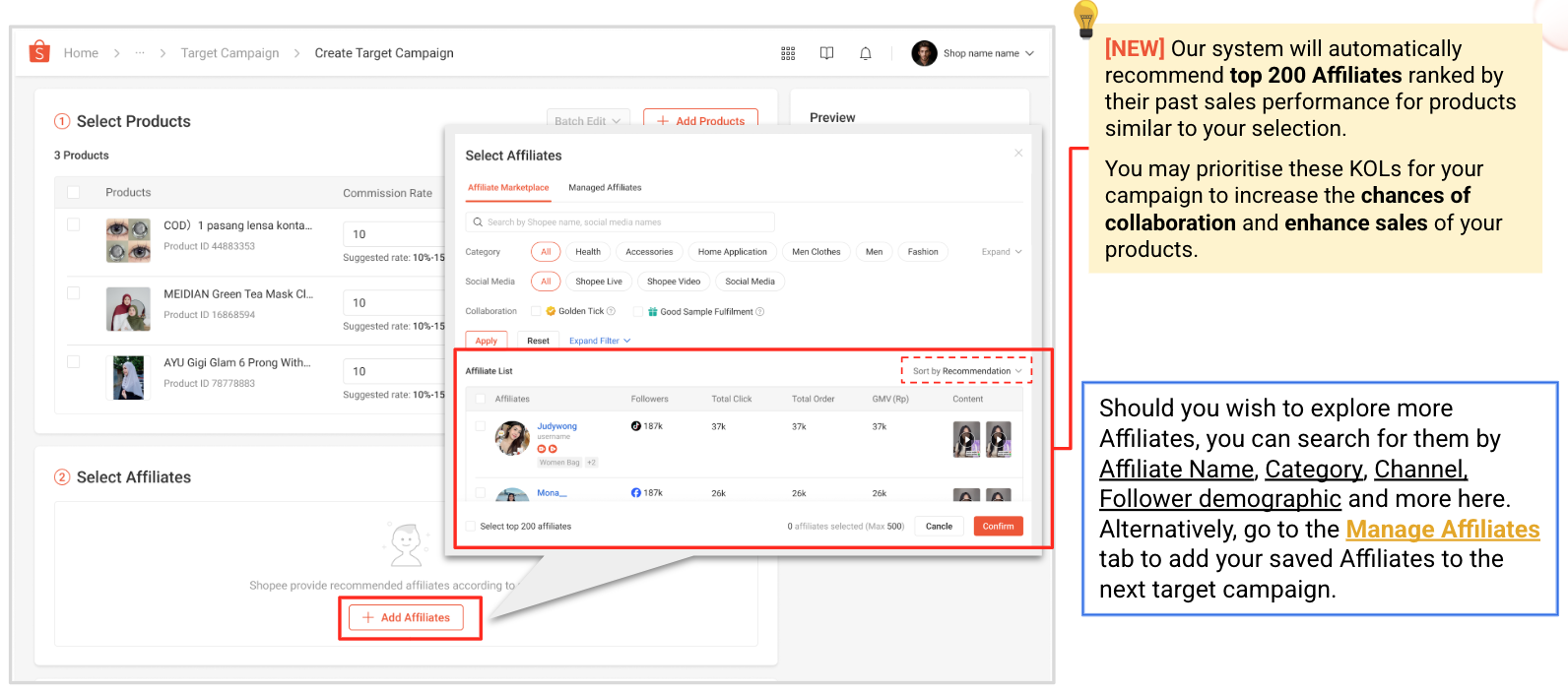
Create new Targeted Campaign:
● v2.ams.create_new_targeted_campaign: Create a new Targeted Campaign with product & affiliate selections and commission rates set on product level. You may also use the previous product recommendations and follow suggested commission rates to set up.
4.2 View & Edit Targeted Campaign
● v2.ams.get_targeted_campaign_list: Retrieve all Targeted Campaigns created by the seller.
● v2.ams.get_targeted_campaign_settings: Retrieve current Targeted Campaign details, including associated products & commission rates and affiliates.
● v2.ams.update_basic_info_of_targeted_campaign: Update basic campaign information such as name, promotion period, message, and budget.
● v2.ams.edit_product_list_of_targeted_campaign: Modify the product list of an existing Targeted Campaign.
● v2.ams.edit_affiliate_list_of_targeted_campaign: Modify the affiliate list of an existing Targeted Campaign.
● v2.ams.terminate_targeted_campaign: Terminate an active Targeted Campaign.
5. Performance & Analytics APIs
AMS provides a set of analytical dashboards designed to help sellers review, analyze, and understand their affiliate marketing performance with ease, enabling data-driven optimization and continuous improvement.
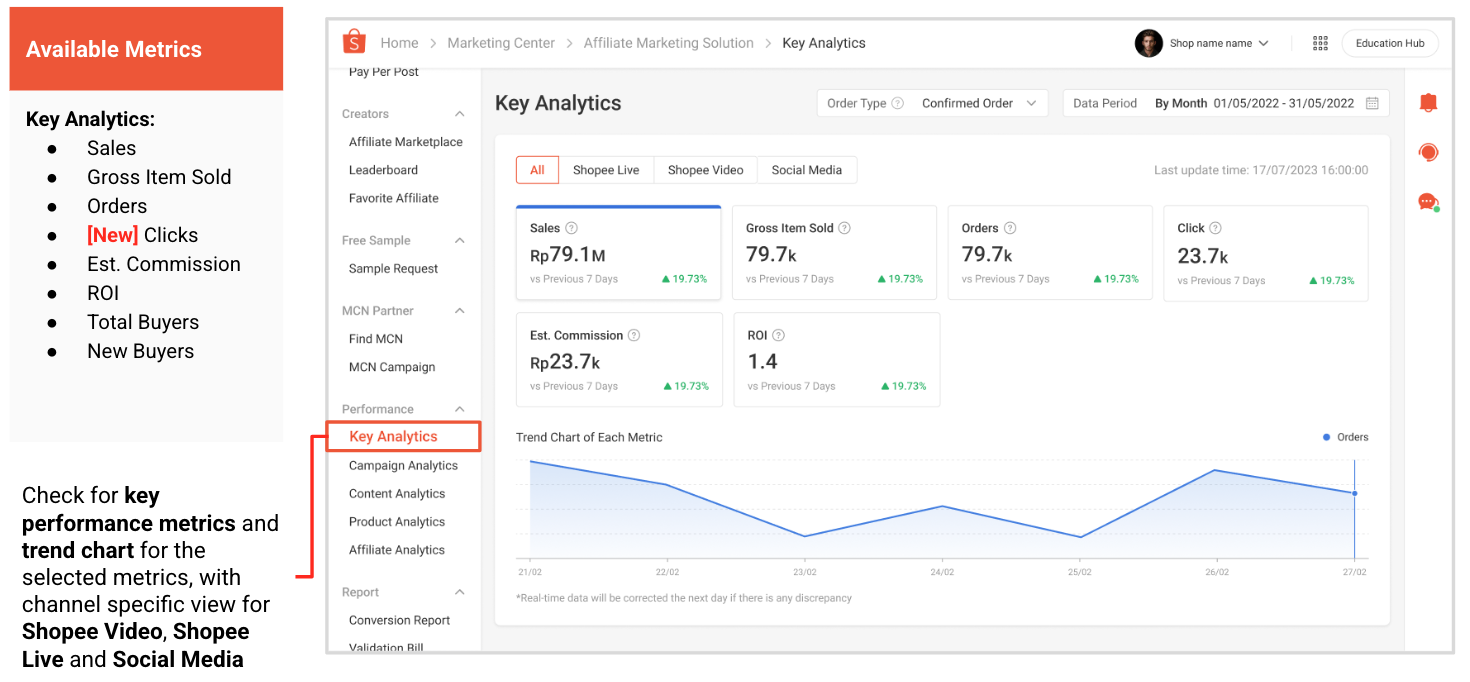
5.1 Key Analytics
● v2.ams.get_performance_data_update_time: All data are updated daily, reflecting orders generated up to the previous day. You can use this API to retrieve the latest AMS performance data update timestamp, ensuring your system displays the most up-to-date performance insights.
● v2.ams.get_shop_performance: Check a few most important metrics related to your shop performance under AMS.
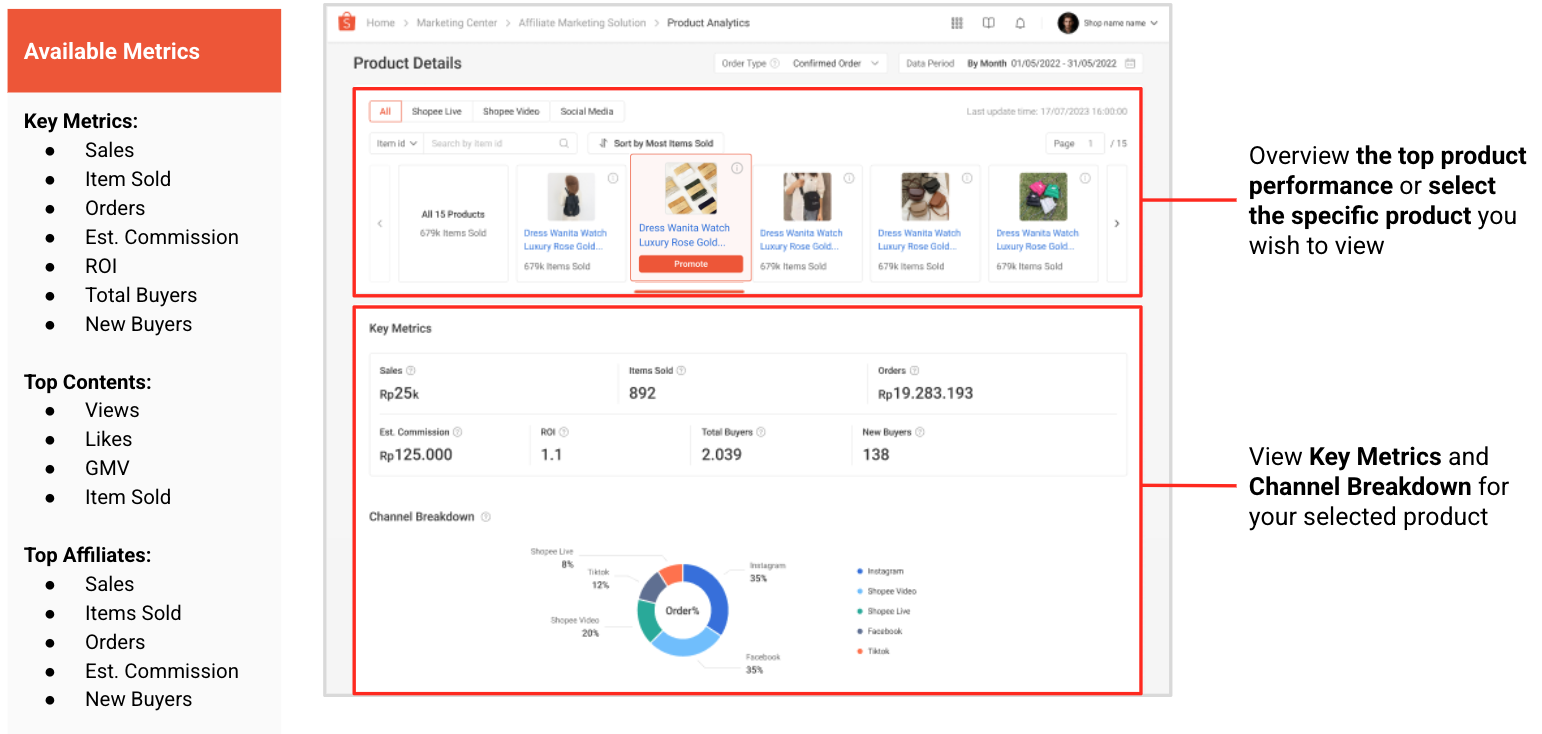
5.2 Product Analytics
● v2.ams.get_product_performance: Retrieve performance data of a specific shop product.
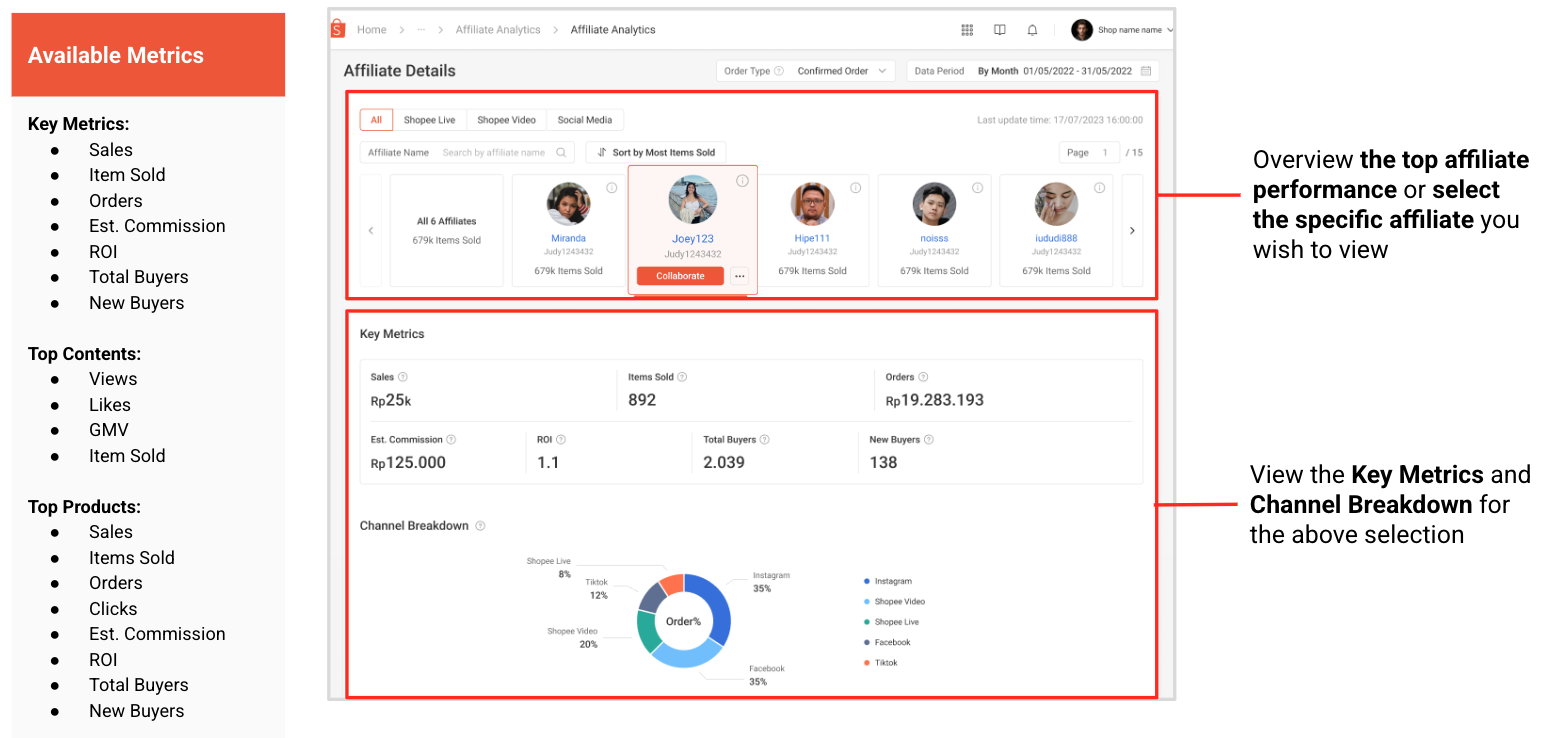
5.3 Affiliate Analytics
● v2.ams.get_affiliate_performance:Retrieve performance data of a specific affiliate brought for the shop.
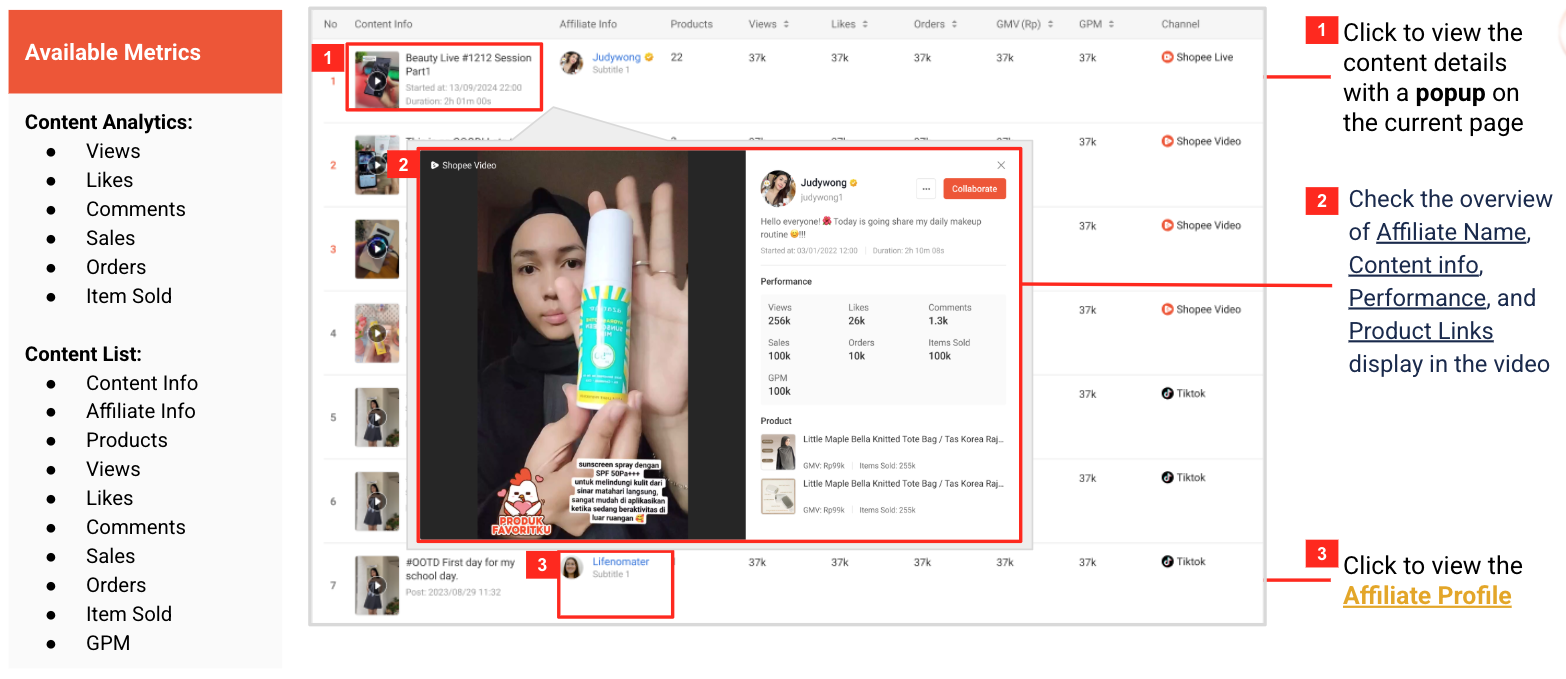
5.4 Content Analytics
● v2.ams.get_content_performance: Retrieve Shopee Video and Shopee Live content performance of the shop.
5.5 Campaign Analytics
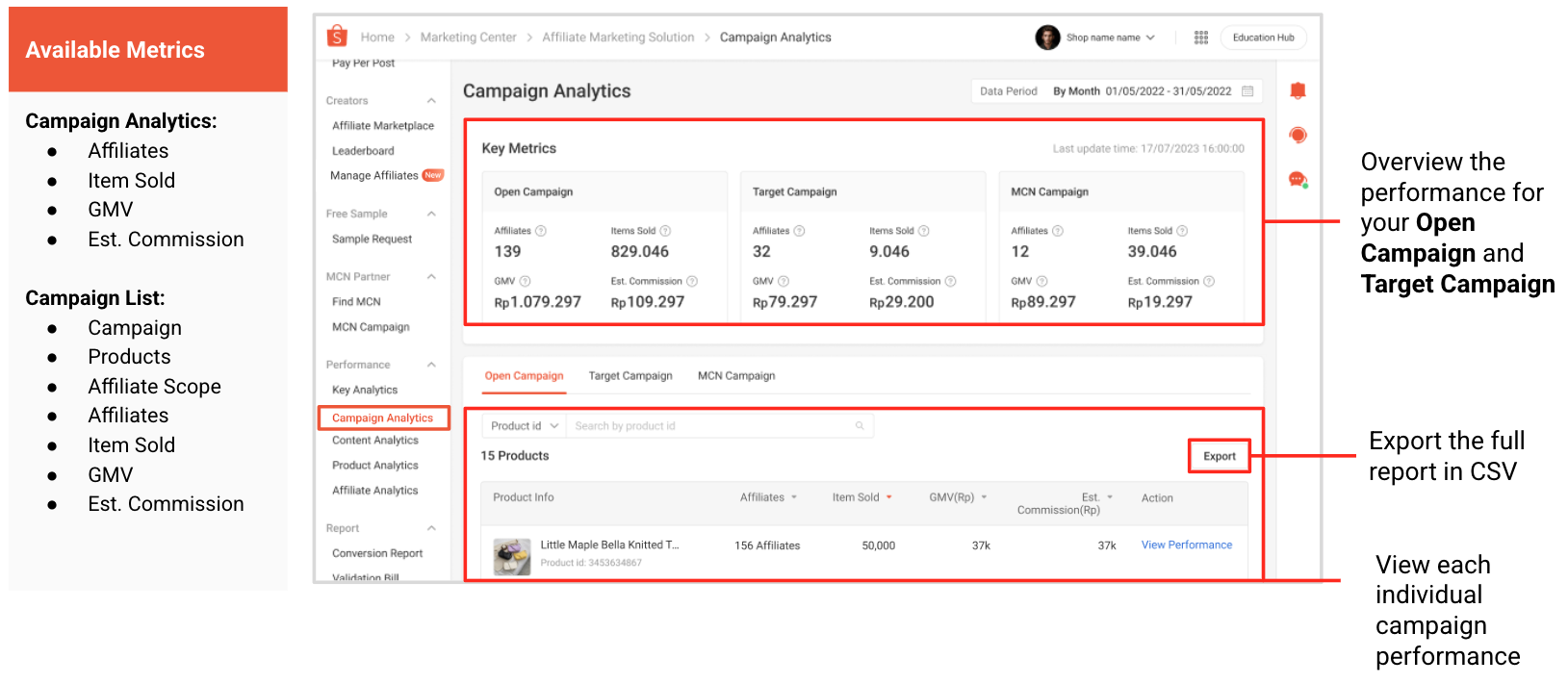
● v2.ams.get_campaign_key_metrics_performance: Retrieve key metrics for Open and Targeted Campaigns.
● v2.ams.get_open_campaign_performance: Retrieve performance data for all products in Open Campaign.
● v2.ams.get_targeted_campaign_performance: Retrieve list of Targeted Campaigns with performance data.
6. Conversion & Validation Report APIs
Used to retrieve and verify AMS billing and conversion reports, helping sellers understand order-level performance and review detailed commission and fee deductions for each transaction generated through AMS.
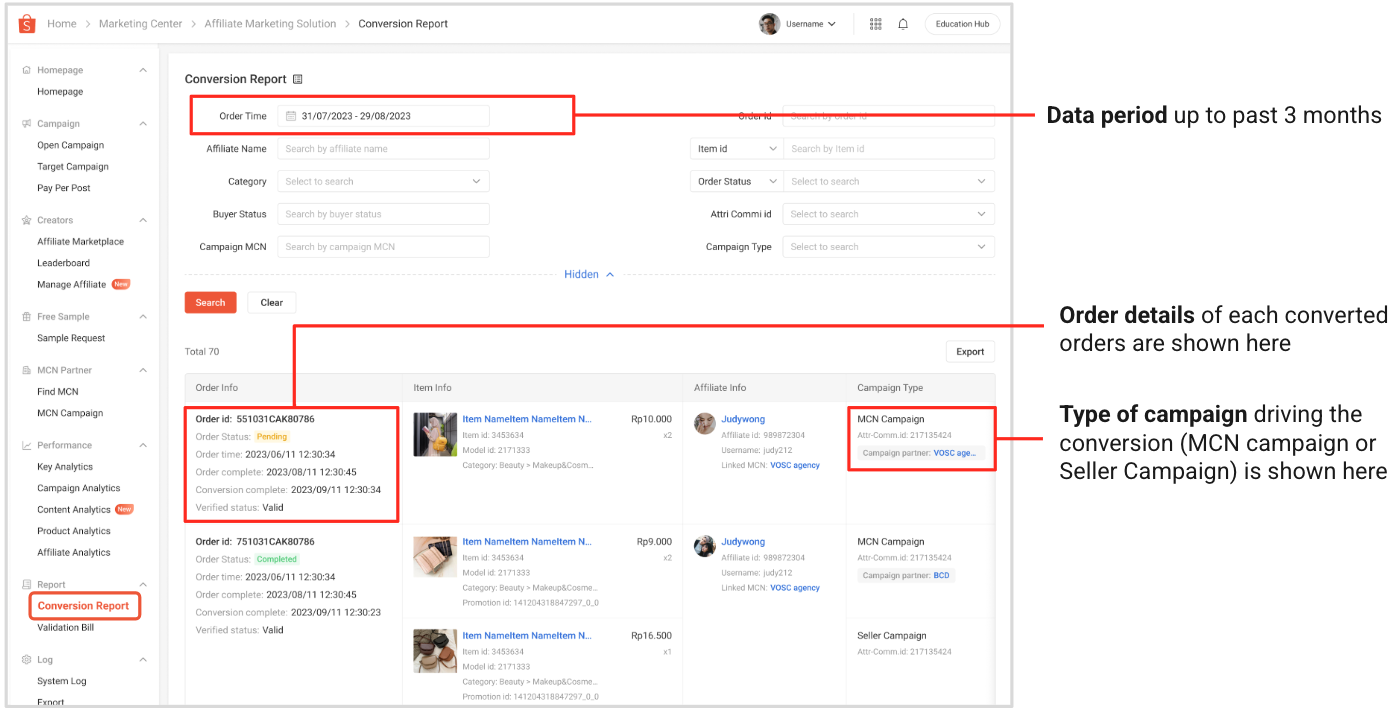
6.1 Conversion Report
● v2.ams.get_conversion_report: Retrieve conversion report with order-level details.
6.2 Validation Bills
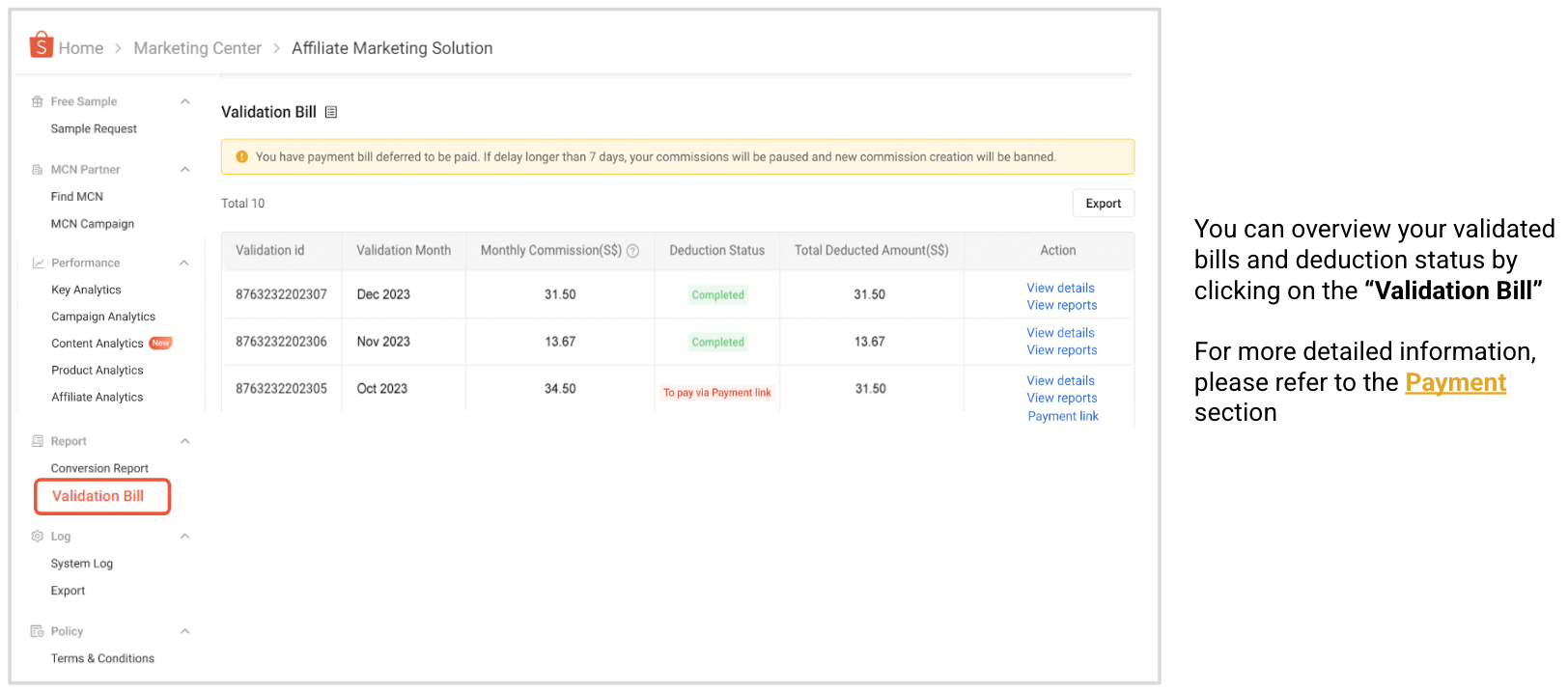
● v2.ams.get_validation_list: Retrieve the seller’s AMS validation bills.
● v2.ams.get_validation_report: Retrieve detailed info for a specific validation bill.
7. Developer Integration Notes
● Only Affiliate Marketing Solution Management applications are eligible to access the AMS OpenAPI. Please create the corresponding type of application in Console before integration.
● All AMS APIs require valid shop authorization and authentication. For more details, please refer to: Authorization and Authentication.
● Use pagination where supported to handle large data sets.
● Performance data and conversion reports have data range and record limits.
● For asynchronous tasks (e.g., batch updates), use batch task result API for status checking.
8. Next Steps
● Refer to the Shopee Open Platform documentation for details on authentication, authorization, and error handling.
● To explore AMS features and ensure proper testing alignment, visit AMS in the Seller Centre. Please note that you must agree to the AMS Terms & Conditions from AMS website before performing any AMS-related API operations.
● Use the AMS Open APIs to automate campaign management, analyze performance, and integrate AMS data with your external systems or tools for streamlined operations.