Shoppable video
Widget Introduction
Compelling videos are at the heart of what drives your success on TikTok Shop. Integrating Shoppable Video hub within your app brings together a wide range of education, inspiration, AI tools, and data to help sellers quickly and easily build shoppable videos.
What are the benefits?
- Grow your business with Shoppable Videos: Shoppable Video is the fastest way to drive traffic to sellers' stores on TikTok Shop. Now they can get access to our powerful Shoppable Video tools directly from the your App.
- Build shoppable videos with lightspeed efficiency: We've done heavy lifting for sellers'; the Content Creation tab produces your customized video in three clicks. Select the product, indicate its key selling points, and then let us handle the rest.
- Get inspired with insights and best practices: Check out top trending songs, hashtags, and more to see what's connecting with buyers. Sellers can also explore what shops like their shops are creating.
- No prior experience required: Seller can create a shoppable video with the range of tools and options available in the Shoppable Video Widget.
Showcase
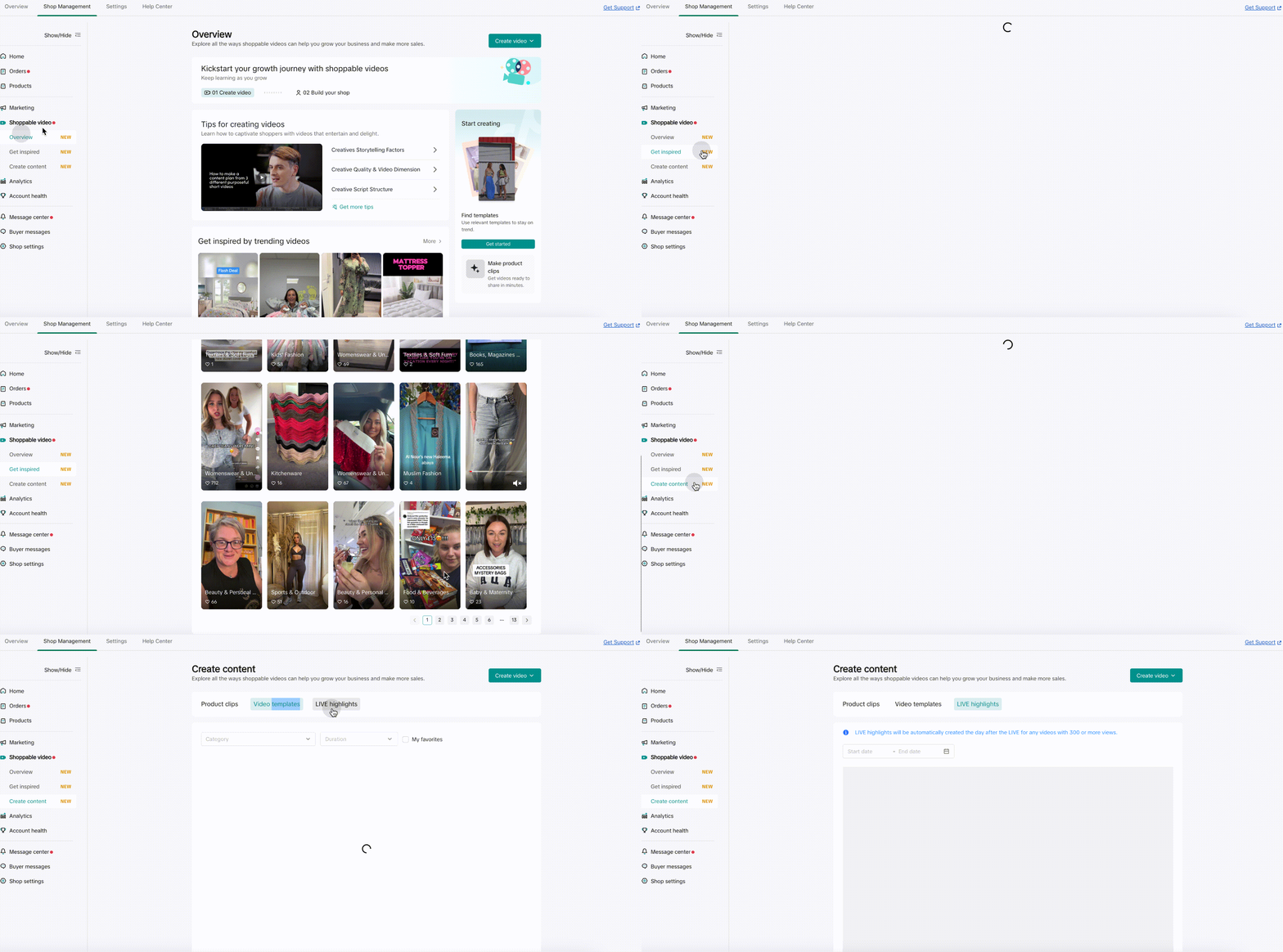
Integration demo
Description
Shoppable Video Widget including three widget which should be used together:
- @tiktokshop-widget/merchant: OverviewWidget
The homepage of Shoppable Videos, provides short video-related educational capabilities, helping new merchants know about short videos and how to grow with short video @tiktokshop-widget/merchant: OverviewWidget - The homepage of Shoppable Videos, provides short video-related educational capabilities, helping new merchants know about short videos and how to grow with short video
- @tiktokshop-widget/merchant: InspirationWidget
The inspiration page of Shoppable Videos, provides short video inspiration, benchmarking accounts, trending hashtags, etc., to inspire merchants to create creative inspiration @tiktokshop-widget/merchant: InspirationWidget - The inspiration page of Shoppable Videos, provides short video inspiration, benchmarking accounts, trending hashtags, etc., to inspire merchants to create creative inspiration
- @tiktokshop-widget/merchant: MakeContentWidget
The content tools page of Shoppable Videos, provides creative production tools to lower the production barrier and help sellers produce short videos easily @tiktokshop-widget/merchant: MakeContentWidget - The content tools page of Shoppable Videos, provides creative production tools to lower the production barrier and help sellers produce short videos easily
The common parameters of the three widgets are:
- handleTabChange
Type
TYPESCRIPTWord Wrap type HandleTabChangeType = ( tabKey: | 'sv_overview' | 'sv_get_inspired' | 'sv_create_content' | 'product_list', options?: Record<string, any>, )=>void;
Description: Inside the shoppable video widget, there is a jump behavior between multiple widgets. Here, the callback function is used to help developers get the jump event and its parameters in the page. handleTabChange
- Type
TYPESCRIPTWord Wrap
   type HandleTabChangeType = (
       tabKey:
         | 'sv_overview'
         | 'sv_get_inspired'
         | 'sv_create_content'
         | 'product_list',
       options?: Record<string, any>,
   )=>void;
-
Description: Inside the shoppable video widget, there is a jump behavior between multiple widgets. Here, the callback function is used to help developers get the jump event and its parameters in the page.
-
Options
Type
TYPESCRIPTWord Wrap { pathname?: string; search?: string; }
Description: The three widgets jump to each other, and each widget has a route inside. So when jumping between widgets, in order to locate the correct route after the jump, some parameters need to be carried through options. Options
- Type
TYPESCRIPTWord Wrap
    {
        pathname?: string;
        search?: string;
    }
-
Description: The three widgets jump to each other, and each widget has a route inside. So when jumping between widgets, in order to locate the correct route after the jump, some parameters need to be carried through options.
-
example TYPESCRIPTWord Wrap`function Demo(){
const optionRef = useRef();
const [visibleWidget,setVisibleWidget] = useState('sv_get_inspired'); return <>
{visibleWidget === 'sv_get_inspired'?<RemoteWidget
name={'@tiktokshop-widget/merchant:InspirationWidget'}
options={{
handleTabChange(tabKey,options){
if(tabKey==='product_list'){
// Jump to product list page
}else if(tabKey==='sv_overview'){
// Open OverviewWidget
optionRef.current = options;
setVisibleWidget(tabKey);
}
}
}}
/>:null}
{visibleWidget === 'sv_overview' ? <RemoteWidget
name={'@tiktokshop-widget/merchant:OverviewWidget'}
options={{
options:optionRef.current
}}
/>:null}
</>
} `
React framework
Configure preload in WidgetConfigProvider preloadWidgetNames, you can put WidgetConfigProvider to the outermost preload time
TYPESCRIPTWord Wrap
import { WidgetConfigProvider,RemoteWidget } from '@tiktokshop/widget-kit-react';

const getWidgetToken = async () => {
  const res: any = await get('https://xxx/api/v1/widget/access_token', {
    outer_shop_id: 'xxx',
    partner_type: '1',
  });
  if (res?.code === 0) {
    return res?.data;
  }
  return {};
};

const initOptions = {
  config: {
    shopId: 'xxx', //seller id, such as 123456
    oecRegion: 'xxx', //country,such as US
    appKey: 'xxx', //The key corresponding to the merchant's creation service
    isvInfo: {
      name: 'xxx', //ISV name,such as OPEN_PLATFORM
    },
  },
  getToken: getWidgetToken, //get auth token
  remotes: [
    {
      name: '@tiktokshop-widget/merchant:OverviewWidget',
    },
    {
      name: '@tiktokshop-widget/merchant:InspirationWidget',
    },
    {
      name: '@tiktokshop-widget/merchant:MakeContentWidget',
    },
  ],
};

export default () => {
  const [currentWidget,setCurrentWidget] = useState('sv_overview');
  const optionRef = useRef<any>(undefined);
  const tempOptionRef = useRef<any>(undefined);

  useEffect(()=>{
      return ()=>{
          optionRef.current = tempOptionRef.current;
          tempOptionRef.current = undefined;
      }
  },[currentWidget]);

  const widgetParams = useMemo()=>({
      handleTabChange: (
        tabKey:
          | 'sv_overview'
          | 'sv_get_inspired'
          | 'sv_create_content'
          | 'product_list',
        options?: Record<string, any>,
      ) => {
          if(tabKey ==='product_list'){
              // open TikTok Shop list page
          }else{
              tempOptionRef.current = options;
              setCurrentWidget(tabKey);
          }
      },
      options: optionRef.current
  }),[currentWidget,optionRef])

  return (
    <WidgetConfigProvider
      config={initOptions.config}
      getToken={initOptions.getToken}
      remotes={initOptions.remotes}
      preloadWidgetNames={[
          '@tiktokshop-widget/merchant:OverviewWidget',
          '@tiktokshop-widget/merchant:InspirationWidget',
          '@tiktokshop-widget/merchant:MakeContentWidget'
      ]}>
        {currentWidget === 'sv_overview' && <RemoteWidget
            name={'@tiktokshop-widget/merchant:OverviewWidget'}
            options={widgetParams}
        />}
        {currentWidget === 'sv_get_inspired' && <RemoteWidget
            name={'@tiktokshop-widget/merchant:InspirationWidget'}
            options={widgetParams}
        />}
        {currentWidget === 'sv_create_content' && <RemoteWidget
            name={'@tiktokshop-widget/merchant:MakeContentWidget'}
            options={widgetParams}
        />}
    </WidgetConfigProvider>
  );
};
Native js
JSONWord Wrap
import React, { useEffect } from 'react';
import { get } from './utils/fetch';
import { loadWidget, init, WidgetComponent } from '@tiktokshop/widget-kit';

let view = null;

const getWidgetToken = async () => {
    const res: any = await get('https://xxx/api/v1/widget/access_token', {
        outer_shop_id: 'xxx',
        partner_type: '1',
    });
    if (res?.code === 0) {
        return res?.data;
    }
    return {};
};

const initWidget = () => {//It is recommended to initialize the widget in the outer layer and execute the preloadWidget([name]) method to preload resources.
init({
    config: {
        shopId: 'xxx',
        oecRegion: 'US',
        appKey: 'xxx',
        isvInfo: {
            name: 'OPEN_PLATFORM',
        },
    },
    remotes: [
        {
            name: '@tiktokshop-widget/merchant:OverviewWidget',
        },
        {
            name: '@tiktokshop-widget/merchant:InspirationWidget',
        },
        {
            name: '@tiktokshop-widget/merchant:MakeContentWidget',
        },
    ],
    getToken: getWidgetToken,
    });
};

const widgetNameMap = {
    'sv_overview': '@tiktokshop-widget/merchant:OverviewWidget',
    'sv_get_inspired': '@tiktokshop-widget/merchant:InspirationWidget',
    'sv_create_content': '@tiktokshop-widget/merchant:MakeContentWidget'
}

export default () => {
  const [currentWidget,setCurrentWidget] = useState('sv_overview');
  const optionRef = useRef<any>(undefined);
  const tempOptionRef = useRef<any>(undefined);


  useEffect(() => {
    initWidget();
  }, []);

  const widgetParams = useMemo()=>({
      handleTabChange: (
        tabKey:
          | 'sv_overview'
          | 'sv_get_inspired'
          | 'sv_create_content'
          | 'product_list',
        options?: Record<string, any>,
      ) => {
          if(tabKey ==='product_list'){
              // open TikTok Shop list page
          }else{
              tempOptionRef.current = options;
              setCurrentWidget(tabKey);
          }
      },
      options: optionRef.current
  }),[currentWidget,optionRef])

  useEffect(()=>{
      if(!currentWidget || !widgetNameMap[currentWidget])return
      loadWidget(widgetNameMap[currentWidget]).then((component: WidgetComponent) => {
          view = component.create(
            document.getElementById('widget-preview-container')!,
          );
          view?.render(widgetParams);
      });
      return ()=>{
          optionRef.current = tempOptionRef.current;
          tempOptionRef.current = undefined;
          view?.unmount();
      }
  },[currentWidget])

  return (
    <div
      className="widget-preview-container"
      id="widget-preview-container"></div>
  );
};
Change log
| Release date | Update |
|---|---|
| 2024/8/5 | The first version is launched, provide the basic functions of shoppable video center |
| 2024/8/15 | Add event tracking & fix campaign banner style. |
Widget SDK User Guide
Refer to Widget SDK User Guide.