Video mua sắm
Giới thiệu Widget
Các video hấp dẫn là cốt lõi tạo nên thành công của bạn trên TikTok Shop. Việc tích hợp trung tâm Shoppable Video vào app của bạn tập hợp nhiều nguồn lực về giáo dục, cảm hứng, công cụ AI và dữ liệu để giúp người bán xây dựng video mua sắm một cách nhanh chóng và dễ dàng.
Lợi ích là gì?
- Phát triển doanh nghiệp với Shoppable Video: Shoppable Video là cách nhanh nhất để thu hút lưu lượng truy cập đến cửa hàng của người bán trên TikTok Shop. Giờ đây họ có thể truy cập các công cụ Shoppable Video mạnh mẽ của chúng tôi ngay từ app của bạn.
- Xây dựng video mua sắm với hiệu suất siêu tốc: Chúng tôi đã làm phần việc nặng nhọc cho người bán; tab Content Creation tạo ra video tùy chỉnh của bạn chỉ trong ba cú nhấp. Chọn sản phẩm, chỉ ra các điểm bán hàng chính, rồi để chúng tôi lo phần còn lại.
- Tìm cảm hứng với insight và best practice: Khám phá các bài hát, hashtag thịnh hành và nhiều hơn nữa để xem điều gì đang kết nối với người mua. Người bán cũng có thể khám phá những gì các shop tương tự đang tạo ra.
- Không cần kinh nghiệm trước đó: Người bán có thể tạo một video mua sắm với loạt công cụ và tùy chọn có sẵn trong Shoppable Video Widget.
Trình diễn
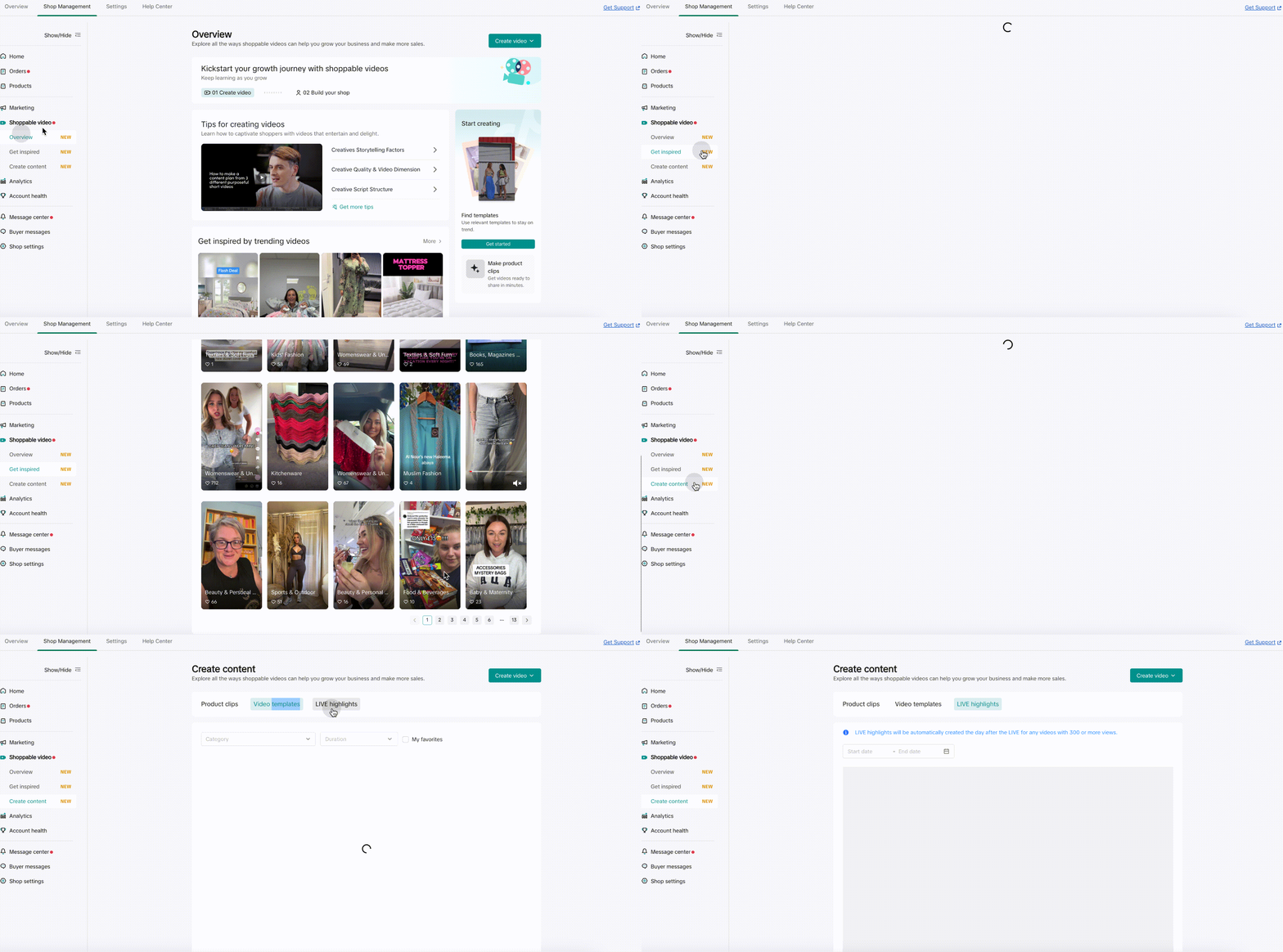
Demo tích hợp
Description
Shoppable Video Widget bao gồm ba widget cần được sử dụng cùng nhau:
- @tiktokshop-widget/merchant: OverviewWidget
Trang chủ của Shoppable Videos, cung cấp các năng lực giáo dục liên quan đến video ngắn, giúp người bán mới hiểu về video ngắn và cách phát triển với video ngắn @tiktokshop-widget/merchant: OverviewWidget - Trang chủ của Shoppable Videos, cung cấp các năng lực giáo dục liên quan đến video ngắn, giúp người bán mới hiểu về video ngắn và cách phát triển với video ngắn
- @tiktokshop-widget/merchant: InspirationWidget
Trang cảm hứng của Shoppable Videos, cung cấp cảm hứng về video ngắn, các tài khoản tham chiếu, hashtag thịnh hành, v.v., để truyền cảm hứng cho người bán tạo ra ý tưởng sáng tạo @tiktokshop-widget/merchant: InspirationWidget - Trang cảm hứng của Shoppable Videos, cung cấp cảm hứng về video ngắn, các tài khoản tham chiếu, hashtag thịnh hành, v.v., để truyền cảm hứng cho người bán tạo ra ý tưởng sáng tạo
- @tiktokshop-widget/merchant: MakeContentWidget
Trang công cụ nội dung của Shoppable Videos, cung cấp các công cụ sản xuất sáng tạo để hạ thấp rào cản sản xuất và giúp người bán dễ dàng tạo video ngắn @tiktokshop-widget/merchant: MakeContentWidget - Trang công cụ nội dung của Shoppable Videos, cung cấp các công cụ sản xuất sáng tạo để hạ thấp rào cản sản xuất và giúp người bán dễ dàng tạo video ngắn
Các tham số chung của ba widget là:
- handleTabChange
Type
TYPESCRIPTWord Wrap type HandleTabChangeType = ( tabKey: | 'sv_overview' | 'sv_get_inspired' | 'sv_create_content' | 'product_list', options?: Record<string, any>, )=>void;
Description: Bên trong shoppable video widget có hành vi điều hướng (jump) giữa nhiều widget. Tại đây, hàm callback được dùng để giúp lập trình viên lấy được sự kiện điều hướng và các tham số của nó trong trang. handleTabChange
- Type
TYPESCRIPTWord Wrap
   type HandleTabChangeType = (
       tabKey:
         | 'sv_overview'
         | 'sv_get_inspired'
         | 'sv_create_content'
         | 'product_list',
       options?: Record<string, any>,
   )=>void;
-
Description: Bên trong shoppable video widget có hành vi điều hướng (jump) giữa nhiều widget. Tại đây, hàm callback được dùng để giúp lập trình viên lấy được sự kiện điều hướng và các tham số của nó trong trang.
-
Options
Type
TYPESCRIPTWord Wrap { pathname?: string; search?: string; }
Description: Ba widget điều hướng lẫn nhau, và mỗi widget có một route bên trong. Vì vậy khi điều hướng giữa các widget, để định vị đúng route sau khi điều hướng, một số tham số cần được truyền qua options. Options
- Type
TYPESCRIPTWord Wrap
    {
        pathname?: string;
        search?: string;
    }
-
Description: Ba widget điều hướng lẫn nhau, và mỗi widget có một route bên trong. Vì vậy khi điều hướng giữa các widget, để định vị đúng route sau khi điều hướng, một số tham số cần được truyền qua options.
-
example TYPESCRIPTWord Wrap`function Demo(){
const optionRef = useRef();
const [visibleWidget,setVisibleWidget] = useState('sv_get_inspired'); return <>
{visibleWidget === 'sv_get_inspired'?<RemoteWidget
name={'@tiktokshop-widget/merchant:InspirationWidget'}
options={{
handleTabChange(tabKey,options){
if(tabKey==='product_list'){
// Jump to product list page
}else if(tabKey==='sv_overview'){
// Open OverviewWidget
optionRef.current = options;
setVisibleWidget(tabKey);
}
}
}}
/>:null}
{visibleWidget === 'sv_overview' ? <RemoteWidget
name={'@tiktokshop-widget/merchant:OverviewWidget'}
options={{
options:optionRef.current
}}
/>:null}
</>
} `
React framework
Cấu hình preload trong WidgetConfigProvider preloadWidgetNames, bạn có thể đặt WidgetConfigProvider ở ngoài cùng để preload sớm nhất
TYPESCRIPTWord Wrap
import { WidgetConfigProvider,RemoteWidget } from '@tiktokshop/widget-kit-react';

const getWidgetToken = async () => {
  const res: any = await get('https://xxx/api/v1/widget/access_token', {
    outer_shop_id: 'xxx',
    partner_type: '1',
  });
  if (res?.code === 0) {
    return res?.data;
  }
  return {};
};

const initOptions = {
  config: {
    shopId: 'xxx', //seller id, such as 123456
    oecRegion: 'xxx', //country,such as US
    appKey: 'xxx', //The key corresponding to the merchant's creation service
    isvInfo: {
      name: 'xxx', //ISV name,such as OPEN_PLATFORM
    },
  },
  getToken: getWidgetToken, //get auth token
  remotes: [
    {
      name: '@tiktokshop-widget/merchant:OverviewWidget',
    },
    {
      name: '@tiktokshop-widget/merchant:InspirationWidget',
    },
    {
      name: '@tiktokshop-widget/merchant:MakeContentWidget',
    },
  ],
};

export default () => {
  const [currentWidget,setCurrentWidget] = useState('sv_overview');
  const optionRef = useRef<any>(undefined);
  const tempOptionRef = useRef<any>(undefined);

  useEffect(()=>{
      return ()=>{
          optionRef.current = tempOptionRef.current;
          tempOptionRef.current = undefined;
      }
  },[currentWidget]);

  const widgetParams = useMemo()=>({
      handleTabChange: (
        tabKey:
          | 'sv_overview'
          | 'sv_get_inspired'
          | 'sv_create_content'
          | 'product_list',
        options?: Record<string, any>,
      ) => {
          if(tabKey ==='product_list'){
              // open TikTok Shop list page
          }else{
              tempOptionRef.current = options;
              setCurrentWidget(tabKey);
          }
      },
      options: optionRef.current
  }),[currentWidget,optionRef])

  return (
    <WidgetConfigProvider
      config={initOptions.config}
      getToken={initOptions.getToken}
      remotes={initOptions.remotes}
      preloadWidgetNames={[
          '@tiktokshop-widget/merchant:OverviewWidget',
          '@tiktokshop-widget/merchant:InspirationWidget',
          '@tiktokshop-widget/merchant:MakeContentWidget'
      ]}>
        {currentWidget === 'sv_overview' && <RemoteWidget
            name={'@tiktokshop-widget/merchant:OverviewWidget'}
            options={widgetParams}
        />}
        {currentWidget === 'sv_get_inspired' && <RemoteWidget
            name={'@tiktokshop-widget/merchant:InspirationWidget'}
            options={widgetParams}
        />}
        {currentWidget === 'sv_create_content' && <RemoteWidget
            name={'@tiktokshop-widget/merchant:MakeContentWidget'}
            options={widgetParams}
        />}
    </WidgetConfigProvider>
  );
};
Native js
JSONWord Wrap
import React, { useEffect } from 'react';
import { get } from './utils/fetch';
import { loadWidget, init, WidgetComponent } from '@tiktokshop/widget-kit';

let view = null;

const getWidgetToken = async () => {
    const res: any = await get('https://xxx/api/v1/widget/access_token', {
        outer_shop_id: 'xxx',
        partner_type: '1',
    });
    if (res?.code === 0) {
        return res?.data;
    }
    return {};
};

const initWidget = () => {//It is recommended to initialize the widget in the outer layer and execute the preloadWidget([name]) method to preload resources.
init({
    config: {
        shopId: 'xxx',
        oecRegion: 'US',
        appKey: 'xxx',
        isvInfo: {
            name: 'OPEN_PLATFORM',
        },
    },
    remotes: [
        {
            name: '@tiktokshop-widget/merchant:OverviewWidget',
        },
        {
            name: '@tiktokshop-widget/merchant:InspirationWidget',
        },
        {
            name: '@tiktokshop-widget/merchant:MakeContentWidget',
        },
    ],
    getToken: getWidgetToken,
    });
};

const widgetNameMap = {
    'sv_overview': '@tiktokshop-widget/merchant:OverviewWidget',
    'sv_get_inspired': '@tiktokshop-widget/merchant:InspirationWidget',
    'sv_create_content': '@tiktokshop-widget/merchant:MakeContentWidget'
}

export default () => {
  const [currentWidget,setCurrentWidget] = useState('sv_overview');
  const optionRef = useRef<any>(undefined);
  const tempOptionRef = useRef<any>(undefined);


  useEffect(() => {
    initWidget();
  }, []);

  const widgetParams = useMemo()=>({
      handleTabChange: (
        tabKey:
          | 'sv_overview'
          | 'sv_get_inspired'
          | 'sv_create_content'
          | 'product_list',
        options?: Record<string, any>,
      ) => {
          if(tabKey ==='product_list'){
              // open TikTok Shop list page
          }else{
              tempOptionRef.current = options;
              setCurrentWidget(tabKey);
          }
      },
      options: optionRef.current
  }),[currentWidget,optionRef])

  useEffect(()=>{
      if(!currentWidget || !widgetNameMap[currentWidget])return
      loadWidget(widgetNameMap[currentWidget]).then((component: WidgetComponent) => {
          view = component.create(
            document.getElementById('widget-preview-container')!,
          );
          view?.render(widgetParams);
      });
      return ()=>{
          optionRef.current = tempOptionRef.current;
          tempOptionRef.current = undefined;
          view?.unmount();
      }
  },[currentWidget])

  return (
    <div
      className="widget-preview-container"
      id="widget-preview-container"></div>
  );
};
Change log
| Release date | Update |
|---|---|
| 2024/8/5 | Phiên bản đầu tiên ra mắt, cung cấp các chức năng cơ bản của trung tâm video mua sắm |
| 2024/8/15 | Thêm event tracking & sửa style của campaign banner. |
Hướng dẫn sử dụng Widget SDK
Tham khảo Hướng dẫn sử dụng Widget SDK.