Widget Người chịu trách nhiệm và Nhà sản xuất
Bối cảnh
Tại thị trường EU, khi đăng bán sản phẩm, người bán bắt buộc phải cung cấp thông tin tuân thủ và tải lên các chứng nhận tuân thủ sản phẩm liên quan, bao gồm:
Manufacturer Information: nhà sản xuất của sản phẩm
Đề cập đến các chi tiết về quy trình sản xuất, địa điểm, và các thực thể chịu trách nhiệm sản xuất sản phẩm. Tất cả sản phẩm phải có nhãn ghi thông tin liên hệ của nhà sản xuất và, nếu có liên quan, thông tin của nhà nhập khẩu. Thông tin này phải hiển thị trên sản phẩm vật lý và trong các listing sản phẩm trực tuyến.
Responsible Person (RP): người chịu trách nhiệm đảm bảo sản phẩm của người bán tuân thủ các quy định của EU.
Đối với bất kỳ sản phẩm phi thực phẩm nào, việc có một Responsible Person đặt tại EU là điều thiết yếu. Người này là đầu mối liên hệ cho khách hàng và có thể trao đổi với các cơ quan quản lý thay mặt cho doanh nghiệp về các vấn đề an toàn sản phẩm. Sản phẩm cần được dán nhãn với thông tin liên hệ của người này bằng ngôn ngữ mà người tiêu dùng có thể dễ dàng hiểu được, theo quy định của Quốc gia thành viên nơi sản phẩm được cung cấp ra thị trường.
Giới thiệu Widget
Thông tin Responsible Person
Tóm tắt: Widget này bao gồm khả năng truy vấn tồn kho RP, thêm RP, và chỉnh sửa RP.
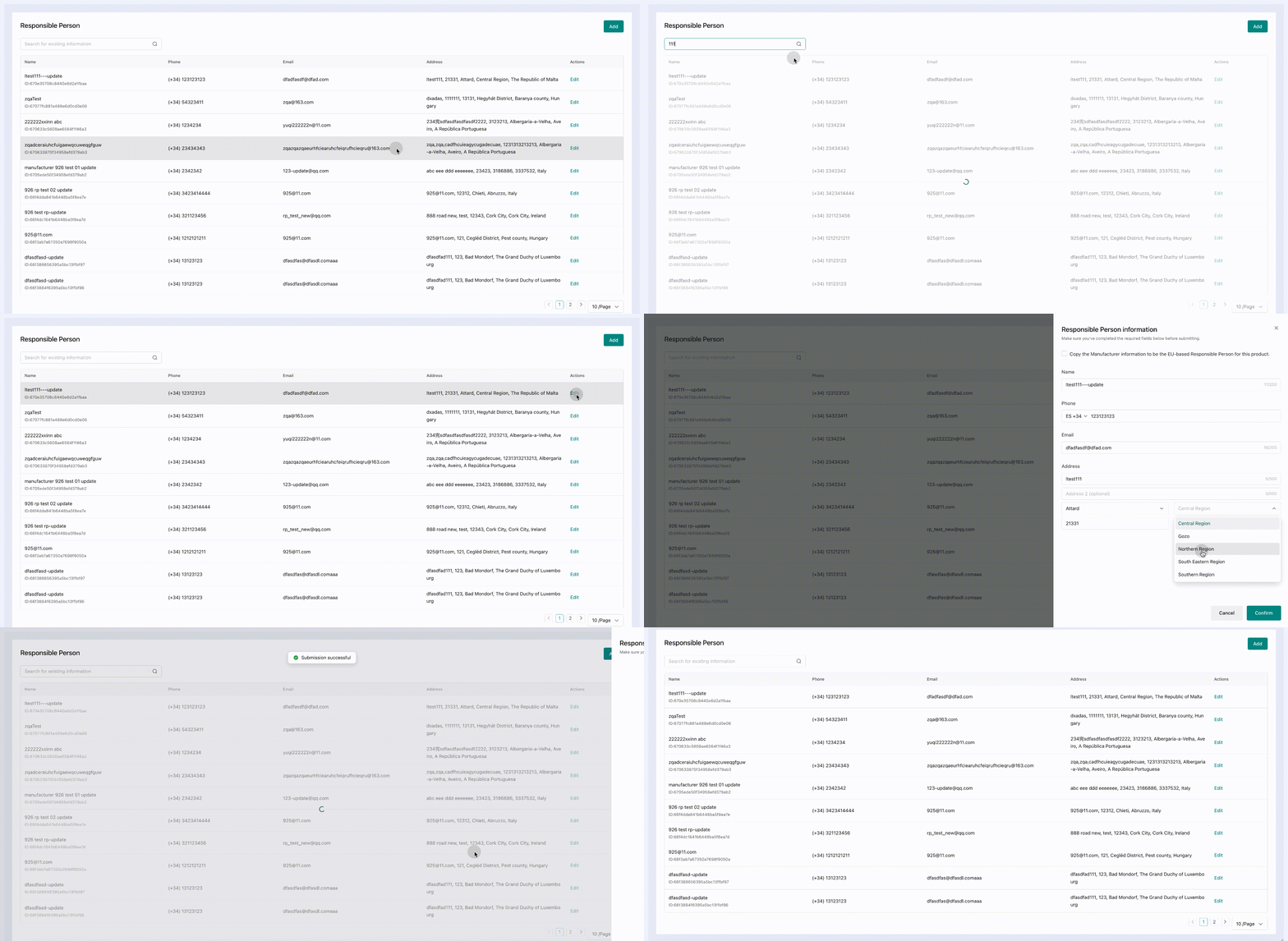
Thông tin Manufacturer
Tóm tắt: Widget này bao gồm khả năng truy vấn tồn kho Manufacturer, thêm Manufacturer, và chỉnh sửa Manufacturer.
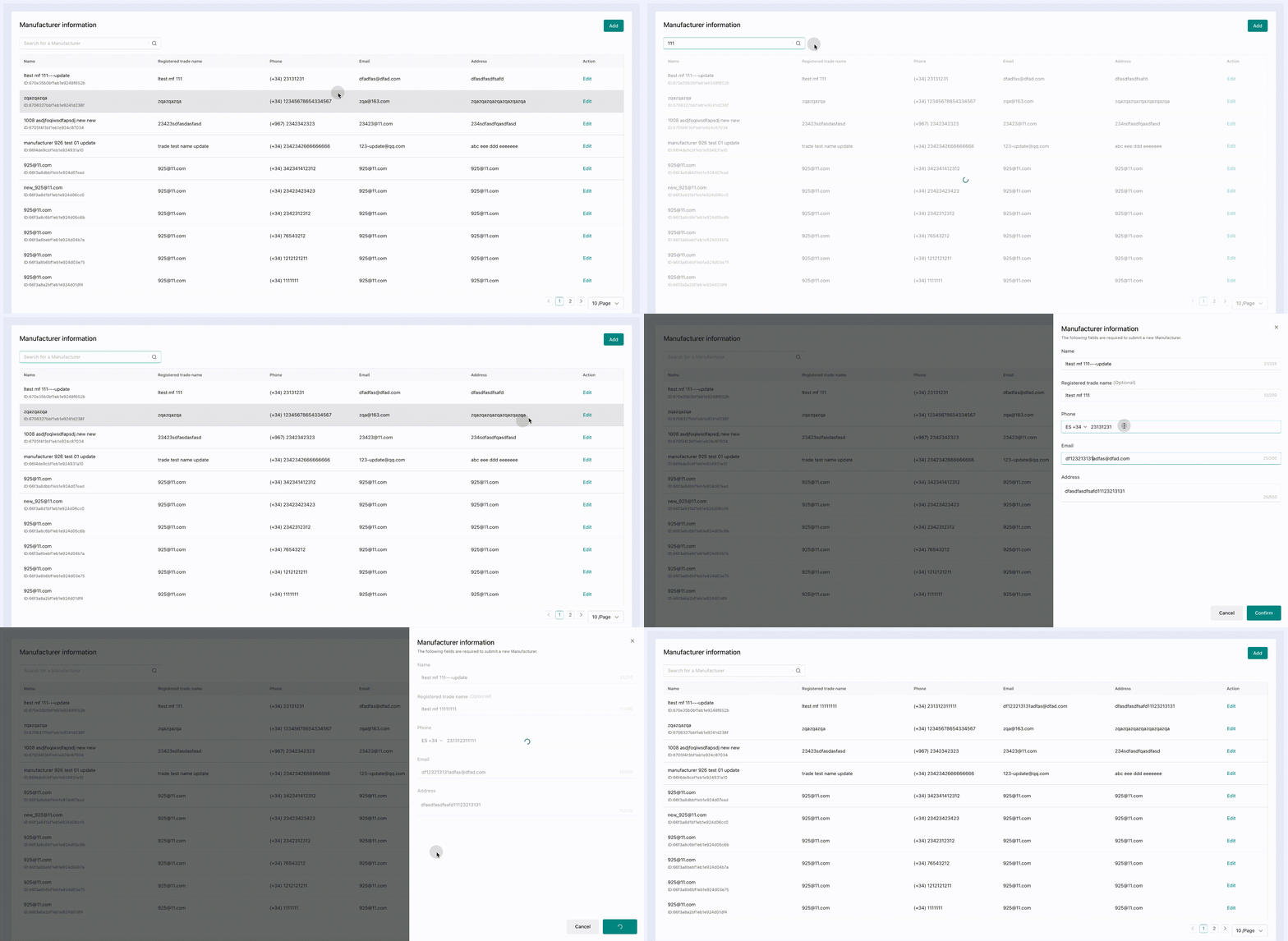
Cách tích hợp
Cấu hình preload trong WidgetConfigProvider preloadWidgetNames, bạn có thể đặt WidgetConfigProvider ở lớp ngoài cùng để preload sớm
Tích hợp với widget thông tin Responsible Person
React framework
TYPESCRIPTWord Wrap
import { WidgetConfigProvider,RemoteWidget } from '@tiktokshop/widget-kit-react';

const getWidgetToken = async () => {
  const res: any = await get('https://xxx/api/v1/widget/access_token', {
    outer_shop_id: 'xxx',
    partner_type: '1',
  });
  if (res?.code === 0) {
    return res?.data;
  }
  return {};
};

const name = "@tiktokshop-widget/qualification:rp";

const initOptions = {
  config: {
    shopId: 'xxx', //seller id, such as 123456
    oecRegion: 'xxx', //country,such as US
    appKey: 'xxx', //The key corresponding to the merchant's creation service
    isvInfo: {
      name: 'xxx', //ISV name,such as OPEN_PLATFORM
    },
  },
  getToken: getWidgetToken, //get auth token
  remotes: [
    {
      name: name, //Integrated business name, provided by the open platform,such as:@tiktokshop-widget/reverse:ManageReturns
    },
  ],
};

export default () => {
  return (
    <WidgetConfigProvider
      config={initOptions.config}
      getToken={initOptions.getToken}
      remotes={initOptions.remotes}
      preloadWidgetNames={[name]}>
      <RemoteWidget
        name={name}
        className={'containerClass'}
      />
    </WidgetConfigProvider>
  );
};
Native js
JSONWord Wrap
import React, { useEffect } from 'react';
import { get } from './utils/fetch';
import { loadWidget, init, WidgetComponent } from '@tiktokshop/widget-kit';

const name = '@tiktokshop-widget/qualification:rp';
let view = null;
export default () => {
  const getWidgetToken = async () => {
    const res: any = await get('https://xxx/api/v1/widget/access_token', {
      outer_shop_id: 'xxx',
      partner_type: '1',
    });
    if (res?.code === 0) {
      return res?.data;
    }
    return {};
  };

  const initWidget = () => {//It is recommended to initialize the widget in the outer layer and execute the preloadWidget([name]) method to preload resources.
    init({
      config: {
        shopId: 'xxx',
        oecRegion: 'US',
        appKey: 'xxx',
        isvInfo: {
          name: 'OPEN_PLATFORM',
        },
      },
      remotes: [
        {
          name,
        },
      ],
      getToken: getWidgetToken,
    });
  };
  useEffect(() => {
    initWidget();
    loadWidget(name).then((component: WidgetComponent) => {
      view = component.create(
        document.getElementById('widget-preview-container')!,
      );
      view?.render({});
    });
    return () => {
      view?.unmount();
    };
  }, []);
  return (
    <div
      className="widget-preview-container"
      id="widget-preview-container"></div>
  );
};
Tích hợp với widget thông tin Manufacturer
React framework
TYPESCRIPTWord Wrap
import { WidgetConfigProvider,RemoteWidget } from '@tiktokshop/widget-kit-react';

const getWidgetToken = async () => {
  const res: any = await get('https://xxx/api/v1/widget/access_token', {
    outer_shop_id: 'xxx',
    partner_type: '1',
  });
  if (res?.code === 0) {
    return res?.data;
  }
  return {};
};

const name = "@tiktokshop-widget/qualification:mf";

const initOptions = {
  config: {
    shopId: 'xxx', //seller id, such as 123456
    oecRegion: 'xxx', //country,such as US
    appKey: 'xxx', //The key corresponding to the merchant's creation service
    isvInfo: {
      name: 'xxx', //ISV name,such as OPEN_PLATFORM
    },
  },
  getToken: getWidgetToken, //get auth token
  remotes: [
    {
      name: name, //Integrated business name, provided by the open platform,such as:@tiktokshop-widget/reverse:ManageReturns
    },
  ],
};

export default () => {
  return (
    <WidgetConfigProvider
      config={initOptions.config}
      getToken={initOptions.getToken}
      remotes={initOptions.remotes}
      preloadWidgetNames={[name]}>
      <RemoteWidget
        name={name}
        className={'containerClass'}
      />
    </WidgetConfigProvider>
  );
};
Native js
JSONWord Wrap
import React, { useEffect } from 'react';
import { get } from './utils/fetch';
import { loadWidget, init, WidgetComponent } from '@tiktokshop/widget-kit';

const name = '@tiktokshop-widget/qualification:mf';
let view = null;
export default () => {
  const getWidgetToken = async () => {
    const res: any = await get('https://xxx/api/v1/widget/access_token', {
      outer_shop_id: 'xxx',
      partner_type: '1',
    });
    if (res?.code === 0) {
      return res?.data;
    }
    return {};
  };

  const initWidget = () => {//It is recommended to initialize the widget in the outer layer and execute the preloadWidget([name]) method to preload resources.
    init({
      config: {
        shopId: 'xxx',
        oecRegion: 'US',
        appKey: 'xxx',
        isvInfo: {
          name: 'OPEN_PLATFORM',
        },
      },
      remotes: [
        {
          name,
        },
      ],
      getToken: getWidgetToken,
    });
  };
  useEffect(() => {
    initWidget();
    loadWidget(name).then((component: WidgetComponent) => {
      view = component.create(
        document.getElementById('widget-preview-container')!,
      );
      view?.render({});
    });
    return () => {
      view?.unmount();
    };
  }, []);
  return (
    <div
      className="widget-preview-container"
      id="widget-preview-container"></div>
  );
};
Nhật ký thay đổi
| Release date | Update |
|---|---|
| 2024/10/16 | RP widget: phát hành phiên bản đầu tiên, bao gồm khả năng truy vấn tồn kho RP, thêm RP, và chỉnh sửa RP.Manufacturer: phát hành phiên bản đầu tiên, truy vấn tồn kho Manufacturer, thêm Manufacturer, chỉnh sửa Manufacturer. |