Responsible Person and Manufacturer Widget
Background
In the EU market, when listing products, sellers are required to provide compliance information and upload the relevant product compliance certifications, which include:
Manufacturer Information: the manufacturer of the product
Refers to the details about the production process, location, and entities responsible for product manufacturing. All products must contain labels with the manufacturer's contact details and, if relevant, the importer's information. This information must be visible on physical products and in the product's online listings.
Responsible Person (RP): the responsible person who ensures a seller's products comply with EU regulations.
For any non-food products, it is essential to have a Responsible Person based within the EU. This person is a point of contact for customers and can communicate with regulatory bodies on behalf of the business about product safety matters. Products should be labeled with this person's contact information in a language that can be easily understood by consumers, as determined by the Member State in which the product is made available on the market.
Widget Introduction
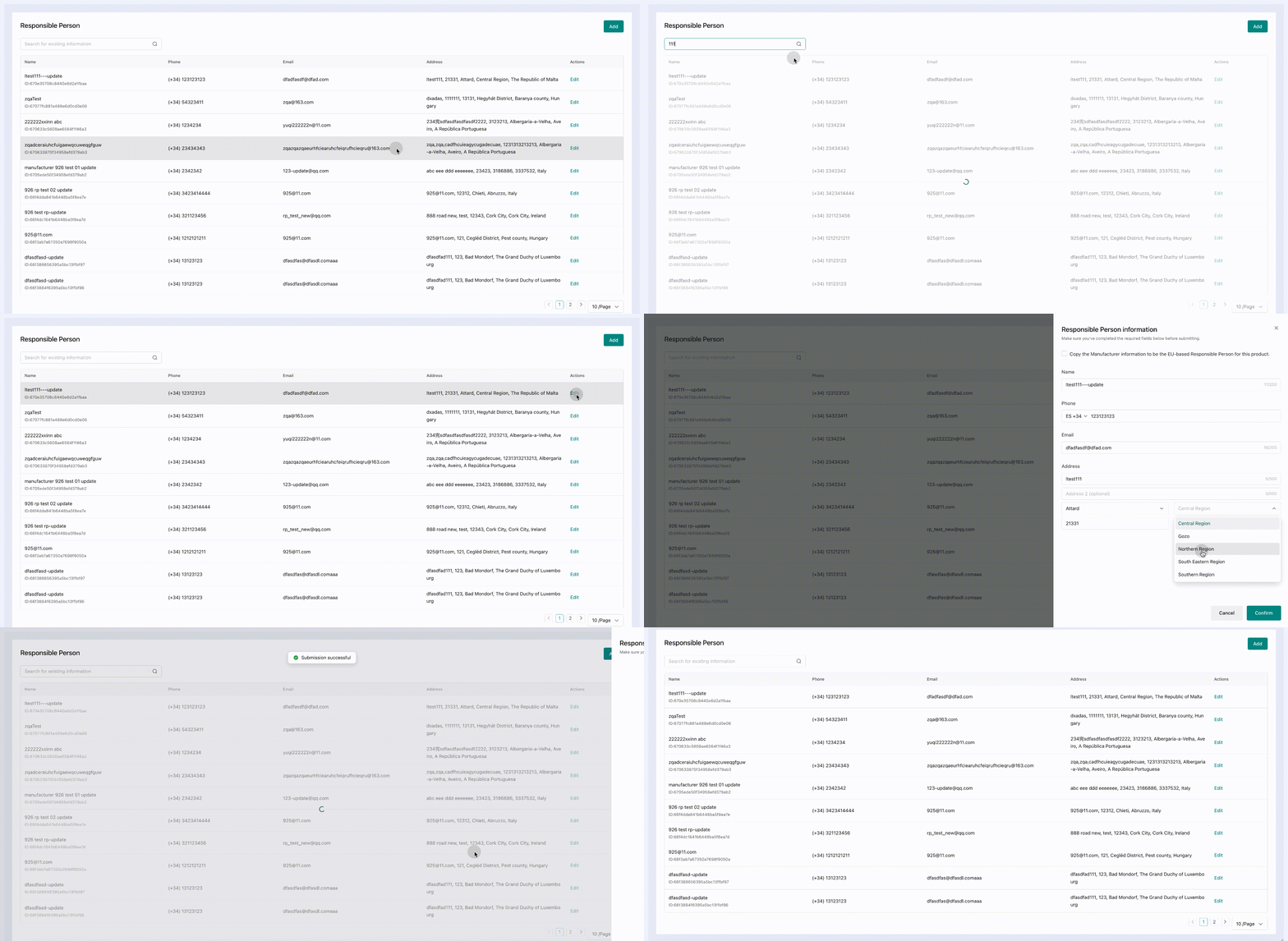
Responsible Person information
Summary: This widget includes the capability of RP stock query, RP addition, and RP editing.
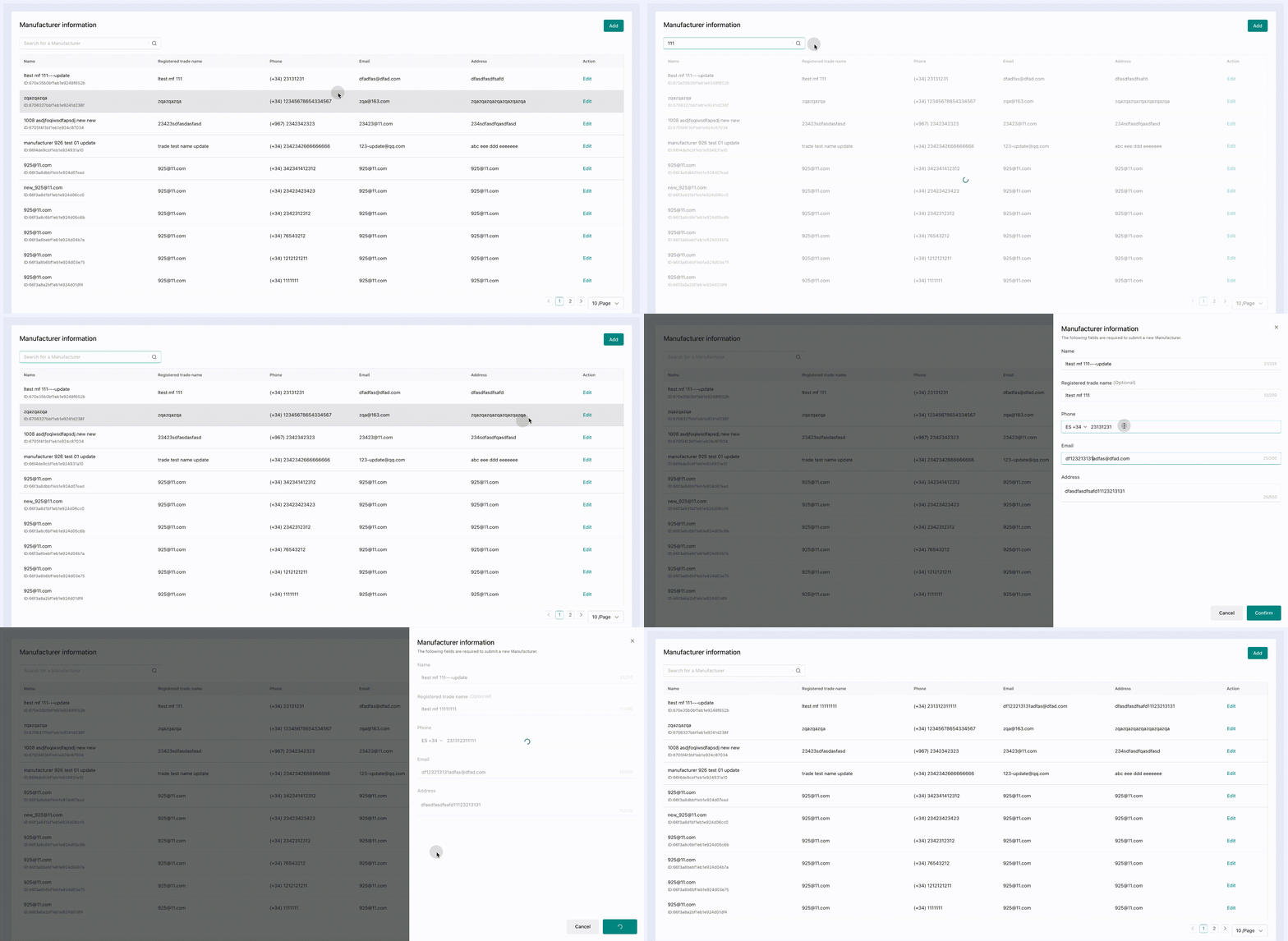
Manufacturer information
Summary: This widget includes the capability of Manufacturer stock query, Manufacturer addition, and Manufacturer editing.
How to integrate
Configure preload in WidgetConfigProvider preloadWidgetNames, you can put WidgetConfigProvider to the outermost preload time
Integrate with the Responsible Person information widget
React framework
TYPESCRIPTWord Wrap
import { WidgetConfigProvider,RemoteWidget } from '@tiktokshop/widget-kit-react';

const getWidgetToken = async () => {
  const res: any = await get('https://xxx/api/v1/widget/access_token', {
    outer_shop_id: 'xxx',
    partner_type: '1',
  });
  if (res?.code === 0) {
    return res?.data;
  }
  return {};
};

const name = "@tiktokshop-widget/qualification:rp";

const initOptions = {
  config: {
    shopId: 'xxx', //seller id, such as 123456
    oecRegion: 'xxx', //country,such as US
    appKey: 'xxx', //The key corresponding to the merchant's creation service
    isvInfo: {
      name: 'xxx', //ISV name,such as OPEN_PLATFORM
    },
  },
  getToken: getWidgetToken, //get auth token
  remotes: [
    {
      name: name, //Integrated business name, provided by the open platform,such as:@tiktokshop-widget/reverse:ManageReturns
    },
  ],
};

export default () => {
  return (
    <WidgetConfigProvider
      config={initOptions.config}
      getToken={initOptions.getToken}
      remotes={initOptions.remotes}
      preloadWidgetNames={[name]}>
      <RemoteWidget
        name={name}
        className={'containerClass'}
      />
    </WidgetConfigProvider>
  );
};
Native js
JSONWord Wrap
import React, { useEffect } from 'react';
import { get } from './utils/fetch';
import { loadWidget, init, WidgetComponent } from '@tiktokshop/widget-kit';

const name = '@tiktokshop-widget/qualification:rp';
let view = null;
export default () => {
  const getWidgetToken = async () => {
    const res: any = await get('https://xxx/api/v1/widget/access_token', {
      outer_shop_id: 'xxx',
      partner_type: '1',
    });
    if (res?.code === 0) {
      return res?.data;
    }
    return {};
  };

  const initWidget = () => {//It is recommended to initialize the widget in the outer layer and execute the preloadWidget([name]) method to preload resources.
    init({
      config: {
        shopId: 'xxx',
        oecRegion: 'US',
        appKey: 'xxx',
        isvInfo: {
          name: 'OPEN_PLATFORM',
        },
      },
      remotes: [
        {
          name,
        },
      ],
      getToken: getWidgetToken,
    });
  };
  useEffect(() => {
    initWidget();
    loadWidget(name).then((component: WidgetComponent) => {
      view = component.create(
        document.getElementById('widget-preview-container')!,
      );
      view?.render({});
    });
    return () => {
      view?.unmount();
    };
  }, []);
  return (
    <div
      className="widget-preview-container"
      id="widget-preview-container"></div>
  );
};
Integrate with the Manufacturer information widget
React framework
TYPESCRIPTWord Wrap
import { WidgetConfigProvider,RemoteWidget } from '@tiktokshop/widget-kit-react';

const getWidgetToken = async () => {
  const res: any = await get('https://xxx/api/v1/widget/access_token', {
    outer_shop_id: 'xxx',
    partner_type: '1',
  });
  if (res?.code === 0) {
    return res?.data;
  }
  return {};
};

const name = "@tiktokshop-widget/qualification:mf";

const initOptions = {
  config: {
    shopId: 'xxx', //seller id, such as 123456
    oecRegion: 'xxx', //country,such as US
    appKey: 'xxx', //The key corresponding to the merchant's creation service
    isvInfo: {
      name: 'xxx', //ISV name,such as OPEN_PLATFORM
    },
  },
  getToken: getWidgetToken, //get auth token
  remotes: [
    {
      name: name, //Integrated business name, provided by the open platform,such as:@tiktokshop-widget/reverse:ManageReturns
    },
  ],
};

export default () => {
  return (
    <WidgetConfigProvider
      config={initOptions.config}
      getToken={initOptions.getToken}
      remotes={initOptions.remotes}
      preloadWidgetNames={[name]}>
      <RemoteWidget
        name={name}
        className={'containerClass'}
      />
    </WidgetConfigProvider>
  );
};
Native js
JSONWord Wrap
import React, { useEffect } from 'react';
import { get } from './utils/fetch';
import { loadWidget, init, WidgetComponent } from '@tiktokshop/widget-kit';

const name = '@tiktokshop-widget/qualification:mf';
let view = null;
export default () => {
  const getWidgetToken = async () => {
    const res: any = await get('https://xxx/api/v1/widget/access_token', {
      outer_shop_id: 'xxx',
      partner_type: '1',
    });
    if (res?.code === 0) {
      return res?.data;
    }
    return {};
  };

  const initWidget = () => {//It is recommended to initialize the widget in the outer layer and execute the preloadWidget([name]) method to preload resources.
    init({
      config: {
        shopId: 'xxx',
        oecRegion: 'US',
        appKey: 'xxx',
        isvInfo: {
          name: 'OPEN_PLATFORM',
        },
      },
      remotes: [
        {
          name,
        },
      ],
      getToken: getWidgetToken,
    });
  };
  useEffect(() => {
    initWidget();
    loadWidget(name).then((component: WidgetComponent) => {
      view = component.create(
        document.getElementById('widget-preview-container')!,
      );
      view?.render({});
    });
    return () => {
      view?.unmount();
    };
  }, []);
  return (
    <div
      className="widget-preview-container"
      id="widget-preview-container"></div>
  );
};
Change log
| Release date | Update |
|---|---|
| 2024/10/16 | RP widget: first version launched, includes the capability of RP stock query, RP addition, and RP editing.Manufacturer: first version launched, Manufacturer stock query, Manufacturer addition, Manufacturer editing. |