Requesting Access to Sensitive Data
Last Updated: 2025-12-28
Language Supported:
English /
简体中文 /
ไทย
Shopee Open Platform safeguards sellers’ business data and users’ personal data considered sensitive (including customer name, phone number, email address, and address).
By default, sensitive data is masked. Developers must complete specific security requirements to request access to unmasked sensitive data.
Eligibility Requirements
To request access to sensitive business data, developers must meet the following conditions:
- Submit Penetration Test Report
- Required for Third-party Partner Platform (ISV) Developers who are serving, or planning to serve, Thailand sellers only.
- A valid penetration test report must be submitted through the Open Platform Console
- Whitelist IP Address(es)
- Required for all developers
- The IP addresses of the servers hosting your application must be declared and whitelisted.
⚠️ Note: For Third-party Partner Platform (ISV) Developers, approved sensitive data access is valid for two (2) years from the penetration test report’s issue date.
How to Submit a Penetration Test Report
Follow the steps below to upload your penetration test report:
- Step 1: Log in to your Open Platform console using your developer account
Note: Member accounts do not have permission to upload reports.
- Step 2: Navigate to Personal Center → Account Information (Chinese Mainland ISVs: Link, Other Region ISVs: Link)
- Step 3: Under Security Reports & Certifications Information, click "Add"
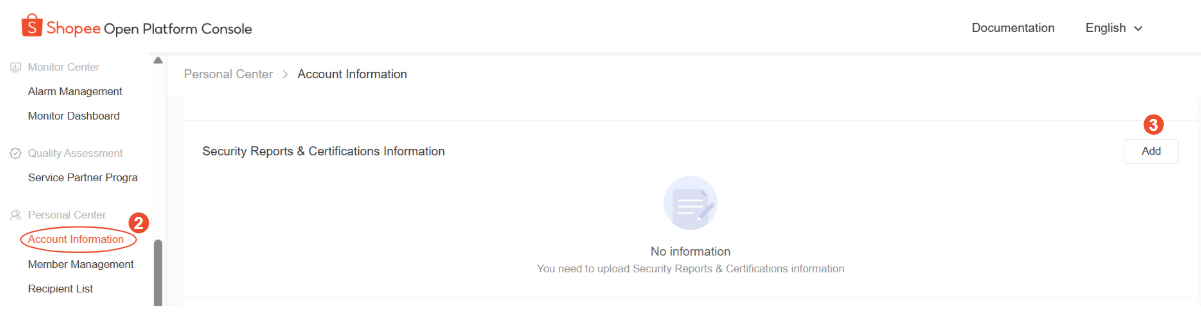
- Step 4: Under Security Report & Certification Type, Choose “Penetration Test Report”
- Step 5: Upload your latest penetration test report
- Step 6: Click “Save”
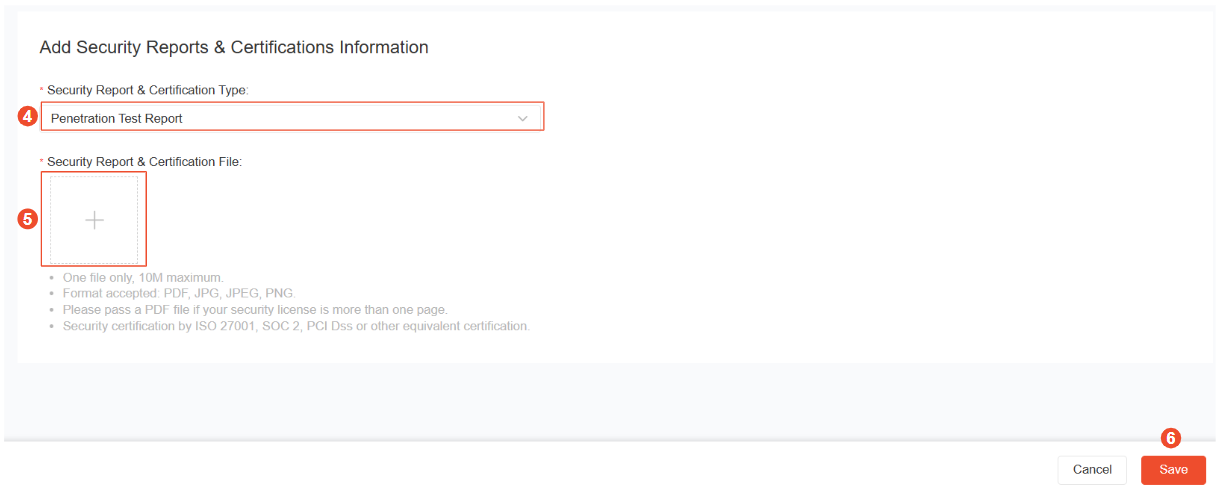
Review Timeline
- The submission status (Approved / Rejected) will be updated in the Account Information section.
- Review results are typically available within 10 working days.
📌 Please refer to the bottom of this page for best practices and guidelines on penetration test report submissions.
How to Enable IP Address Whitelisting
To enable IP address whitelisting for your application:
- Step 1: Log in to your Open Platform console and go to App List
- Step 2: Select the app that requires sensitive data access
- Step 3: Click Go Live and fill up the required information
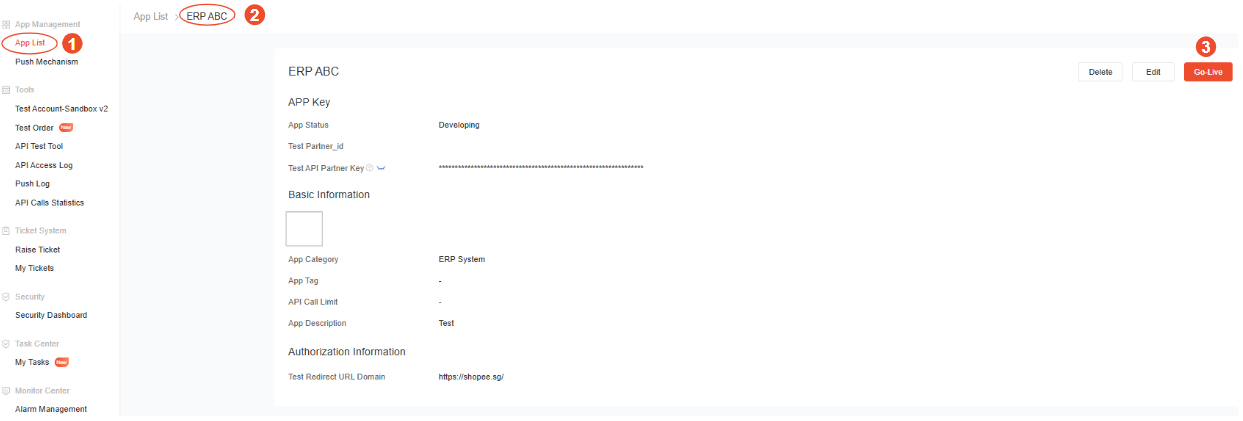
- Step 4: Under “IP Address Whitelist”, enter the IP address(es) of the server(s) hosting your application
- Step 5: Toggle Enable IP Address Whitelist to ON
- Step 6: Click Submit
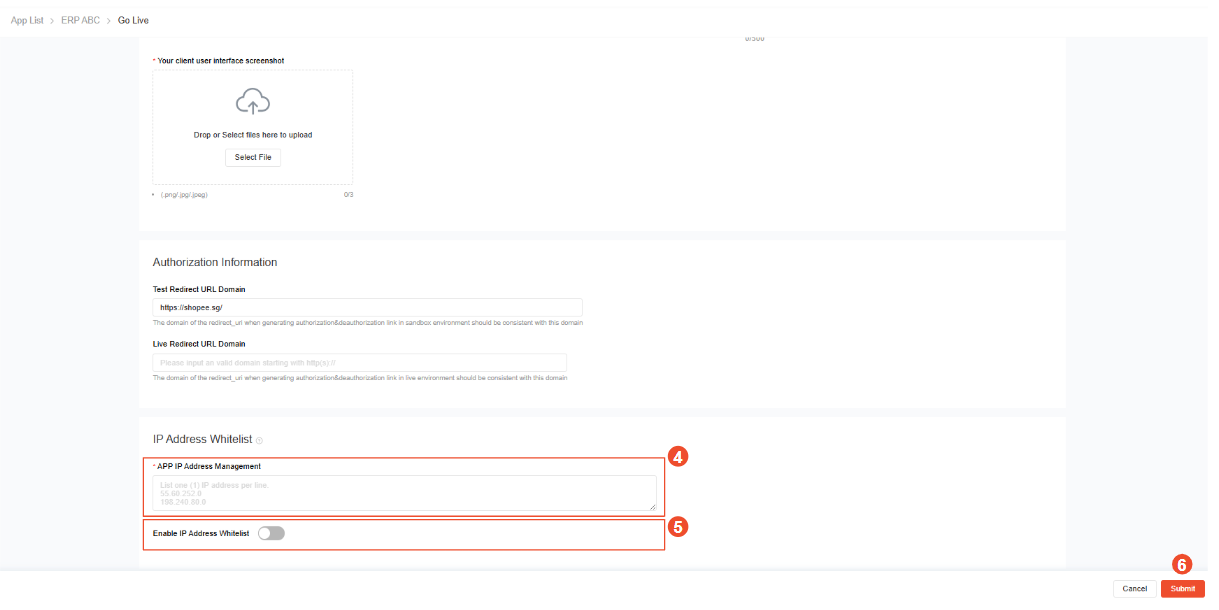
⚠️ Important: Once IP Address Whitelisting is enabled, API calls can only be made from applications hosted on the declared IP address(es).
Good Practices for Penetration Test Report Submission
- Recommended Testing Providers
To improve report quality and review efficiency, ISVs are encouraged to engage reputable, accredited penetration testers.
-
For all ISVs: Use CREST-accredited penetration testers.
-
For ISVs based in China (CN): We recommend testers accredited by:
-
奇安信:Qianxin
-
360:360
-
深信服:Sangfor
-
长亭科技:Chaitin
-
Reports from other penetration testers will still be reviewed and considered for approval on a case-by-case basis.
- Report Quality Requirements
A complete Penetration Test Report should:
- Reflect the application’s external exposure
- Assess vulnerabilities in all relevant systems or applications
- Include a complete list of findings
- Confirm that no critical or high-risk issues remain unresolved
- Recommended Report Issuance Date
- ISVs are encouraged to submit a penetration test report issued within the last one (1) year.
- Sensitive data access will be granted for two (2) years from the report issue date.