Authorization and Authentication
Last Updated: 2025-10-17
Language Supported:
English /
简体中文 /
繁體中文 /
Português (Brasil) /
ไทย
Authorization is an important step to using Open API. You need to be authorized by the seller in order for your App to call non-public APIs required for shop management.
You will be authenticated based on the public parameters passed to Open API. If the authentication fails, your call will fail and an error will be returned.
| ⚠️ Note - Authorization Validity Each authorization can be set for a period of up to 365 days. Once the authorization expires, you will need to contact the seller to re-authorize your App.Note: The validity period is optional, but cannot exceed 365 days. - SIP Shops Authorization When a SIP Primary shop grants authorization to an App, all its SIP Affiliate shops will automatically be granted authorization as well.Please note that SIP Affiliate shops have limited API calling permissions compared to the Primary shop. |
The authorization process
There are 4 steps to complete authorization: Generating the authorization link, acquiring authorizations from shop(s), using the authorization code, and getting and refreshing the access_token.
These will be explained in detail below, along with information on what to prepare before authorization, details of the authorization process, and how to use the information returned after authorization to pass the authentication of the platform.
Generating the authorization link
For Seller in House System App, you can log in Open Platform> App list> click Authorize> fill in Redirect URL to generate an authorization link.
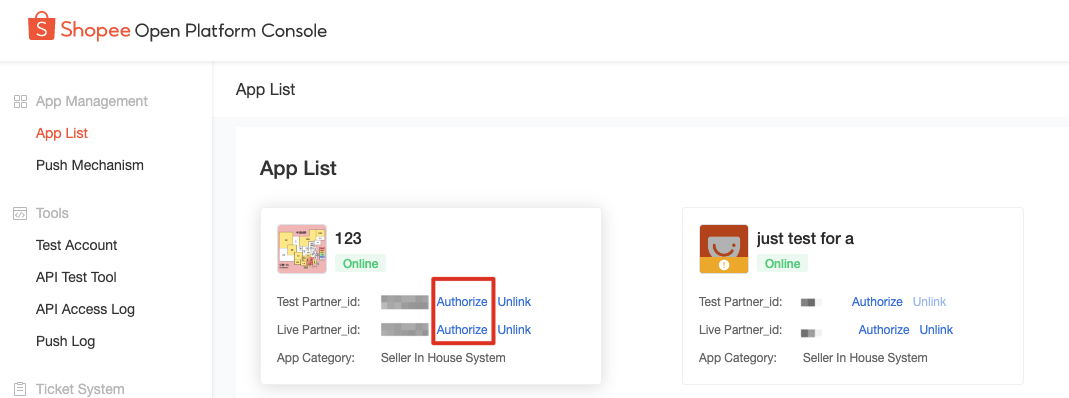
For all type of App, you need to create an authorization link with the following specifications. The authorization link comprises a fixed authorization URL and other required parameters.
Fixed authorization URL:
Production Environment:
https://partner.shopeemobile.com/api/v2/shop/auth\_partner
(Chinese Mainland)https://openplatform.shopee.cn/api/v2/shop/auth\_partner
Sandbox test environment:
https://openplatform.sandbox.test-stable.shopee.sg/api/v2/shop/auth\_partner
(Chinese Mainland) https://openplatform.sandbox.test-stable.shopee.cn/api/v2/shop/auth\_partner
Other required parameters:
| Parameter name | Type | Description |
|---|---|---|
| sign | string | The signature obtained by sign base string (order: partner_id, api path, timestamp...) HMAC-SHA256 hashing with the partner_key. |
| partner_id | int | partner_id obtained from the App. |
| timestamp | int | This needs to be the same as the timestamp used in the sign base string. The timestamp is only valid for 5 minutes. |
| redirect | string | The URL to which the webpage redirects to after authorization is completed. This can be any URL, such as your company's official website. |
Calculating the sign parameter
The sign parameter is not only a component of the authorization link, but also a parameter used for authentication each time it is called. This section will explain how to create a sign base string and calculate the authentication signature through HMAC-SHA256.
Creating a sign base string
There are 3 types of APIs that require the use of different parameters to create the sign base string. (consistent with its common parameters).
Concatenate the API path (without host) and the common parameters below into a single sign base string in the following order:
- For Shop APIs: partner_id, api path, timestamp, access_token, shop_id
- For Merchant APIs: partner_id, api path, timestamp, access_token, merchant_id
- For Public APIs: partner_id, api path, timestamp
Calculating the authentication signature
Use HMAC-SHA256 to hash the sign base string, and use the partner key as the encryption key. The hexadecimal all-lowercase hash value is the authentication signature.
Python Code Demo:
Python
import hmac
import json
import time
import requests
import hashlib
def shop_auth():
timest = int(time.time())
host = "https://partner.shopeemobile.com"
path = "/api/v2/shop/auth_partner"
redirect_url = "https://www.baidu.com/"
partner_id = 80001
tmp = "test...."
partner_key = tmp.encode()
tmp_base_string = "%s%s%s" % (partner_id, path, timest)
base_string = tmp_base_string.encode()
sign = hmac.new(partner_key, base_string, hashlib.sha256).hexdigest()
##generate api
url = host + path + "?partner_id=%s×tamp=%s&sign=%s&redirect=%s" % (partner_id, timest, sign, redirect_url)
print(url)
Go Code Demo:
Go
func auth_shop(){
timest := strconv.FormatInt(time.Now().Unix(),10)
host := "https://openplatform.sandbox.test-stable.shopee.sg"
path := "/api/v2/shop/auth_partner"
redirectUrl := "https://www.baidu.com/"
partnerId := strconv.Itoa(2006566)
partnerKey := "1391fd986fe8ec7569bebed75b0c33ee35eb5a305bed7038657a5cd5f75b1c88"
baseString := fmt.Sprintf("%s%s%s", partnerId,path,timest)
h := hmac.New(sha256.New,[]byte(partnerKey))
h.Write([]byte(baseString))
sign := hex.EncodeToString(h.Sum(nil))
url := fmt.Sprintf(host+path+"?partner_id=%s×tamp=%s&sign=%s&redirect=%s", partnerId,timest,sign, redirectUrl)
fmt.Println(url)
}
Java Code Demo:
Java
//generate auth url
public static void shop_auth(){
long timest = System.currentTimeMillis() / 1000L;
String host = "https://partner.shopeemobile.com";
String path = "/api/v2/shop/auth_partner";
String redirect_url = "https://www.baidu.com/";
long partner_id = 123456L;
String tmp_partner_key = "...";
String tmp_base_string = String.format("%s%s%s", partner_id, path, timest);
byte[] partner_key;
byte[] base_string;
String sign = "";
try {
base_string = tmp_base_string.getBytes("UTF-8");
partner_key = tmp_partner_key.getBytes("UTF-8");
Mac mac = Mac.getInstance("HmacSHA256");
SecretKeySpec secret_key = new SecretKeySpec(partner_key, "HmacSHA256");
mac.init(secret_key);
sign = String.format("%064x",new BigInteger(1,mac.doFinal(base_string)));
} catch (Exception e) {
e.printStackTrace();
}
String url = host + path + String.format("?partner_id=%s×tamp=%s&sign=%s&redirect=%s", partner_id,timest, sign, redirect_url);
System.out.println(url);
}
PHP Code Demo:
PHP
<?php
function authShop($partnerId, $partnerKey) {
global $host;
$path = "/api/v2/shop/auth_partner";
$redirectUrl = "https://www.baidu.com/";
$timest = time();
$baseString = sprintf("%s%s%s", $partnerId, $path, $timest);
$sign = hash_hmac('sha256', $baseString, $partnerKey);
$url = sprintf("%s%s?partner_id=%s×tamp=%s&sign=%s&redirect=%s", $host, $path, $partnerId, $timest, $sign, $redirectUrl);
return $url;
}
$host="https://openplatform.sandbox.test-stable.shopee.sg";
$partnerId = 847892;
$partnerKey = "57615053704d6470644f554a78656d50484143644964436a5568777544524579";
echo authShop($partnerId, $partnerKey);
?>
Examples of authorization links
Here are examples of authorization links in the production and sandbox test environments for your reference.
Production Environment:
(Chinese Mainland)
Sandbox test environment:
(Chinese Mainland)
| ⚠️ NoteThe timestamp used to calculate the sign is only valid for 5 minutes. After the timestamp and the sign expire, the authorization link will no longer be valid, and you need to generate a new link. |
Acquiring authorizations from shop(s)
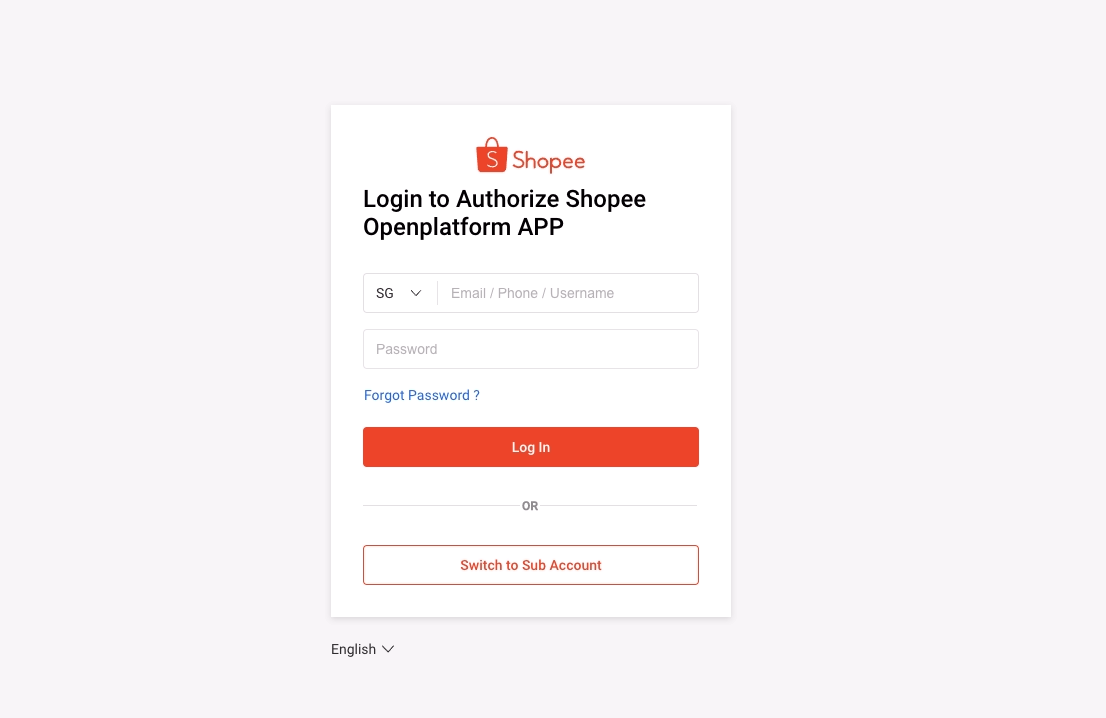
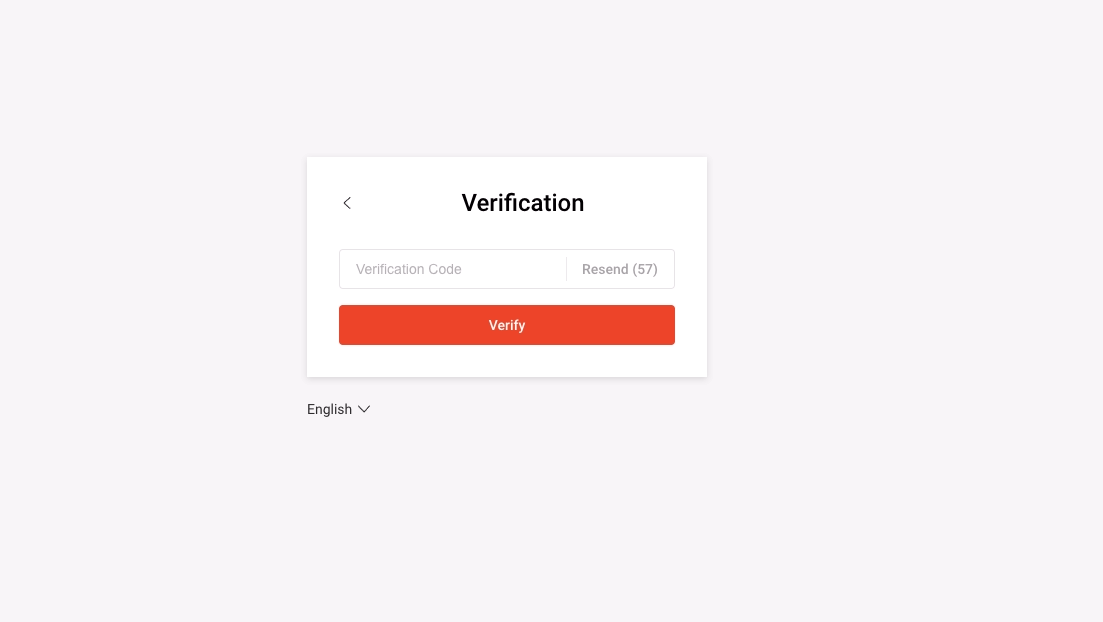
After you share the authorization link with the seller, the seller needs to log in to their account, fill in the verification code sent to their mobile phone, and enter the authorization page.
The seller can use a shop account to authorize a single shop or a main account to authorize multiple merchants/shops. Sub-accounts cannot be used to log in to the authorization page.
| ⚠️ NoteSeller In-house System App types can only be authorized to access data from the seller’s own shop. You must also log in to the developer account too. |
Authorizing from a shop account
- The seller fills in their login details and selects Log In.
- The seller fills in the verification code sent to their mobile phone and selects Verify.
- Upon logging in, the seller selects Confirm Authorization.
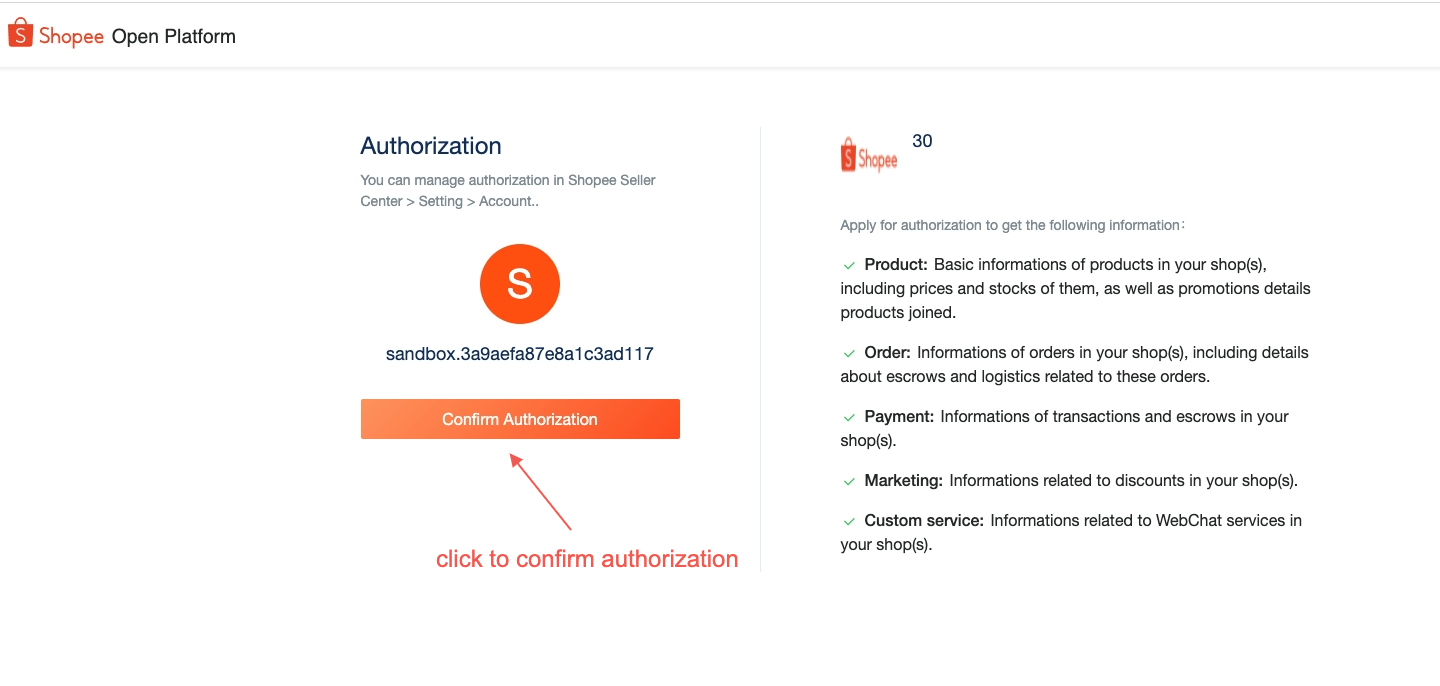
- After authorization, the front-end page will redirect to the redirect URL in your authorization link:
https://open.shopee.com/?code=xxxxxxxxxx&shop_id=xxxxxx
Authorizing from a main account
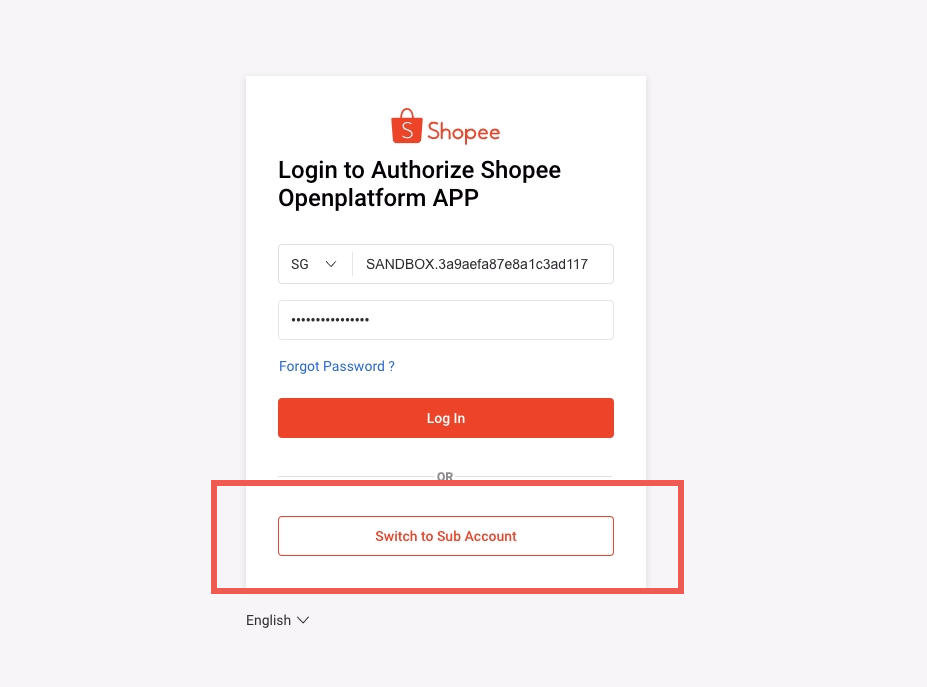
- To log in to a main account, the seller selects Switch to Sub Account on the login page.
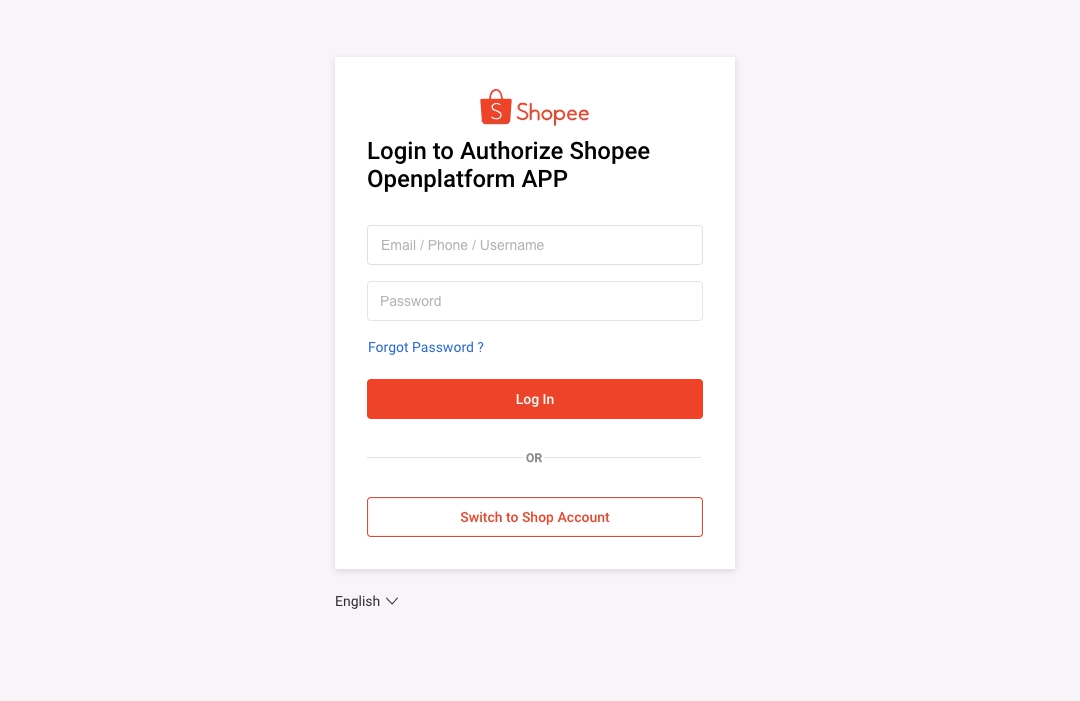
- The seller can then fill in their login details and select Log In.
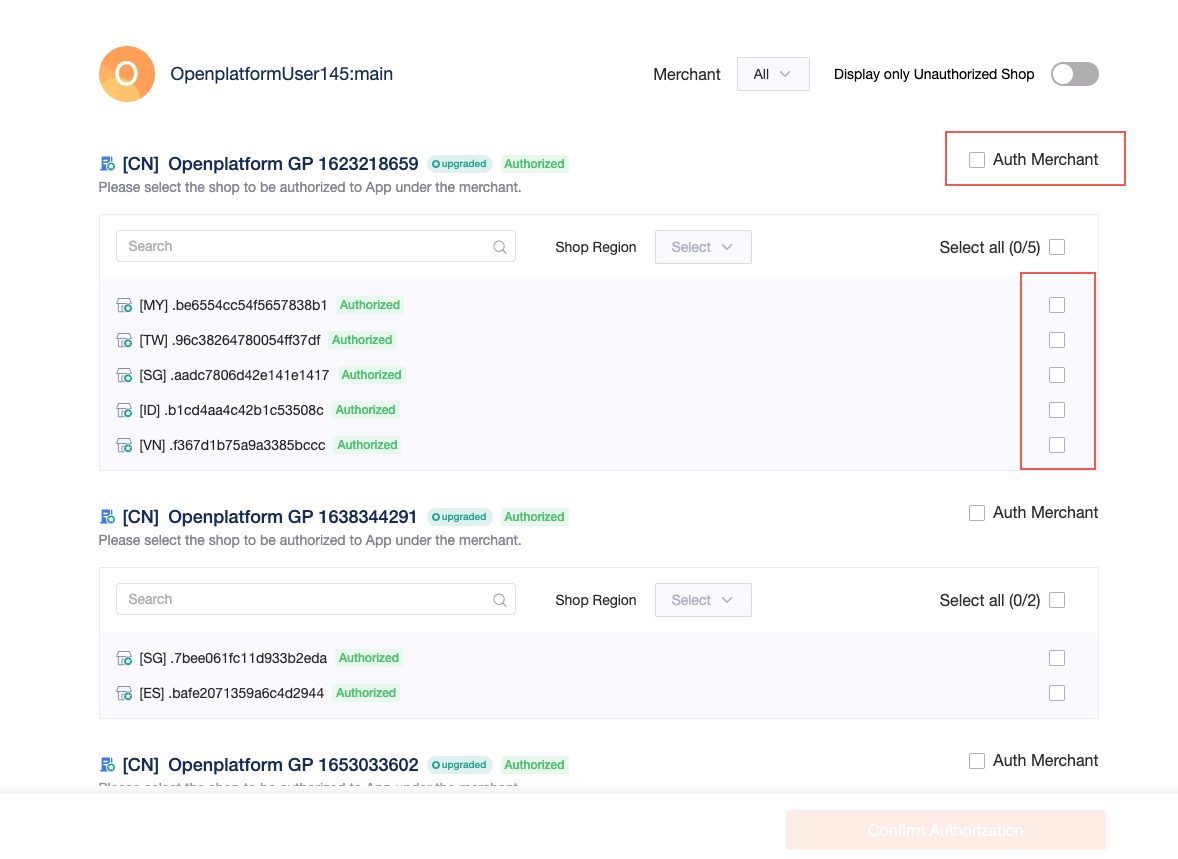
- The seller selects the shops that need to be authorized.
Note: For cross border sellers, If you need to call the merchant’s API, please remind the seller to select the Auth Merchant checkbox.
Local main account authorization:
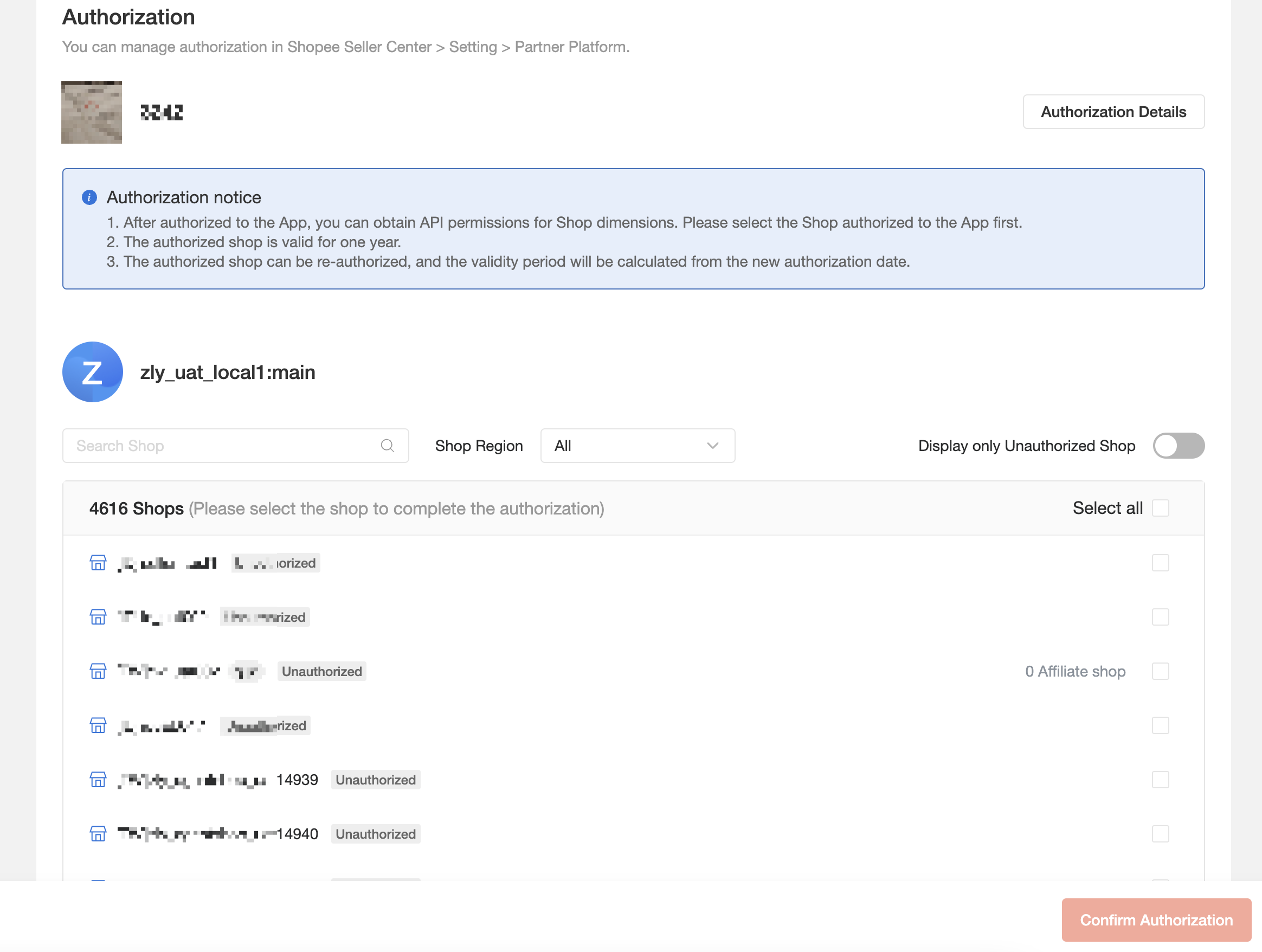
- The seller selects Confirm Authorization to confirm their selection.
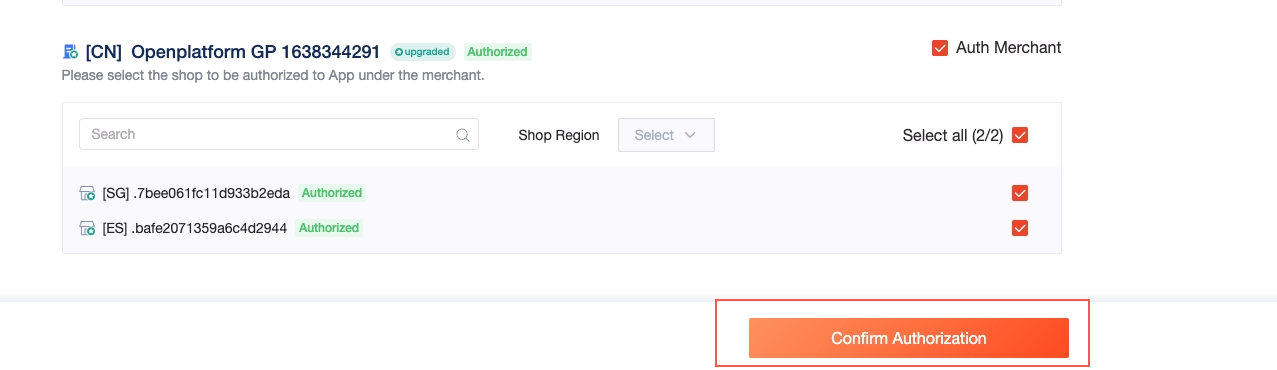
- After authorization, the front-end page will redirect to the redirect URL in your authorization link:
https://open.shopee.com/?code=xxxxxx&main_account_id=xxxxxx
Using the authorization code
After the seller has granted authorization, Open Platform will return the authorization code to the callback address redirect URL. You can then use the code to get access_token for the first time.
If authorization was done on a shop account, a code and shop_id will be returned in the redirect URL.
If authorization was done on a main account, a code and main_account_id will be returned in the redirect URL.
| Parameter name | Type | Description |
|---|---|---|
| code | string | Returned when the call is successful. This code is used to obtain access_token and refresh_token. It is valid for only once and expires after 10 minutes. |
| shop_id | int | The ID of the shop that just granted authorization to your App. Returned after authorization was done on a shop account. |
| main_account_id | int | The ID of the main account that just granted authorization to your shop. . Returned after authorization was done on a main account. |
Getting and refreshing the access_token
The access_token is a dynamic token, and you need to pass access_token to call non-public APIs. Each access_token is valid for 4 hours and can be used multiple times within 4 hours. However, you need to refresh the access token by calling RefreshAccessToken before it expires in order to obtain a new access_token.
Refresh_token is a parameter used to refresh access_token. Each refresh_token is valid for 30 days.
⚠️ Note
The access_token and refresh_token of each shop_id and merchant_id need to be saved separately.
GetAccesstoken
After successful authorization, use the code and shop_id or main_account_id in the redirect URL to call this API. This helps you obtain the shop_id, merchant_id, access_token and refresh_token.
Path:
Production environment:https://partner.shopeemobile.com/api/v2/auth/token/get
(Chinese Mainland):https://openplatform.shopee.cn/api/v2/auth/token/get
Sandbox environment: https://openplatform.sandbox.test-stable.shopee.sg/api/v2/auth/token/get
(Chinese Mainland):https://openplatform.sandbox.test-stable.shopee.cn/api/v2/auth/token/get
Request method: POST
Common parameters:
| Parameter name | Type | Required | Description |
|---|---|---|---|
| sign | string | True | The signature obtained by sign base string (order: partner_id, api path, timestamp...) HMAC-SHA256 hashing with the partner_key. |
| partner_id | int | True | The partner_id obtained from the App. This partner_id is put into the query. |
| timestamp | int | True | Timestamp, valid for 5 minutes. |
Request parameters:
| Parameter name | Type | Required | Description |
|---|---|---|---|
| code | string | True | The code in the redirect URL after authorization. It is only valid once and expires after 10 minutes. |
| partner_id | int | True | The partner_id obtained from the App. This partner_id is put into the request body. |
| shop_id | int | True, input 1 only. | For the shop_id authorized to you, either the shop_id or main_account_id can be selected as the input parameter. |
| main_account_id | int | For the main_account_id authorized to you, either the shop_id or main_account_id can be selected as the input parameter. |
Response parameters:
| Parameter name | Type | Description |
|---|---|---|
| request_id | string | ID of API requests; always returned. Used to diagnose problems. |
| error | string | Error codes for API requests; always returned. When the API call is successful, the error code returned is empty. |
| refresh_token | string | Returned when the API call is successful. Use refresh_token to get a new access_token. Valid for each shop_id and merchant_id respectively, for 30 days. |
| access_token | string | Returned when the API call is successful. A dynamic token that can be used multiple times and expires after 4 hours. |
| expire_in | int | Returned when the API call is successful. The validity period of the access_token, in seconds. |
| message | string | Always returned. Provides detailed error information. |
| merchant_id_list | int[ ] | Returned when there is main_account_id in the input parameter, including all the merchant_ids authorized this time under the main account. |
| shop_id_list | int[ ] | Returned when there is main_account_id in the input parameter, including all shop_ids authorized this time under the main account. |
Python Code Demo:
Python
print(shop_auth())
# first time request token
def get_token_shop_level(code, partner_id, tmp_partner_key, shop_id):
timest = int(time.time())
host = "https://partner.shopeemobile.com"
path = "/api/v2/auth/token/get"
body = {"code": code, "shop_id": shop_id, "partner_id": partner_id}
tmp_base_string = "%s%s%s" % (partner_id, path, timest)
base_string = tmp_base_string.encode()
partner_key = tmp_partner_key.encode()
sign = hmac.new(partner_key, base_string, hashlib.sha256).hexdigest()
url = host + path + "?partner_id=%s×tamp=%s&sign=%s" % (partner_id, timest, sign)
# print(url)
headers = {"Content-Type": "application/json"}
resp = requests.post(url, json=body, headers=headers)
ret = json.loads(resp.content)
access_token = ret.get("access_token")
new_refresh_token = ret.get("refresh_token")
return access_token, new_refresh_token
def get_token_account_level(code, partner_id, tmp_partner_key, main_account_id):
timest = int(time.time())
host = "https://openplatform.sandbox.test-stable.shopee.sg"
path = "/api/v2/auth/token/get"
body = {"code": code, "main_account_id": main_account_id, "partner_id": partner_id}
tmp_base_string = "%s%s%s" % (partner_id, path, timest)
base_string = tmp_base_string.encode()
partner_key = tmp_partner_key.encode()
sign = hmac.new(partner_key, base_string, hashlib.sha256).hexdigest()
url = host + path + "?partner_id=%s×tamp=%s&sign=%s" % (partner_id, timest, sign)
headers = {"Content-Type": "application/json"}
resp = requests.post(url, json=body, headers=headers)
ret = json.loads(resp.content)
access_token = ret.get("access_token")
new_refresh_token = ret.get("refresh_token")
return access_token, new_refresh_token
Java Code Demo:
Java
import com.alibaba.fastjson.JSONObject;
import javax.crypto.Mac;
import javax.crypto.spec.SecretKeySpec;
import java.io.*;
import java.math.BigInteger;
import java.nio.charset.StandardCharsets;
import java.text.ParseException;
import java.util.HashMap;
import java.net.HttpURLConnection;
import java.net.URL;
import java.util.Map;
import com.alibaba.fastjson.JSON;
public class shop_auth {
public static void main(String[] args) throws ParseException, IOException {
shop_auth();
//get_token_shop_level(code,partner_id,partner_key,shop_id);
}
//generate auth url
public static void shop_auth(){
long timest = System.currentTimeMillis() / 1000L;
String host = "https://partner.shopeemobile.com";
String path = "/api/v2/shop/auth_partner";
String redirect_url = "https://www.baidu.com/";
long partner_id = 123456L;
String tmp_partner_key = "...";
String tmp_base_string = String.format("%s%s%s", partner_id, path, timest);
byte[] partner_key;
byte[] base_string;
String sign = "";
try {
base_string = tmp_base_string.getBytes("UTF-8");
partner_key = tmp_partner_key.getBytes("UTF-8");
Mac mac = Mac.getInstance("HmacSHA256");
SecretKeySpec secret_key = new SecretKeySpec(partner_key, "HmacSHA256");
mac.init(secret_key);
sign = String.format("%064x",new BigInteger(1,mac.doFinal(base_string)));
} catch (Exception e) {
e.printStackTrace();
}
String url = host + path + String.format("?partner_id=%s×tamp=%s&sign=%s&redirect=%s", partner_id,timest, sign, redirect_url);
System.out.println(url);
}
//shop request for access token for the first time
public static String[] get_token_shop_level(String code,long partner_id,String tmp_partner_key,long shop_id) throws ParseException,IOException{
String[] res = new String[2];
long timest = System.currentTimeMillis() / 1000L;
String host = "https://partner.shopeemobile.com";
String path = "/api/v2/auth/token/get";
String tmp_base_string = String.format("%s%s%s", partner_id, path, timest);
byte[] partner_key;
byte[] base_string;
BigInteger sign = null;
String result = "";
try {
base_string = tmp_base_string.getBytes("UTF-8");
partner_key = tmp_partner_key.getBytes("UTF-8");
Mac mac = Mac.getInstance("HmacSHA256");
SecretKeySpec secret_key = new SecretKeySpec(partner_key, "HmacSHA256");
mac.init(secret_key);
sign = new BigInteger(1,mac.doFinal(base_string));
} catch (Exception e) {
e.printStackTrace();
}
String tmp_url = host + path + String.format("?partner_id=%s×tamp=%s&sign=%s", partner_id,timest, String.format("%032x",sign));
URL url = new URL(tmp_url);
HttpURLConnection conn = null;
PrintWriter out = null;
BufferedReader in = null;
try {
conn = (HttpURLConnection) url.openConnection();
conn.setRequestMethod("POST");
conn.setDoOutput(true);
conn.setDoInput(true);
conn.setConnectTimeout(30000);
conn.setReadTimeout(10000);
conn.setRequestProperty("Content-Type", "application/json");
conn.setRequestProperty("Accept", "application/json");
Map<String,Object> map = new HashMap<>();
map.put("code",code);
map.put("shop_id",shop_id);
map.put("partner_id",partner_id);
String json = JSON.toJSONString(map);
conn.connect();
out = new PrintWriter(conn.getOutputStream());
out.print(json);
out.flush();
in = new BufferedReader(new InputStreamReader(conn.getInputStream()));
String line = "";
while((line=in.readLine())!=null){
result +=line;
}
JSONObject jsonObject = JSONObject.parseObject(result);
res[0] = (String) jsonObject.get("access_token");
res[1] = (String) jsonObject.get("refresh_token");
} catch(Exception e){
e.printStackTrace();
}finally {
try{
if(out != null){
out.close();
}
if(in != null){
in.close();
}
}catch (IOException ioe){
ioe.printStackTrace();
}
}
return res;
}
//main account request for the access token for the first time
public static String[] get_token_account_level(String code,long partner_id,String tmp_partner_key,long main_account_id) throws ParseException,IOException{
String[] res = new String[2];
long timest = System.currentTimeMillis() / 1000L;
String host = "https://openplatform.sandbox.test-stable.shopee.sg";
String path = "/api/v2/auth/token/get";
String tmp_base_string = String.format("%s%s%s", partner_id, path, timest);
byte[] partner_key;
byte[] base_string;
BigInteger sign = null;
String result = "";
try {
base_string = tmp_base_string.getBytes("UTF-8");
partner_key = tmp_partner_key.getBytes("UTF-8");
Mac mac = Mac.getInstance("HmacSHA256");
SecretKeySpec secret_key = new SecretKeySpec(partner_key, "HmacSHA256");
mac.init(secret_key);
sign = new BigInteger(1,mac.doFinal(base_string));
} catch (Exception e) {
e.printStackTrace();
}
String tmp_url = host + path + String.format("?partner_id=%s×tamp=%s&sign=%s", partner_id,timest, String.format("%032x",sign));
URL url = new URL(tmp_url);
HttpURLConnection conn = null;
PrintWriter out = null;
BufferedReader in = null;
try {
conn = (HttpURLConnection) url.openConnection();
conn.setRequestMethod("POST");
conn.setDoOutput(true);
conn.setDoInput(true);
conn.setConnectTimeout(30000);
conn.setReadTimeout(10000);
conn.setRequestProperty("Content-Type", "application/json");
conn.setRequestProperty("Accept", "application/json");
Map<String,Object> map = new HashMap<>();
map.put("code",code);
map.put("main_account_id",main_account_id);
map.put("partner_id",partner_id);
String json = JSON.toJSONString(map);
conn.connect();
out = new PrintWriter(conn.getOutputStream());
out.print(json);
out.flush();
in = new BufferedReader(new InputStreamReader(conn.getInputStream()));
String line = "";
while((line=in.readLine())!=null){
result +=line;
}
JSONObject jsonObject = JSONObject.parseObject(result);
res[0] = (String) jsonObject.get("access_token");
res[1] = (String) jsonObject.get("refresh_token");
} catch(Exception e){
e.printStackTrace();
}finally {
try{
if(out != null){
out.close();
}
if(in != null){
in.close();
}
}catch (IOException ioe){
ioe.printStackTrace();
}
}
return res;
}
PHP Code Demo:
PHP
<?php
function getTokenShopLevel($code, $partnerId, $partnerKey, $shopId) {
global $host;
$path = "/api/v2/auth/token/get";
$timest = time();
$body = array("code" => $code, "shop_id" => $shopId, "partner_id" => $partnerId);
$baseString = sprintf("%s%s%s", $partnerId, $path, $timest);
$sign = hash_hmac('sha256', $baseString, $partnerKey);
$url = sprintf("%s%s?partner_id=%s×tamp=%s&sign=%s", $host, $path, $partnerId, $timest, $sign);
$c = curl_init($url);
curl_setopt($c, CURLOPT_POST, 1);
curl_setopt($c, CURLOPT_POSTFIELDS, json_encode($body));
curl_setopt($c, CURLOPT_HTTPHEADER, array('Content-Type: application/json'));
curl_setopt($c, CURLOPT_RETURNTRANSFER, 1);
$resp = curl_exec($c);
echo "raw result: $resp";
$ret = json_decode($resp, true);
$accessToken = $ret["access_token"];
$newRefreshToken = $ret["refresh_token"];
echo "\naccess_token: $accessToken, refresh_token: $newRefreshToken raw: $ret"."\n";
return $ret;
}
function getTokenAccountLevel($code, $partnerId, $partnerKey, $mainAccountId) {
global $host;
$path = "/api/v2/auth/token/get";
$timest = time();
$body = array("code" => $code, "main_account_id" => $mainAccountId, "partner_id" => $partnerId);
$baseString = sprintf("%s%s%s", $partnerId, $path, $timest);
$sign = hash_hmac('sha256', $baseString, $partnerKey);
$url = sprintf("%s%s?partner_id=%s×tamp=%s&sign=%s", $host, $path, $partnerId, $timest, $sign);
$c = curl_init($url);
curl_setopt($c, CURLOPT_POST, 1);
curl_setopt($c, CURLOPT_POSTFIELDS, json_encode($body));
curl_setopt($c, CURLOPT_HTTPHEADER, array('Content-Type: application/json'));
curl_setopt($c, CURLOPT_RETURNTRANSFER, 1);
$result = curl_exec($c);
echo "\nraw result ".$result."\n";
$ret = json_decode($result, true);
$accessToken = $ret["access_token"];
$newRefreshToken = $ret["refresh_token"];
echo "\naccess_token: ".$accessToken.", refresh_token: ".$newRefreshToken."\n";
return $ret;
}
$host="https://partner.shopeemobile.com";
$partnerId = 847892;
$partnerKey = "57615053704d6470644f554a78656d50484143644964436a5568777544524579";
$code="494d7a4a4f5a66524556776f66425453";
// $shopId=200520705;
// getTokenShopLevel($code, $partnerId, $partnerKey, $shopId);
$accountId=19479;
getTokenAccountLevel($code, $partnerId, $partnerKey, $accountId)
?>
RefreshAccessToken
Before the access_token expires, refresh it by using refresh_token to call this API. After the API call, a new refresh_token and access_token will be returned at the same time.The new refresh_token needs to be used the next time this API is called.
Path:
Production environment:https://partner.shopeemobile.com/api/v2/auth/access\_token/get
(Chinese Mainland):https://openplatform.shopee.cn/api/v2/auth/access\_token/get
Sandbox environment: https://openplatform.sandbox.test-stable.shopee.sg/api/v2/auth/access\_token/get
(Chinese Mainland):https://openplatform.sandbox.test-stable.shopee.cn/api/v2/auth/access\_token/get
Request method: POST
| ⚠️ NoteEach main_account_id will get the same initial access_token and refresh_token when calling GetAccessToken API for the first time However, after calling the RefreshAccessToken API for the first time, a new set of independent access_token and refresh_token will be generated for each shop_id and merchant_id. Here is an example: 1. The first access_token and refresh_token obtained from calling GetAccessToken API for the first time is applicable to 7 shop_ids and 3 merchant_ids. 2. After the first access_token expires, you use the first refresh_token to call RefreshAccessToken. 3. You obtain 10 sets of independent access_token and refresh_token for each shop_id and merchant_id. Subsequently, shop_id and merchant_id no longer share any access_token or refresh_token. |
Public parameters:
| Parameter name | Type | Required | Description |
|---|---|---|---|
| sign | string | True | The signature obtained by sign base string (order: partner_id, api path, timestamp...) HMAC-SHA256 hashing with the partner_key. |
| partner_id | int | True | The partner_id obtained from the APP. This partner_id is put into the query. |
| timestamp | int | True | Timestamp, valid for 5 minutes. |
Request parameters:
| Parameter name | Type | Required | Description |
|---|---|---|---|
| refresh_token | string | True | Use refresh_token to get a new access_token. Each refresh_token is valid for 30 days, and can only be used once by either a shop_id or merchant_id. |
| partner_id | int | True | The partner_id obtained from the App. This partner_id is inserted into the body. |
| shop_id | int | Yes, input 1 only. | The shop_id of the main account that granted authorization to your App. Only the shop_id or merchant_id can be selected as the input parameter, and they must be refreshed separately. |
| merchant_id | int | The merchant_id for identifying the main account that granted authorization to your App. Only the shop_id or merchant_id can be selected as the input parameter, and they must be refreshed separately. |
Response parameters:
| Parameter name | Type | Description |
|---|---|---|
| request_id | string | ID of API requests; always returned. Used to diagnose problems. |
| error | string | Error codes for API requests; always returned. When the API call is successful, the error code returned is empty. |
| refresh_token | string | New refresh_tokenReturned when the API call is successful. Use a refresh_token to get a new access_token. Each refresh_token is valid for 30 days, and can only be used once by either a shop_id or merchant_id. |
| access_token | string | Returned when the API call is successful. Each new access_token is a dynamic token that can be used multiple times. It expires after 4 hours. |
| expire_in | int | Returned when the API call is successful. The validity period of the access_token, in seconds. |
| message | string | Always returned. Provides detailed error information. |
| merchant_id | int | Returned when the API call is successful. The merchant_id for this refresh, for identifying each merchant. |
| shop_id | int | Returned when the API call is successful. The shop_id for this refresh |
| partner_id | int | Returned when the API call is successful. The partner_id you used for this refresh |
| ⚠️ Notes - After a new access_token is generated, the old access_token is still valid for 5 minutes. - Re-authorization will trigger a refresh of refresh_token and access_token. - You must call the RefreshAccessToken API within the validity period of the authorization. - If you did not save the new refresh_token and access_token returned, see possible solutions. |
Python Code Demo:
Python
# refresh token
def get_access_token_shop_level(shop_id, partner_id, tmp_partner_key, refresh_token):
timest = int(time.time())
host = "https://openplatform.sandbox.test-stable.shopee.sg"
path = "/api/v2/auth/access_token/get"
body = {"shop_id": shop_id, "refresh_token": refresh_token,"partner_id":partner_id}
tmp_base_string = "%s%s%s" % (partner_id, path, timest)
base_string = tmp_base_string.encode()
partner_key = tmp_partner_key.encode()
sign = hmac.new(partner_key, base_string, hashlib.sha256).hexdigest()
url = host + path + "?partner_id=%s×tamp=%s&sign=%s" % (partner_id, timest, sign)
# print(url)
headers = {"Content-Type": "application/json"}
resp = requests.post(url, json=body, headers=headers)
ret = json.loads(resp.content)
access_token = ret.get("access_token")
new_refresh_token = ret.get("refresh_token")
return access_token, new_refresh_token
def get_access_token_merchant_level(merchant_id, partner_id, tmp_partner_key, refresh_token):
timest = int(time.time())
host = "https://openplatform.sandbox.test-stable.shopee.sg"
path = "/api/v2/auth/access_token/get"
body = {"merchant_id": merchant_id, "refresh_token": refresh_token}
tmp_base_string = "%s%s%s" % (partner_id, path, timest)
base_string = tmp_base_string.encode()
partner_key = tmp_partner_key.encode()
sign = hmac.new(partner_key, base_string, hashlib.sha256).hexdigest()
url = host + path + "?partner_id=%s×tamp=%s&sign=%s" % (partner_id, timest, sign)
headers = {"Content-Type": "application/json"}
resp = requests.post(url, json=body, headers=headers)
ret = json.loads(resp.content)
access_token = ret.get("access_token")
new_refresh_token = ret.get("refresh_token")
return access_token, new_refresh_token
partner_id = 2006566
partner_key = "1a78dde5d6c3342f56ac939cbdd81607654c0e87725e118736ba5e3ae31c579c"
shop_id = 602226924
main_account_id = 31219
merchant_id = 45719
code = "c01204cada7b4cd0e4688154f5a256ca"
print(shop_auth())
# access_token,refresh_token = get_token_shop_level(code,partner_id,partner_key,602226924)
# print(access_token)
# print(refresh_token)
# print(get_access_token_shop_level(shop_id,partner_id,partner_key,refresh_token))
access_token,refresh_token = get_token_account_level(code,partner_id,partner_key,main_account_id)
print(access_token)
print(refresh_token)
print(get_access_token_merchant_level(merchant_id,partner_id,partner_key,refresh_token))
Java Code Demo:
Java
//shop refresh the access token
public static String[] get_access_token_shop_level(String refresh_token,long partner_id,String tmp_partner_key,long shop_id) throws ParseException,IOException{
String[] res = new String[2];
long timest = System.currentTimeMillis() / 1000L;
String host = "https://partner.shopeemobile.com";
String path = "/api/v2/auth/access_token/get";
String tmp_base_string = String.format("%s%s%s", partner_id, path, timest);
byte[] partner_key;
byte[] base_string;
BigInteger sign = null;
String result = "";
try {
base_string = tmp_base_string.getBytes("UTF-8");
partner_key = tmp_partner_key.getBytes("UTF-8");
Mac mac = Mac.getInstance("HmacSHA256");
SecretKeySpec secret_key = new SecretKeySpec(partner_key, "HmacSHA256");
mac.init(secret_key);
sign = new BigInteger(1,mac.doFinal(base_string));
} catch (Exception e) {
e.printStackTrace();
}
String tmp_url = host + path + String.format("?partner_id=%s×tamp=%s&sign=%s", partner_id,timest, String.format("%032x",sign));
URL url = new URL(tmp_url);
HttpURLConnection conn = null;
PrintWriter out = null;
BufferedReader in = null;
try {
conn = (HttpURLConnection) url.openConnection();
conn.setRequestMethod("POST");
conn.setDoOutput(true);
conn.setDoInput(true);
conn.setConnectTimeout(30000);
conn.setReadTimeout(10000);
conn.setRequestProperty("Content-Type", "application/json");
conn.setRequestProperty("Accept", "application/json");
Map<String,Object> map = new HashMap<>();
map.put("refresh_token",refresh_token);
map.put("shop_id",shop_id);
map.put("partner_id",partner_id);
String json = JSON.toJSONString(map);
conn.connect();
out = new PrintWriter(conn.getOutputStream());
out.print(json);
out.flush();
in = new BufferedReader(new InputStreamReader(conn.getInputStream()));
String line = "";
while((line=in.readLine())!=null){
result +=line;
}
JSONObject jsonObject = JSONObject.parseObject(result);
res[0] = (String) jsonObject.get("access_token");
res[1] = (String) jsonObject.get("refresh_token");
} catch(Exception e){
e.printStackTrace();
}finally {
try{
if(out != null){
out.close();
}
if(in != null){
in.close();
}
}catch (IOException ioe){
ioe.printStackTrace();
}
}
return res;
}
//merchant refresh the access token
public static String[] get_access_token_merchant_level(String refresh_token,long partner_id,String tmp_partner_key,long merchant_id) throws ParseException,IOException{
String[] res = new String[2];
long timest = System.currentTimeMillis() / 1000L;
String host = "https://partner.shopeemobile.com";
String path = "/api/v2/auth/access_token/get";
String tmp_base_string = String.format("%s%s%s", partner_id, path, timest);
byte[] partner_key;
byte[] base_string;
BigInteger sign = null;
String result = "";
try {
base_string = tmp_base_string.getBytes("UTF-8");
partner_key = tmp_partner_key.getBytes("UTF-8");
Mac mac = Mac.getInstance("HmacSHA256");
SecretKeySpec secret_key = new SecretKeySpec(partner_key, "HmacSHA256");
mac.init(secret_key);
sign = new BigInteger(1,mac.doFinal(base_string));
} catch (Exception e) {
e.printStackTrace();
}
String tmp_url = host + path + String.format("?partner_id=%s×tamp=%s&sign=%s", partner_id,timest, String.format("%032x",sign));
URL url = new URL(tmp_url);
HttpURLConnection conn = null;
PrintWriter out = null;
BufferedReader in = null;
try {
conn = (HttpURLConnection) url.openConnection();
conn.setRequestMethod("POST");
conn.setDoOutput(true);
conn.setDoInput(true);
conn.setConnectTimeout(30000);
conn.setReadTimeout(10000);
conn.setRequestProperty("Content-Type", "application/json");
conn.setRequestProperty("Accept", "application/json");
Map<String,Object> map = new HashMap<>();
map.put("refresh_token",refresh_token);
map.put("merchant_id",merchant_id);
map.put("partner_id",partner_id);
String json = JSON.toJSONString(map);
conn.connect();
out = new PrintWriter(conn.getOutputStream());
out.print(json);
out.flush();
in = new BufferedReader(new InputStreamReader(conn.getInputStream()));
String line = "";
while((line=in.readLine())!=null){
result +=line;
}
JSONObject jsonObject = JSONObject.parseObject(result);
res[0] = (String) jsonObject.get("access_token");
res[1] = (String) jsonObject.get("refresh_token");
} catch(Exception e){
e.printStackTrace();
}finally {
try{
if(out != null){
out.close();
}
if(in != null){
in.close();
}
}catch (IOException ioe){
ioe.printStackTrace();
}
}
return res;
}
}
PHP Code Demo:
PHP
<?php
function getAccessTokenShopLevel($partnerId, $partnerKey, $shopId, $refreshToken) {
global $host;
$path = "/api/v2/auth/access_token/get";
$timest = time();
$body = array("partner_id" => $partnerId, "shop_id" => $shopId, "refresh_token" => $refreshToken);
$baseString = sprintf("%s%s%s", $partnerId, $path, $timest);
$sign = hash_hmac('sha256', $baseString, $partnerKey);
$url = sprintf("%s%s?partner_id=%s×tamp=%s&sign=%s", $host, $path, $partnerId, $timest, $sign);
$c = curl_init($url);
curl_setopt($c, CURLOPT_POST, 1);
curl_setopt($c, CURLOPT_POSTFIELDS, json_encode($body));
curl_setopt($c, CURLOPT_HTTPHEADER, array('Content-Type: application/json'));
curl_setopt($c, CURLOPT_RETURNTRANSFER, 1);
$result = curl_exec($c);
echo "\nraw result ".$result."\n";
$ret = json_decode($result, true);
$accessToken = $ret["access_token"];
$newRefreshToken = $ret["refresh_token"];
echo "\naccess_token: ".$accessToken.", refresh_token: ".$newRefreshToken."\n";
return $ret;
}
function getAccessTokenMerchantLevel($partnerId, $partnerKey, $merchantId, $refreshToken) {
global $host;
$path = "/api/v2/auth/access_token/get";
$timest = time();
$body = array("partner_id" => $partnerId, "merchant_id" => $merchantId, "refresh_token" => $refreshToken);
$baseString = sprintf("%s%s%s", $partnerId, $path, $timest);
$sign = hash_hmac('sha256', $baseString, $partnerKey);
$url = sprintf("%s%s?partner_id=%s×tamp=%s&sign=%s", $host, $path, $partnerId, $timest, $sign);
$c = curl_init($url);
curl_setopt($c, CURLOPT_POST, 1);
curl_setopt($c, CURLOPT_POSTFIELDS, json_encode($body));
curl_setopt($c, CURLOPT_HTTPHEADER, array('Content-Type: application/json'));
curl_setopt($c, CURLOPT_RETURNTRANSFER, 1);
$result = curl_exec($c);
echo "\nraw result ".$result."\n";
$ret = json_decode($result, true);
$accessToken = $ret["access_token"];
$newRefreshToken = $ret["refresh_token"];
echo "\naccess_token: ".$accessToken.", refresh_token: ".$newRefreshToken."\n";
return $ret;
}
$host="https://partner.shopeemobile.com";
$partnerId = 847892;
$partnerKey = "57615053704d6470644f554a78656d50484143644964436a5568777544524579";
// $shopId=200520705;
// $shopRefreshToken="71724c4e68746b546965424c70617244";
// getAccessTokenShopLevel($partnerId, $partnerKey, $shopId, $shopRefreshToken)
$merchantId=1018829;
$merchantRefreshToken="546e5064627042696756455277774f53";
getAccessTokenMerchantLevel($partnerId, $partnerKey, $merchantId, $merchantRefreshToken)
?>
Refreshing the access_token and refresh_token on a shop account
1.Use the code and shop_id from the redirect URL to call the GetAccessToken API and obtain the first pair of access_token and refresh_token.
Redirect URL: https://open.shopee.com/?code=7867624d4e76616648544f6e52625557&shop\_id=54804)
{"shop_id":54804,
"code":"7867624d4e76616648544f6e52625557",
"partner_id":1000016
}
2.Save the first pair of access_token and refresh_token returned.
{
"refresh_token": "456e416149664b76745a6a794156794a",
"access_token": "6a55746e61546f707579627656637464",
"expire_in": 13859,
"request_id": "c040b886cfcabdfa5a23af51c595cd1b",
"error": "",
"message": ""
}
3.Call the RefreshAccessToken API to refresh the access_token and refresh_token.
{"shop_id":54804,
"refresh_token":"456e416149664b76745a6a794156794a",
"partner_id":1000016
}
4.Save the new access_token and refresh_token.
{
"partner_id": 1000016,
"refresh_token": "666478546b6c63464867685554477a57",
"access_token": "7a5970754768697552654a466f425573",
"expire_in": 14400,
"request_id": "6d79dd0ffe4e070e185c71ca5153cd51",
"error": "",
"message": "",
"shop_id": 54804
}
Refreshing the access_token and refresh_token on a main account
1.Use the code and main_account_id from the URL obtained during authorization to call the GetAccessToken API and obtain the first pair of access_token and refresh_token.
Redirect URL: : https://open.shopee.com/?code=644d4e48787873706c5a444c776d4b59&main\_account\_id=10208
{"main_account_id":10208,
"code":"644d4e48787873706c5a444c776d4b59",
"partner_id":1000016
}
2.Save the first pair of access_token and refresh_token returned.
{
"refresh_token": "684d42685667777868597a4477587455",
"access_token": "44776151594778486943647644745361",
"expire_in": 14344,
"request_id": "9199e13ee74b22411498209cb5516e24",
"merchant_id_list": [
1001705
],
"shop_id_list": [
33142,
46154
],
"error": "",
"message": ""
}
3.Call the RefreshAccessToken API to refresh the access_token and refresh_token of shop_id and merchant_id respectively
{"shop_id":33142,
"refresh_token":"684d42685667777868597a4477587455",
"partner_id":1000016
}
{"merchant_id":1001705,
"refresh_token":"684d42685667777868597a4477587455",
"partner_id":1000016
}
4.Save the new access_token and refresh_token.
{
"partner_id": 1000016,
"refresh_token": "417472546e73504949676279576c477a",
"access_token": "646d474965714a696177764963775743",
"expire_in": 14400,
"request_id": "78e64d11cb6dec6f6669282839fca916",
"error": "",
"message": "",
"shop_id": 33142
}
{
"partner_id": 1000016,
"refresh_token": "715075736d6c6570544364774f437369",
"access_token": "69634c664a7350696c6b466d5a53714a",
"expire_in": 14400,
"request_id": "51eacbc81bd6fa8fddddf1e0ef2dee16",
"error": "",
"message": "",
"merchant_id": 1001705
}
By following the steps above, you can call the RefreshAccessToken API within 4 hours to get new access_token and refresh_token. Maintaining the API call loop will ensure you can continue to obtain new sets of access_token and refresh_token within the authorization validity period.
| ⚠️ NoteIf you did not save the new refresh_token and access_token returned, see possible solutions. |
Canceling authorization
You can cancel an authorization by changing the authorization URL or via Seller Center.
Canceling authorization by changing the authorization URL
Follow the same steps to generate an authorization URL, but replace the fixed authorization URL with these fixed deauthorization URLs:
-
Production Environment:
-
Sandbox Environment:
Log in to your account.
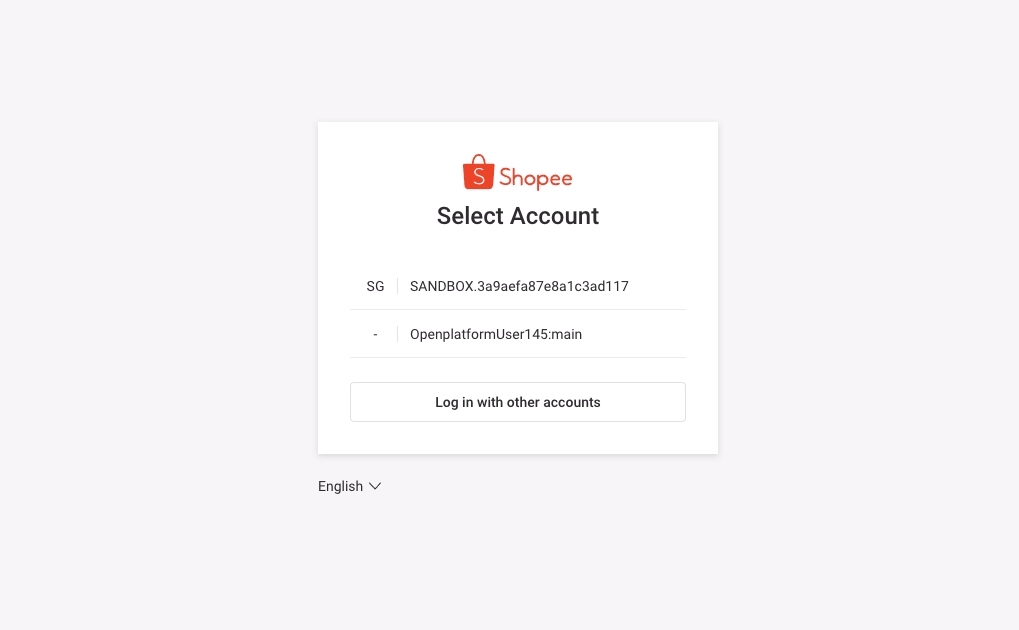
Select Cancel Authorization.
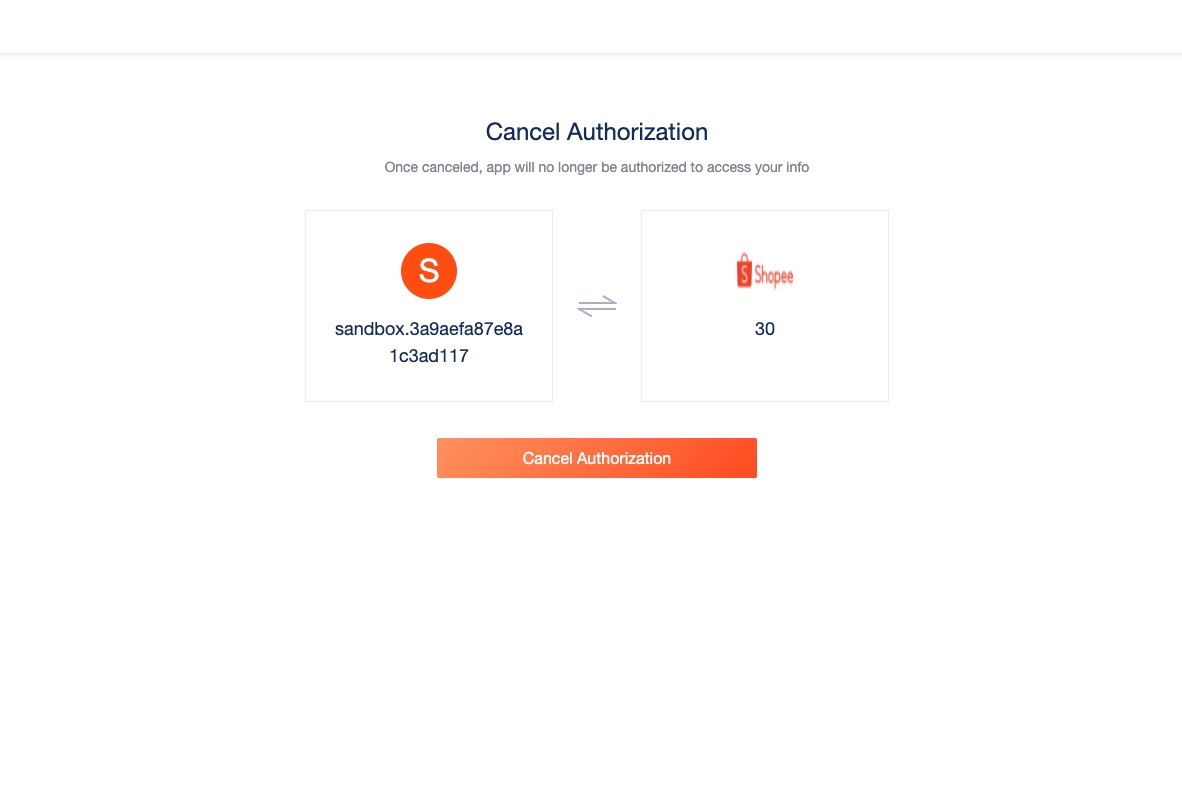
Canceling authorization on Seller Center
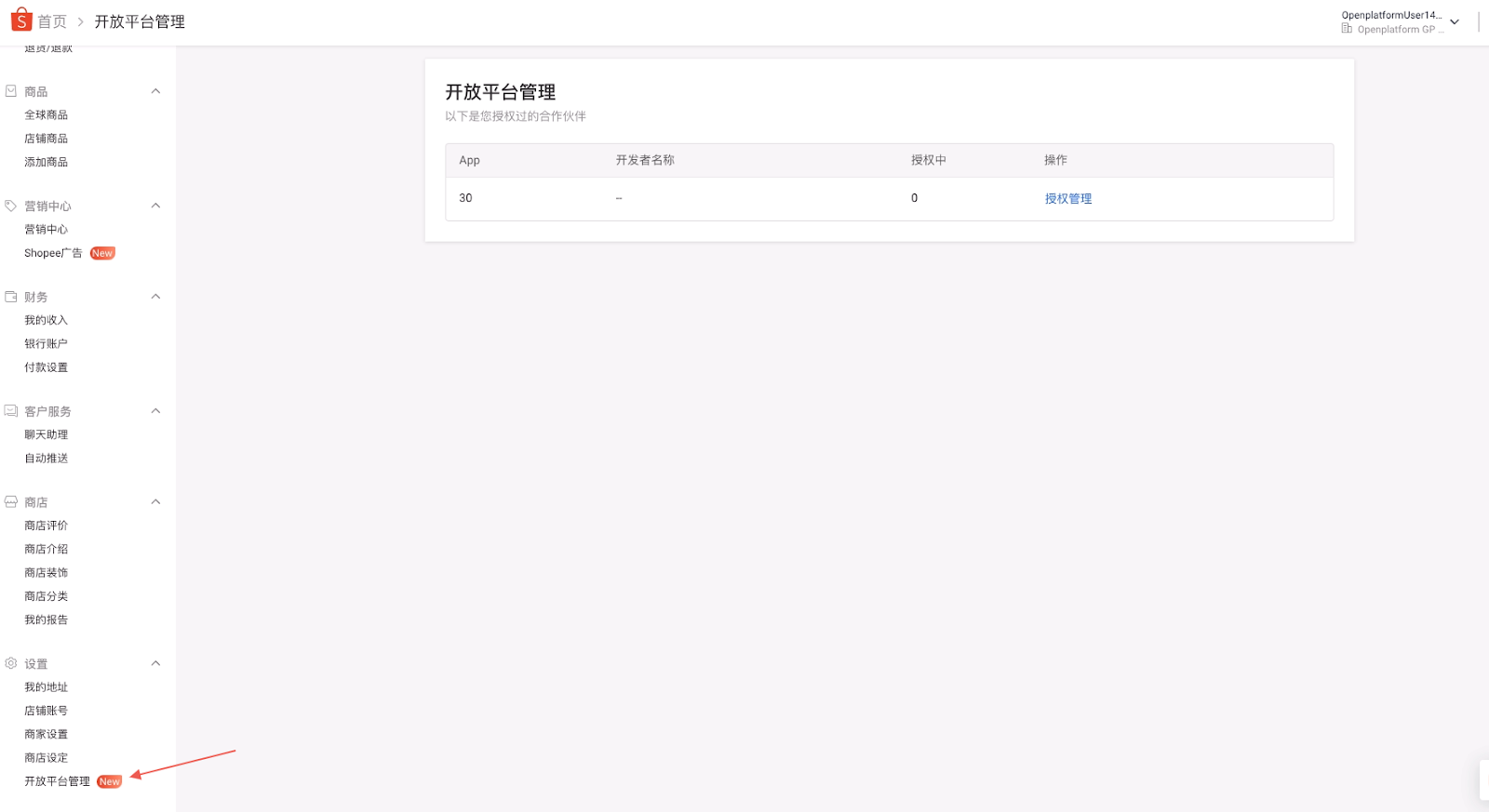
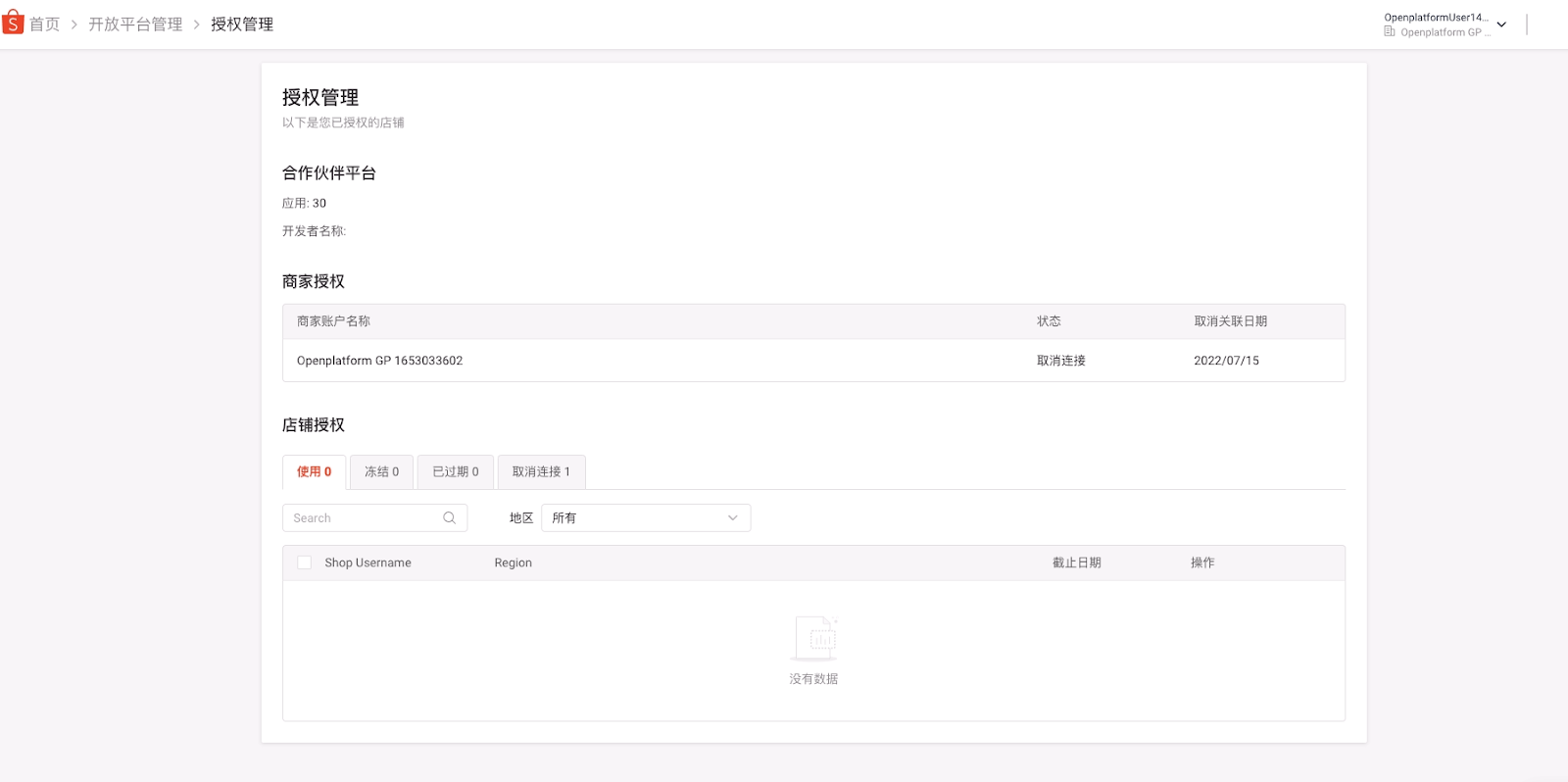
On the Platform Partner page in Seller Center, sellers can check which Apps the shop has authorized and their corresponding authorization expiration dates. The seller can also directly cancel the authorization of Apps by selecting Separate under the Action column.
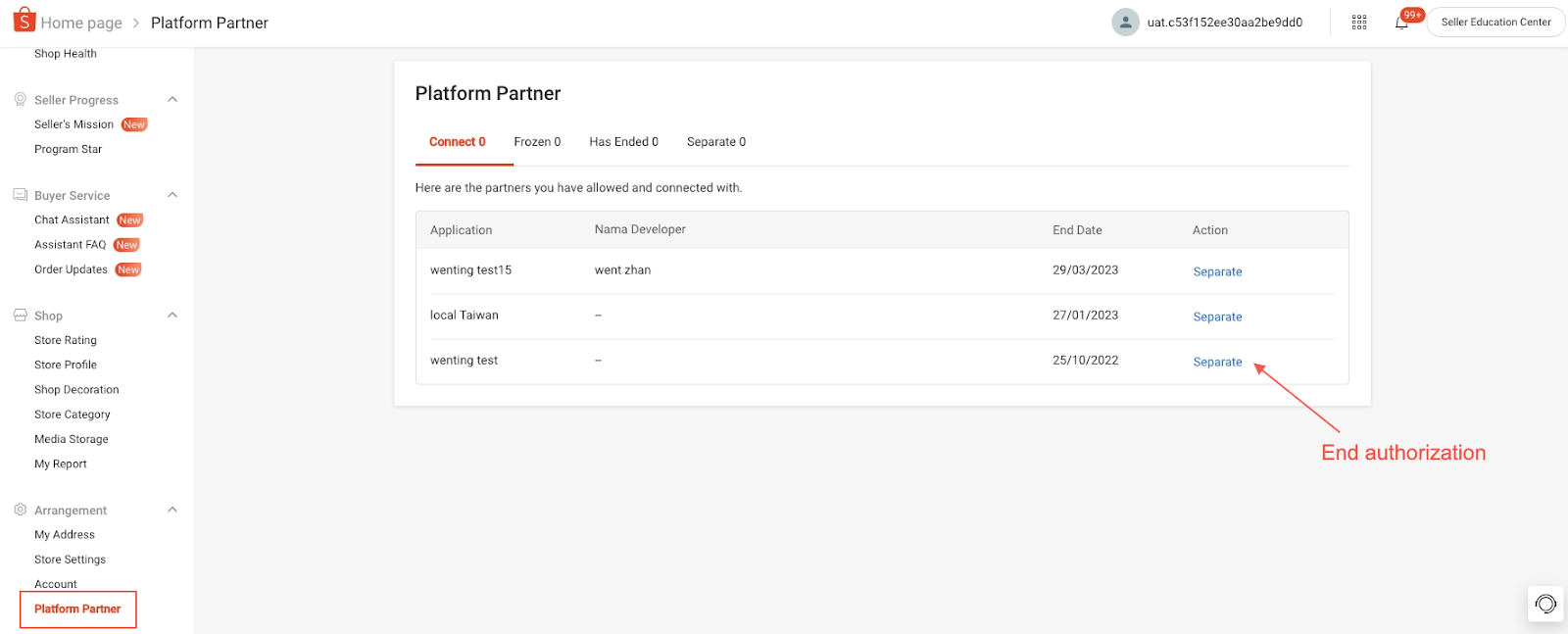
CNSC and KRSC sellers can check which Apps the main account has granted authorization to. On the Platform Partner page, sellers can directly cancel any authorizations granted by the merchant or shop.
FAQs on authorization and authentication
If you encounter errors during the authorization process, you can refer to our FAQs on authorization and authentication.