API calls
Last Updated: 2025-11-21
Language Supported:
English /
繁體中文 /
Português (Brasil) /
ไทย
⚠️ Note: This guide only applies to making API calls for Shopee Open API v2.0.
API domains
There are 3 domains available:
-
Production environment
-
https://openplatform.shopee.cn/ — for developers who deployed their services near Chinese Mainland.
-
https://openplatform.shopee.com.br/ — for developer who deployed their services near US.
-
https://partner.shopeemobile.com/ — for developer who deployed their services near SG.
-
Sandbox environment
-
https://openplatform.sandbox.test-stable.shopee.sg/ — for All developers
-
https://openplatform.sandbox.test-stable.shopee.cn/ —for Chinese Mainland developers
Select the correct domain name, based on the server location you’re accessing the Open API from.
API request methods
Currently, Open API only provides two request methods: GET and POST.
API Protocol
HTTP/JSON for most APIs. HTTP/FORM for some certain APIs, for example, the API for uploading files.
API request parameters
In the API document, you will see two types of request parameters:
- Common parameter
- Request parameter
For GET-type APIs, these two parameters may exist at the same time, or only the common parameter will exist.
For POST-type APIs, these two parameters will exist at the same time.
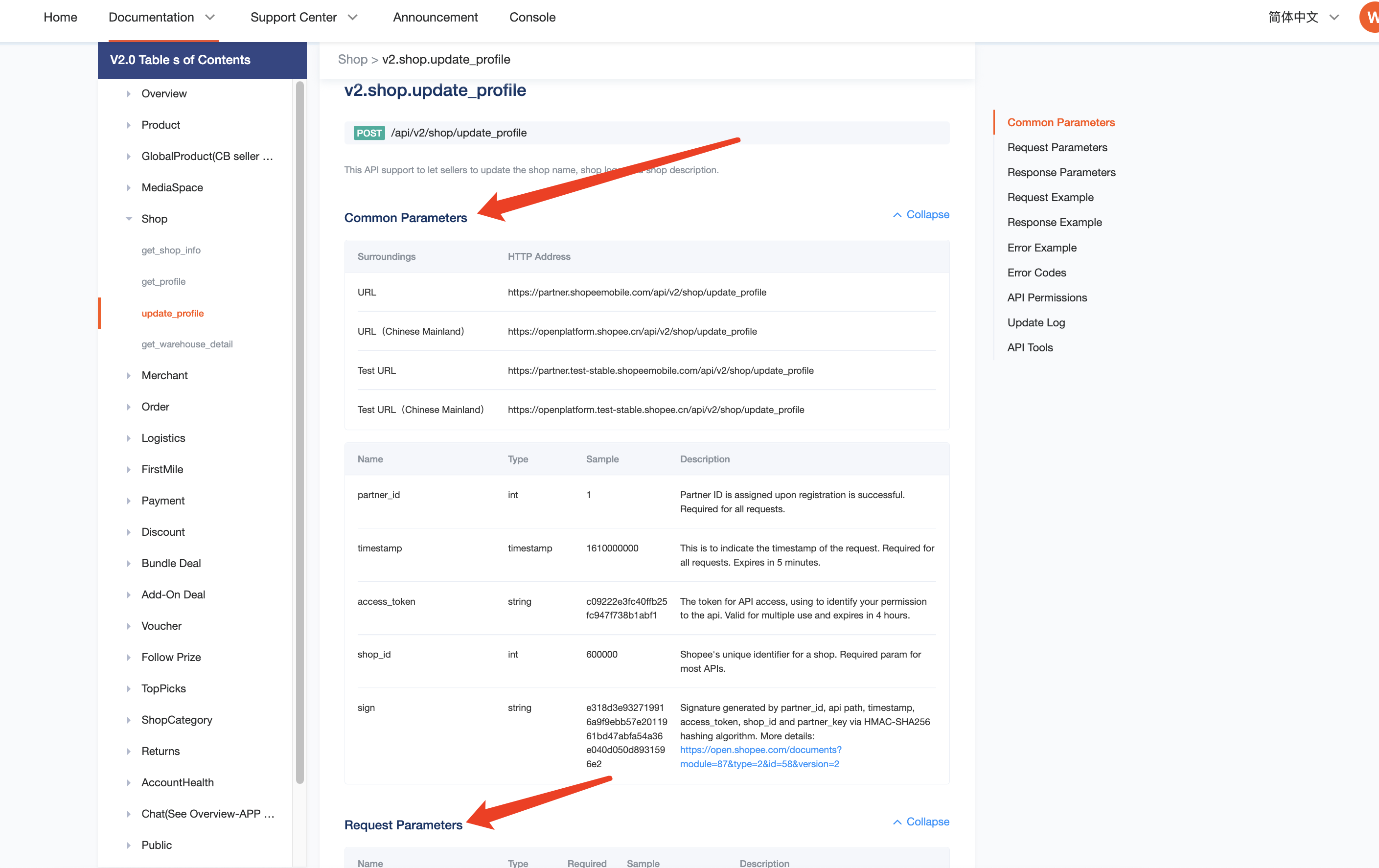
The table below consists of descriptions for common parameters:
| Parameters | Description |
|---|---|
| partner_id | All API calls require a partner ID. You can obtain a partner ID by creating an App on the Shopee Open Platform Console App list page. Test partner ID can only be used in the test environment, and Live partner ID can only be used in the production environment. |
| timestamp | All API calls require timestamps. Example of a timestamp: 1610000000. Each API request needs to be requested within 5 minutes of a timestamp. |
| sign | All API calls require signatures that are generated using the SHA256 algorithm. Different API types have different signature generation methods. For more details, please refer to the Signature Calculation section in this article. |
| access_token | Access tokens are required to obtain and modify seller data-related APIs. Each access token is valid for 4 hours and can be reused within the validity period. The access token needs to be refreshed regularly. Refer to the Authorization and Authentication article to learn more about obtaining and refreshing access tokens. |
| shop_id | The unique identification ID of a Shopee shop can be obtained after the shop has granted authorization. Refer to the Authorization and Authentication article on how to obtain your shop ID. |
| merchant_id | The unique identification ID of a Shopee merchant, which can be obtained after a shop has granted authorization. Open API only supports cross-border sellers using a merchant ID. Refer to the Authorization and Authentication article on how to acquire your merchant ID. |
Types of Open API
In the API document, there are 3 API types due to the different common parameters. The public parameters contained in these 3 types are as follows:
- Shop API: partner_id, timestamp, sign, access_token, shop_id
- Merchant API: partner_id, timestamp, sign, access_token, merchant_id
- Public API: partner_id, timestamp, sign
⚠️ Note: Red items are highlighted to indicate that they are different from Public API.
The Public API does not require an access token, while both the Shop and Merchant APIs do.
This means that Shop and Merchant APIs can be called only after the shop has granted authorization.
Currently, only Shopee cross-border merchants need to use Merchant API. Local sellers do not need to use it.
Signature calculation
Step 1: Create a base string:
Different types of APIs contain different elements in its base string. Concatenate the API path (without host) and the following common parameters into a single string. You should strictly follow the sequence (base string) as shown below:
*API path example:/api/v2/auth/token/get
Shop API: partner_id, api path, timestamp, access_token, shop_id
*Example:
partner_id: 2001887
API path: /api/v2/shop/get_shop_info
timestamp: 1655714431
access_token: 59777174636562737266615546704c6d
shop id: 14701711
Base string=2001887/api/v2/shop/get_shop_info165571443159777174636562737266615546704c6d14701711
Merchant API: partner_id, api path, timestamp, access_token, merchant_id
*Example:
partner_id: 2001887
API path: /api/v2/global_product/get_category
timestamp: 1655714431
access_token: 09777174636962737266615546704c6d
merchant_id: 1000000
Base string=2001887/api/v2/global_product/get_category165571443109777174636962737266615546704c6d1000000
Public API: partner_id, api path, timestamp
*Example:
partner_id:2001887
API path: /api/v2/public/get_shops_by_partner
timestamp:1655714431
Base string=2001887/api/v2/public/get_shops_by_partner1655714431
Step 2: Calculate the signature using the HMAC-SHA256 algorithm
Calculate the signature by using the HMAC-SHA256 hashing algorithm on the base string and partner Key (obtained through the Shopee Open Platform Console App detail page). The output of the hash function is a hex-encoded string.
*Example:
sign=56f31d01aeda9d08bf456b37f6f6640ef8614b4d6ad49baafe30b39a061f0e26
Find out why you may encounter the “Wrong sign” error and how you can resolve the issue.
Sample of Code:
Python
#!/usr/bin/envpython
# encoding:utf-8
import hmac
import time
import requests
import hashlib
timest=int(time.time())
host="https://partner.shopeemobile.com
access_token = "random string"
partner id =80001
partner key = "test....."
#### call shop level api
shop id =209920
base string ="%s%s%s%s%s"%(partner id, path timest access token, shop id)
sign = hmac.new( partner key,base string,hashlib.sha256)hexdigest()
path ="/api/v2/example/shop level/get"
url = host + path + "?partner_id=%s&shop_id=%s×tamp=%s&access_token=%s&sign=%s"%(partner_id, shop_id, timest, access_token, sign)
headers={"Content-Type":"application/ison"?
resp=requests.post(urlheaders=headers)
#### call merchant level api
merchant id =1234567
base string ="%s%s%s%s%s"%(partner id, path timest, access token, merchant id)
sign =hmac.new( partner key,base string,hashlib.sha256).hexdigest()
path ="/api/v2/example/merchant_level/get"
url = host+ path +"?partner id=%s&merchant id=%s×tamp=%s&access token=%s&sign=%s"%(partnerid, merchant id, timest, access token, sign)
headers ={"Content-Type":"application/ison"? resp =requests.eet(urlheaders=headers)
#### call public api
base string ="%s%s%5%s"%(partner idpathtimestaccess token)
sign= hmac.new( partner keybase stringhashlib.sha256)hexdigest()
path ="/api/v2/auth merchant/access token/get"
url = host+path+"?partner id=%s×tamp=%s&sign=%s%(partner idtimest, sign)
body ={"partner id":partner id, "merchant id": merchant id,"refresh token":"testingtoken")
headers =["Content-Type":"application/ison"?
resp =requests.post(url,json=bodyheaders=headers)
API request sample
For GET-type API requests, you need to put both the common parameters and request parameters in the URL.
For example: V2.product.get_category
API request URL:
*For this API endpoint,partner_id、timestamp、access_token、shop_id and sign are common parameters. Meanwhile, language is a request parameter.
For POST-type API requests, you need to insert common parameters in the request URL and request parameters in the request body.
For example:v2.shop.update_profile
API request URL:
Request body:
{
"shop_logo": "https://cf.shopee.sg/file/8424390be4677b0b3c37ce6499ce261a",
"description": "TTest",
"shop_name": "123"
}
*For this API endpoint,partner_id、timestamp、access_token、shop_id、and sign are common parameters. Meanwhile, shop_logo、description and shop_name are request parameters.
API response parameters
| Parameters | Must return? | Description |
|---|---|---|
| request id | Yes | Each API request has a unique request ID. When you encounter an API issue, please provide this ID and the corresponding API information to get a faster response. |
| error | Yes | Error code. When the request is successful, the error parameter will return empty. If the request fails, the corresponding error code will be reflected in this field. |
| message | No | Error message. When the request is successful, the message will return empty. If the request fails, this field will contain detailed information about the error. |
| warning | No | If the API call is successful, but some data is not returned or some batch requests fail, the information will be reflected in this field. |
| response | No | When the request is successful, the corresponding data will be reflected in this field. |
API functions
| API module | Function Description |
|---|---|
| Product | You can obtain the following information: - Product-related category tree - Attribute and brand information - Shop product data - Product promotion information - Boost item and boost item list - Product reviews and review list - Product recommended categories and recommended attributes - Registered product brands Perform the following actions: - Create, delete and update product information. |
| Shop | You can obtain the following information: - Shop name - Market shop is based in - Shop type Perform the following actions: - Update shop information |
| Merchant | *This module is only required by cross-border sellersGet merchant information (merchant name/market/currency) and a list of all shops under the merchant that have granted authorization. |
| GlobalProduct | *This module is only required by cross-border sellersObtain the following information: - Related category tree - Attribute and brand information - Global product data - List of products that can be listed in certain markets only - List of products with global product already published - List of products already listed in specific markets - Global product ID corresponding to the product in a specific market - Recommended category and attribute of a global product Perform the following actions: - Create, delete and update global products. - Enable/Disable syncing of global product information. - Publish global product |
| MediaSpace | Upload videos and images |
| Order | Obtain the following information: - Shop order list - Order list and order details - List of invoice orders to be uploaded - Invoice information Perform the following actions: - Manage orders by splitting and canceling them - Undo split orders - Process sellers’ order cancellation application - Add order remarks - Upload and download invoices to retrieve invoice information |
| Logistics | Obtain the following information: - List of shop channel - Shipping parameters - Order tracking number and tracking information - Shipping document formats and shipping documents - List of shop addresses Perform the following actions: - Ship orders/Ship orders in bulk - Update shop address flag - Enable/Disable shop channel - Delete shop addresses |
| FirstMile | *This module is only required by cross-border sellersObtain the following information: - Unbound First Mile orders - First Mile tracking numbers and details - First Mile order details - First Mile shipping documents - FirstMile channel details |
| Returns | Obtain the following information: - List of return and refund requests - Return and refund request details - Get a return and refund plan Perform the following actions: - Confirm refunds - Submit disputes - Negotiate refunds - Upload image evidence for disputes |
| Payment | Obtain the following information: - Order income - Payout data - Wallet data - List of completed orders - Installment shop settings - List of products that have been set up for installment payment |
| Discount | Create, view, update, and delete Discount Promotions |
| Bundle Deal | Create, view, update, and delete Bundle Deals |
| Add-On Deal | Create, view, update, and delete Add-on Deals |
| Voucher | Create, view, update, and delete Vouchers |
| Follow Prize | Create, view, update, and delete Follow Prizes |
| TopPicks | Create, view, update, and delete Top Picks |
| ShopCategory | Create, view, update, and delete Shop Categories |
| AccountHealth | Obtain shop performance and any shop penalty points data |
| Public | Perform the following actions: - Obtain list of shops that have granted authorization - Obtain list of merchants that have granted authorization - Resend code and upgrade codes to retrieve tokens - Retrieve and refresh tokens |
| Push | Retrieve and update Push Mechanism settings |
| Chat | *This module is only open to whitelisted users. To apply to join the whitelist, you may refer to this FAQ. Obtain the following information: - Chat list - Chat details - Chat information - Obtain Make Offer settings Perform the following actions: - Delete chats - Mark chats as unread - Pin and unpin chats - Upload images to chats - Send manual and automatic chat messages - Enable/disable Make Offer settings |
Problems with API
If you encounter problems during the API integration process, you may refer to the FAQ page for help. If your problem persists, you can raise a ticket.