Tokopedia & Shop - Migration rehearsal
Overview
- Are you concerned about the emergence of the following problems during the migration process?
Whether you should proceed to call the Tokopedia API to fetch orders. Whether merchants might duplicate shipments. Are you concerned about the emergence of the following problems during the migration process? - Whether you should proceed to call the Tokopedia API to fetch orders.
-
Whether merchants might duplicate shipments.
-
To assist Tokopedia developers in providing enhanced services to sellers and guaranteeing a smooth transition of diverse business operations during the merchant migration phase, the "Tokopedia & Shop Partner Center" has introduced a novel function named "Migration Rehearsal". This functionality empowers developers to proactively foresee the performance of normal API call returns on both the Tokopedia platform and the Tokopedia & Shop platform throughout each stage of integrating the Tokopedia stores under their purview with Tokopedia & Shop shops, which encompasses the pre-integration, integration-in-progress, and post-integration periods.
-
It is essential that developers leverage this feature comprehensively to authenticate and optimize their own systems.
-
📌 Given the restricted quantity of test shops available on the platform and the irreversible characteristic of the integration process, each developer is entitled to a maximum of five opportunities for shop integration rehearsals. It is recommended that developers, in advance, adhere to the instructions provided in the Changelog and Tokopedia & Shop - ISV & Seller developer onboarding to finalize the development and deploy it into the test environment. Subsequently, this function should be employed for the purposes of testing and verification.
Rehearsal Guide
Rehearsal Process

Preparation
Tokopedia Open Platform: https://developer.tokopedia.com/
Tokopedia & Shop Partner Center: https://partner.tiktokshop.com/
- The developer is required to possess a Tokopedia Developer account.
- There should be at least one test App in the Tokopedia Developer account.
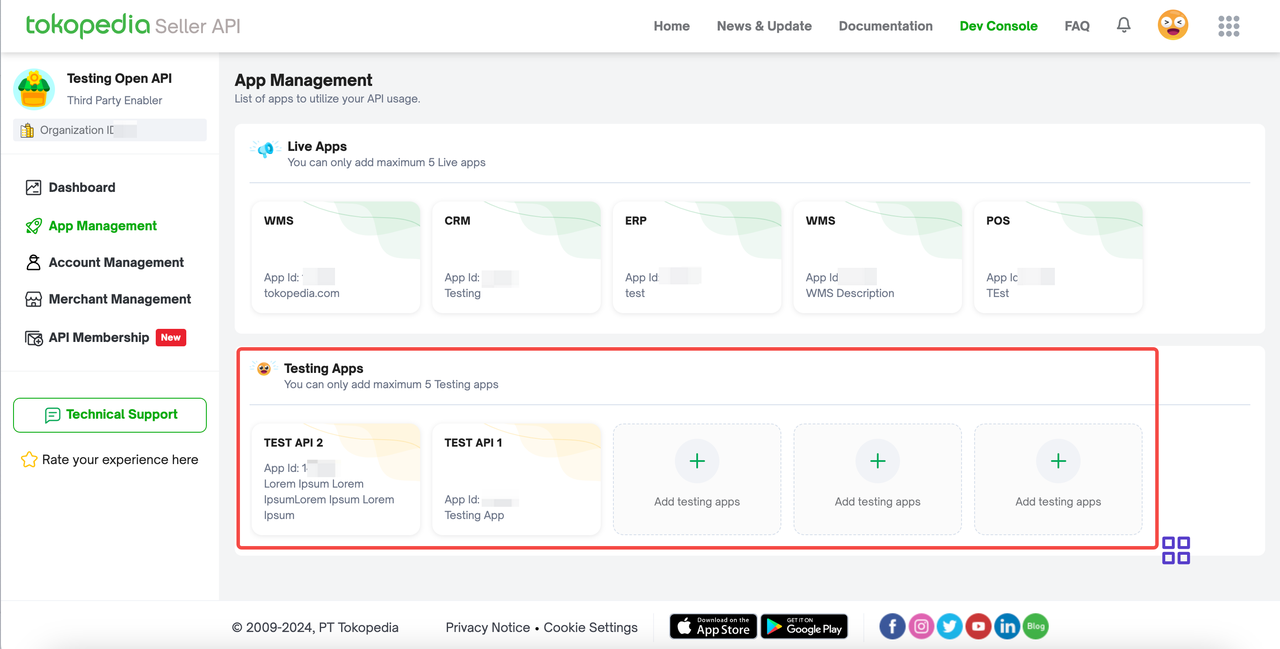 3. The developer should subscribe to the "merge" event for their Tokopedia test App according to the instructions in the "Registering a Webhook with Tokopedia" section of the [Changelog].
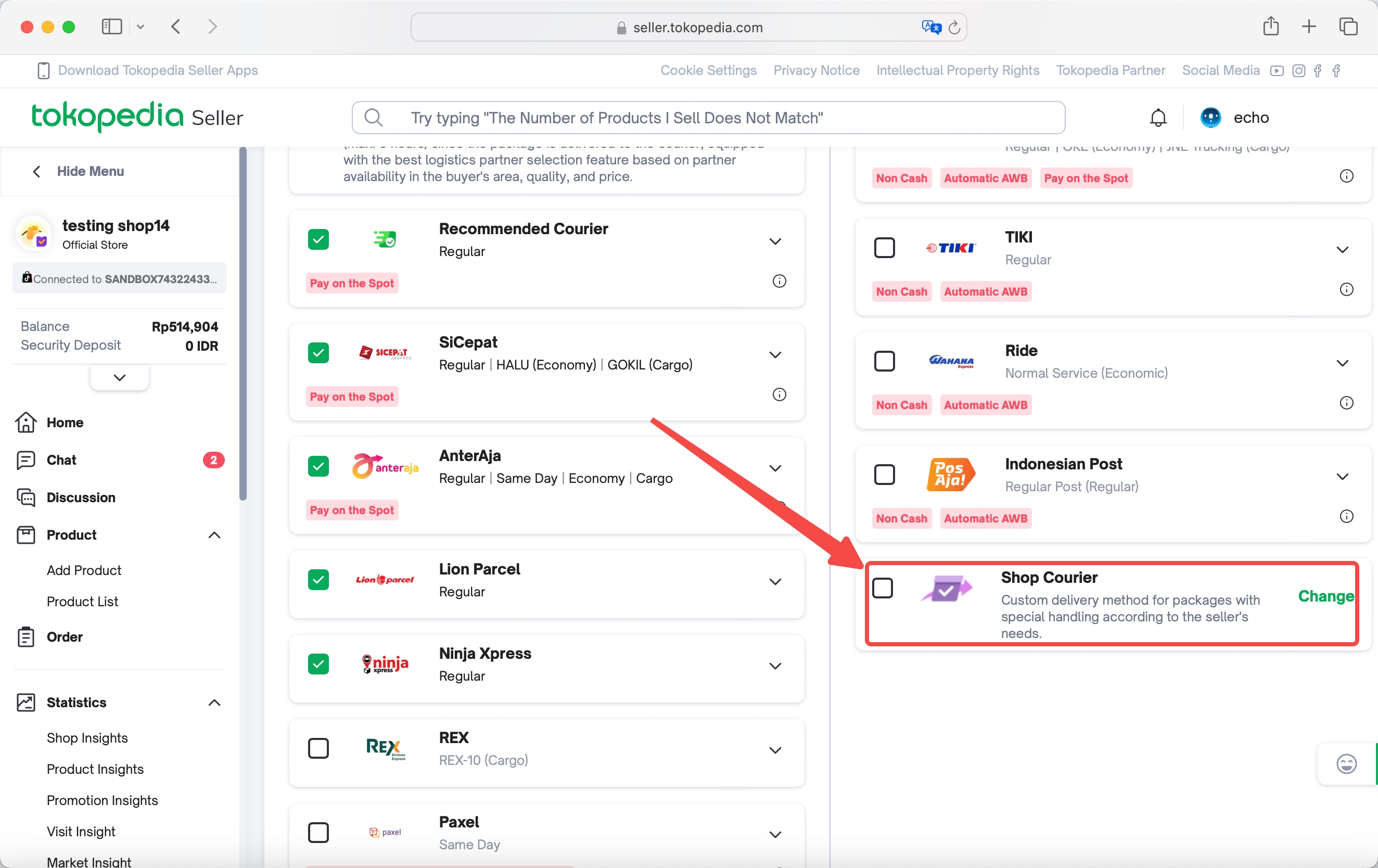
4. The developer should ensure that none of the test shops under their test App have the following options enabled.
3. The developer should subscribe to the "merge" event for their Tokopedia test App according to the instructions in the "Registering a Webhook with Tokopedia" section of the [Changelog].
4. The developer should ensure that none of the test shops under their test App have the following options enabled.
 5. The target market of Tokopedia & Shop App has already included Indonesia.
6. The developer has already bound their Tokopedia & Shop Partner Center account with the Tokopedia Open Platform account.
5. The target market of Tokopedia & Shop App has already included Indonesia.
6. The developer has already bound their Tokopedia & Shop Partner Center account with the Tokopedia Open Platform account.
 7. The developer should have newly created at least one development shop in Indonesia.
 8. The developer should have adapted to the new version of API in the Indonesian market according to the [Changelog] and the corresponding API documentation.
9. The developer should have tested the business process of their system in the development shop in Indonesia according to the "Step 5: Test your App and Publish" in Tokopedia & Shop - ISV & Seller developer onboarding.
8. The developer should have adapted to the new version of API in the Indonesian market according to the [Changelog] and the corresponding API documentation.
9. The developer should have tested the business process of their system in the development shop in Indonesia according to the "Step 5: Test your App and Publish" in Tokopedia & Shop - ISV & Seller developer onboarding.
Start to Rehearse
- Enter Tokopedia & Shop Partner Center - Development Shops.
- Select a Development Shop with "Indonesia" as the Target market.
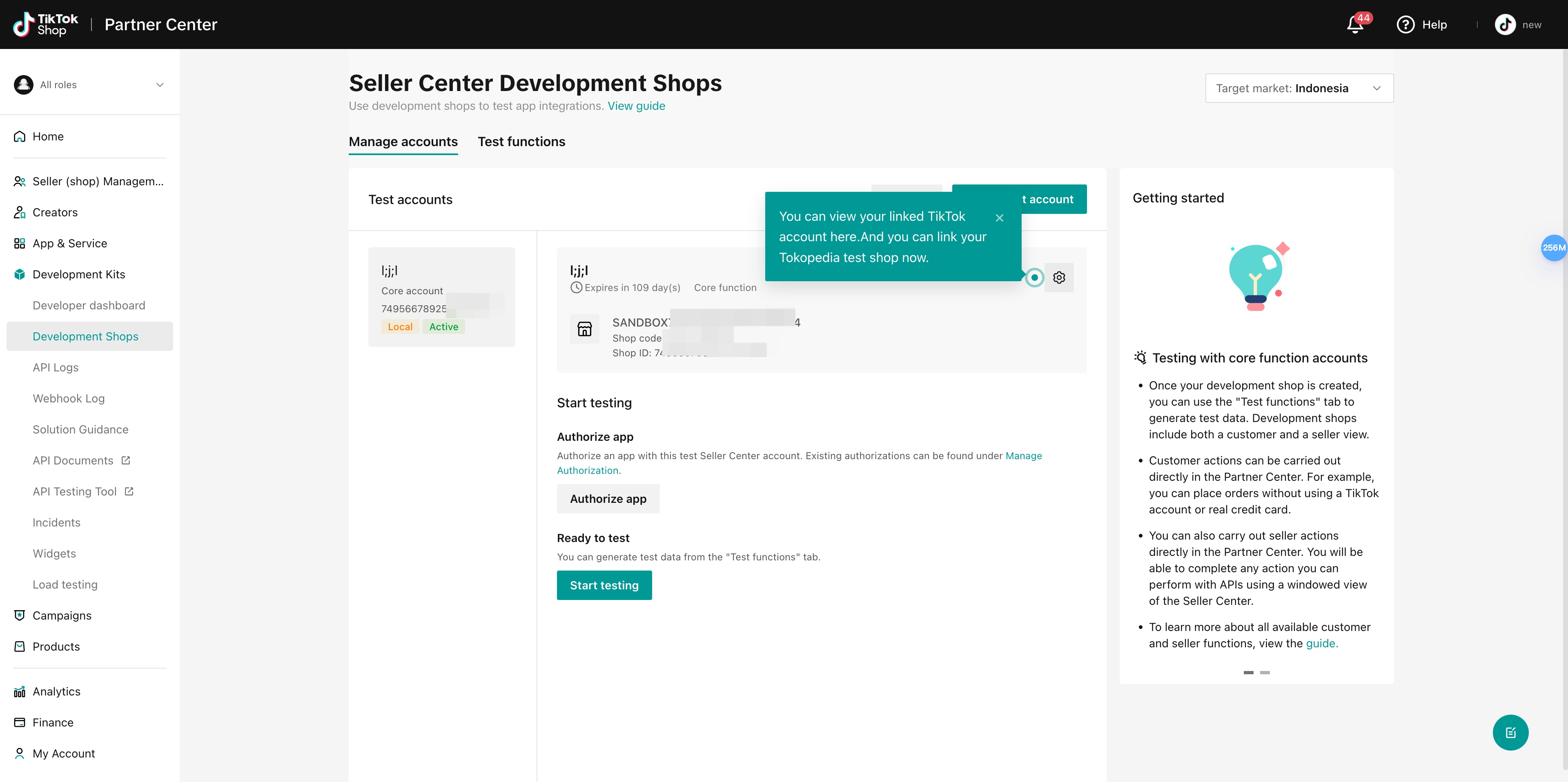 3. Click on the "Setting" button.
4. Click on "Link Tokopedia test shop".
3. Click on the "Setting" button.
4. Click on "Link Tokopedia test shop".
 5. Select the test app corresponding to the Tokopedia test shop that you want to bind.

 6. Click on "Confirm".
Verification
- When everything is in proper order, the Tokopedia test shop will attempt integration with the Tokopedia & Shop Development Shop.
Please be aware that this integration process is irreversible and unbinding after integration is not an option. The process may last from a few hours to a full day. When everything is in proper order, the Tokopedia test shop will attempt integration with the Tokopedia & Shop Development Shop. - Please be aware that this integration process is irreversible and unbinding after integration is not an option.
-
The process may last from a few hours to a full day.
-
During migration, developers must cover the following scenarios at least:
For Tokopedia & Shop Test Shop:
Product Modification Testing: The price and inventory of products in the Tokopedia & Shop Development Shop can be altered using the Tokopedia & Shop Products API. Other information cannot be modified and new product additions are not possible. Order Fulfillment Testing: A virtual order can be created in the Tokopedia & Shop Development Shop and retrieved via the Tokopedia & Shop Orders API. The fulfillment can be simulated through the Tokopedia & Shop Fulfillment API.
For the Tokopedia test shop:
Product Modification Testing: The price and inventory of products in the Tokopedia test shop can be changed via the Tokopedia Product API. Other details cannot be modified and new product additions are prohibited. Order Fulfillment Testing: A virtual order can be made on the Tokopedia consumer end with a test buyer account. The order can be fetched through the Tokopedia Order API and the fulfillment simulated via the Tokopedia Orders API.
Once the developer receives the "merge" webhook sent by the Tokopedia gateway on the server, it indicates a successful integration. After the shop merges:

Developers can immediately use the Order API to obtain orders and fulfillment. However, APIs related to product listing and product modifying can only be successfully called after merchants manually confirm the "product merge". Developers should:
Test whether the tts_seller_id and shop_id(toko_shop_id) obtained from the Tokopedia Get Shop Info API are consistent with the tts_seller_id and shop_id(toko_shop_id) in the webhook. Test whether it is possible to obtain the product id of the original Tokopedia products on the Tokopedia & Shop side through the Tokopedia Get Product Info API. Thoroughly test the use of the Tokopedia & Shop Product API for subsequent product management tasks (including price and inventory changes, description modifications, product launches, and listing and delisting on both platforms). Use a Tokopedia buyer account to create a virtual order. Then, retrieve the order via the Tokopedia & Shop Orders API and simulate the fulfillment via the TTS Fulfillment API. Use a Tokopedia buyer account to start a customer service conversation. Then, retrieve the conversation via the Tokopedia & Shop Customer Service API and test various message types.
Developers should confirm "Product Merge" in seller center, before testing any Tokopedia & Shop Product API:
 During migration, developers must cover the following scenarios at least: - For Tokopedia & Shop Test Shop:
Product Modification Testing: The price and inventory of products in the Tokopedia & Shop Development Shop can be altered using the Tokopedia & Shop Products API. Other information cannot be modified and new product additions are not possible. Order Fulfillment Testing: A virtual order can be created in the Tokopedia & Shop Development Shop and retrieved via the Tokopedia & Shop Orders API. The fulfillment can be simulated through the Tokopedia & Shop Fulfillment API. For Tokopedia & Shop Test Shop: - Product Modification Testing: The price and inventory of products in the Tokopedia & Shop Development Shop can be altered using the Tokopedia & Shop Products API. Other information cannot be modified and new product additions are not possible. - Order Fulfillment Testing: A virtual order can be created in the Tokopedia & Shop Development Shop and retrieved via the Tokopedia & Shop Orders API. The fulfillment can be simulated through the Tokopedia & Shop Fulfillment API.
- For the Tokopedia test shop:
Product Modification Testing: The price and inventory of products in the Tokopedia test shop can be changed via the Tokopedia Product API. Other details cannot be modified and new product additions are prohibited. Order Fulfillment Testing: A virtual order can be made on the Tokopedia consumer end with a test buyer account. The order can be fetched through the Tokopedia Order API and the fulfillment simulated via the Tokopedia Orders API. For the Tokopedia test shop: - Product Modification Testing: The price and inventory of products in the Tokopedia test shop can be changed via the Tokopedia Product API. Other details cannot be modified and new product additions are prohibited. - Order Fulfillment Testing: A virtual order can be made on the Tokopedia consumer end with a test buyer account. The order can be fetched through the Tokopedia Order API and the fulfillment simulated via the Tokopedia Orders API.
- Once the developer receives the "merge" webhook sent by the Tokopedia gateway on the server, it indicates a successful integration.
- After the shop merges:
Developers can immediately use the Order API to obtain orders and fulfillment. However, APIs related to product listing and product modifying can only be successfully called after merchants manually confirm the "product merge". Developers should:
Test whether the tts_seller_id and shop_id(toko_shop_id) obtained from the Tokopedia Get Shop Info API are consistent with the tts_seller_id and shop_id(toko_shop_id) in the webhook. Test whether it is possible to obtain the product id of the original Tokopedia products on the Tokopedia & Shop side through the Tokopedia Get Product Info API. Thoroughly test the use of the Tokopedia & Shop Product API for subsequent product management tasks (including price and inventory changes, description modifications, product launches, and listing and delisting on both platforms). Use a Tokopedia buyer account to create a virtual order. Then, retrieve the order via the Tokopedia & Shop Orders API and simulate the fulfillment via the TTS Fulfillment API. Use a Tokopedia buyer account to start a customer service conversation. Then, retrieve the conversation via the Tokopedia & Shop Customer Service API and test various message types.
Developers should confirm "Product Merge" in seller center, before testing any Tokopedia & Shop Product API:
After the shop merges:
- Developers can immediately use the Order API to obtain orders and fulfillment. However, **APIs related to product listing and product modifying can only be successfully called after merchants manually confirm the "product merge"**.
- Developers should:
Test whether the tts_seller_id and shop_id(toko_shop_id) obtained from the Tokopedia Get Shop Info API are consistent with the tts_seller_id and shop_id(toko_shop_id) in the webhook. Test whether it is possible to obtain the product id of the original Tokopedia products on the Tokopedia & Shop side through the Tokopedia Get Product Info API. Thoroughly test the use of the Tokopedia & Shop Product API for subsequent product management tasks (including price and inventory changes, description modifications, product launches, and listing and delisting on both platforms). Use a Tokopedia buyer account to create a virtual order. Then, retrieve the order via the Tokopedia & Shop Orders API and simulate the fulfillment via the TTS Fulfillment API. Use a Tokopedia buyer account to start a customer service conversation. Then, retrieve the conversation via the Tokopedia & Shop Customer Service API and test various message types. Developers should: - Test whether the tts_seller_id and shop_id(toko_shop_id) obtained from the Tokopedia Get Shop Info API are consistent with the tts_seller_id and shop_id(toko_shop_id) in the webhook. - Test whether it is possible to obtain the product id of the original Tokopedia products on the Tokopedia & Shop side through the Tokopedia Get Product Info API. - Thoroughly test the use of the Tokopedia & Shop Product API for subsequent product management tasks (including price and inventory changes, description modifications, product launches, and listing and delisting on both platforms). - Use a Tokopedia buyer account to create a virtual order. Then, retrieve the order via the Tokopedia & Shop Orders API and simulate the fulfillment via the TTS Fulfillment API. - Use a Tokopedia buyer account to start a customer service conversation. Then, retrieve the conversation via the Tokopedia & Shop Customer Service API and test various message types.
- Developers should confirm "Product Merge" in seller center, before testing any **Tokopedia & Shop Product API:**
FAQ
1. What APIs can I integrate with?
Please click here to access to the API onepager to view more about:
- Data access via APIs: What APIs to use to access new data and integrate historical data of merchants migrating from Tokopedia to "Tokopedia & Shop"?
- Changes to "Tokopedia & Shop" APIs: What changes are made in "Tokopedia & Shop" APIs to suit the Indonesian market?
- Mapping of shops and products: How will the new shops and products from "Tokopedia & Shop" be mapped to those from Tokopedia?
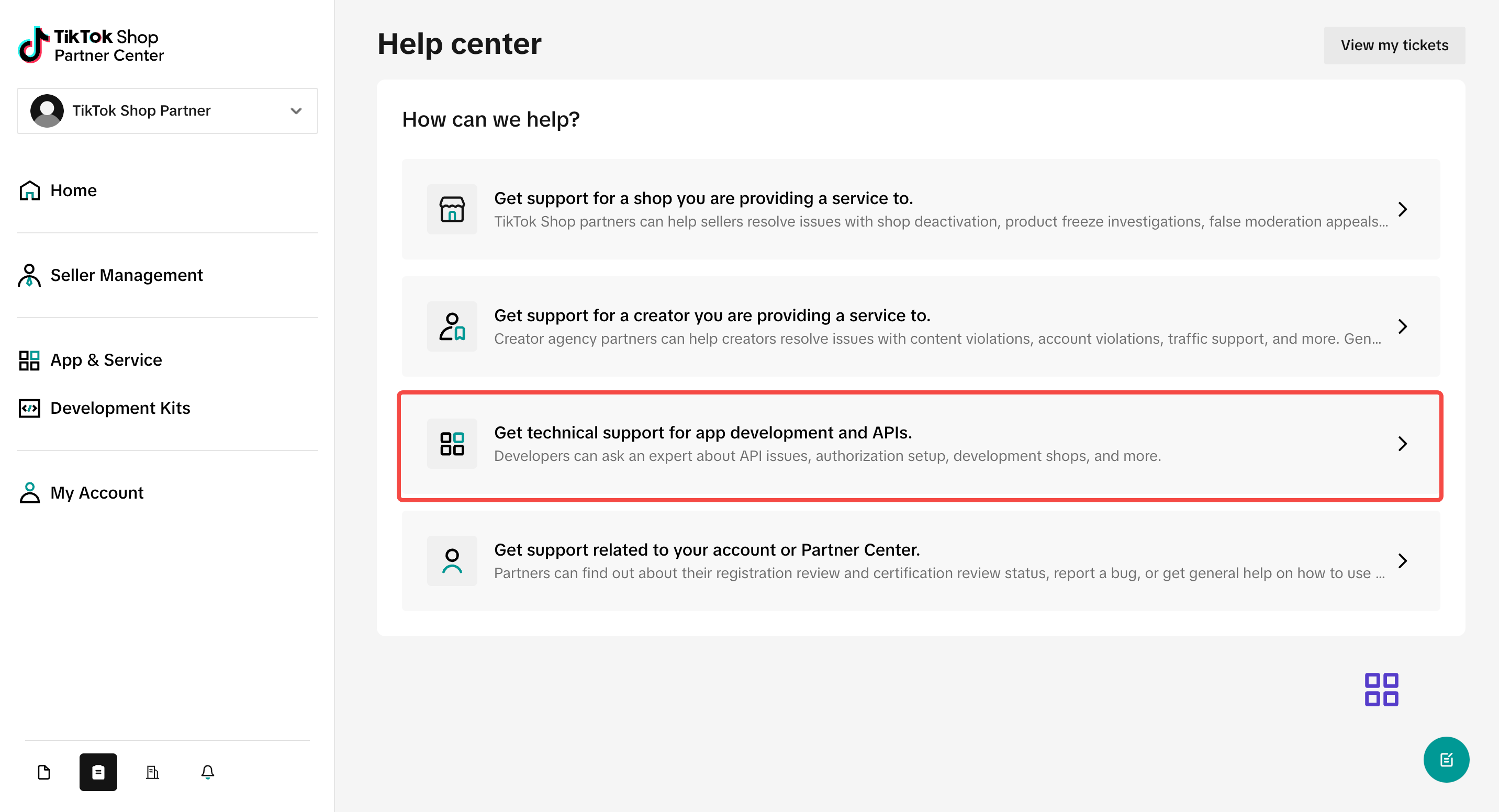
2. If I have questions, where can I contact Tokopedia & Shop?
Please access the Help Center https://partner.tiktokshop.com/ticket/landing
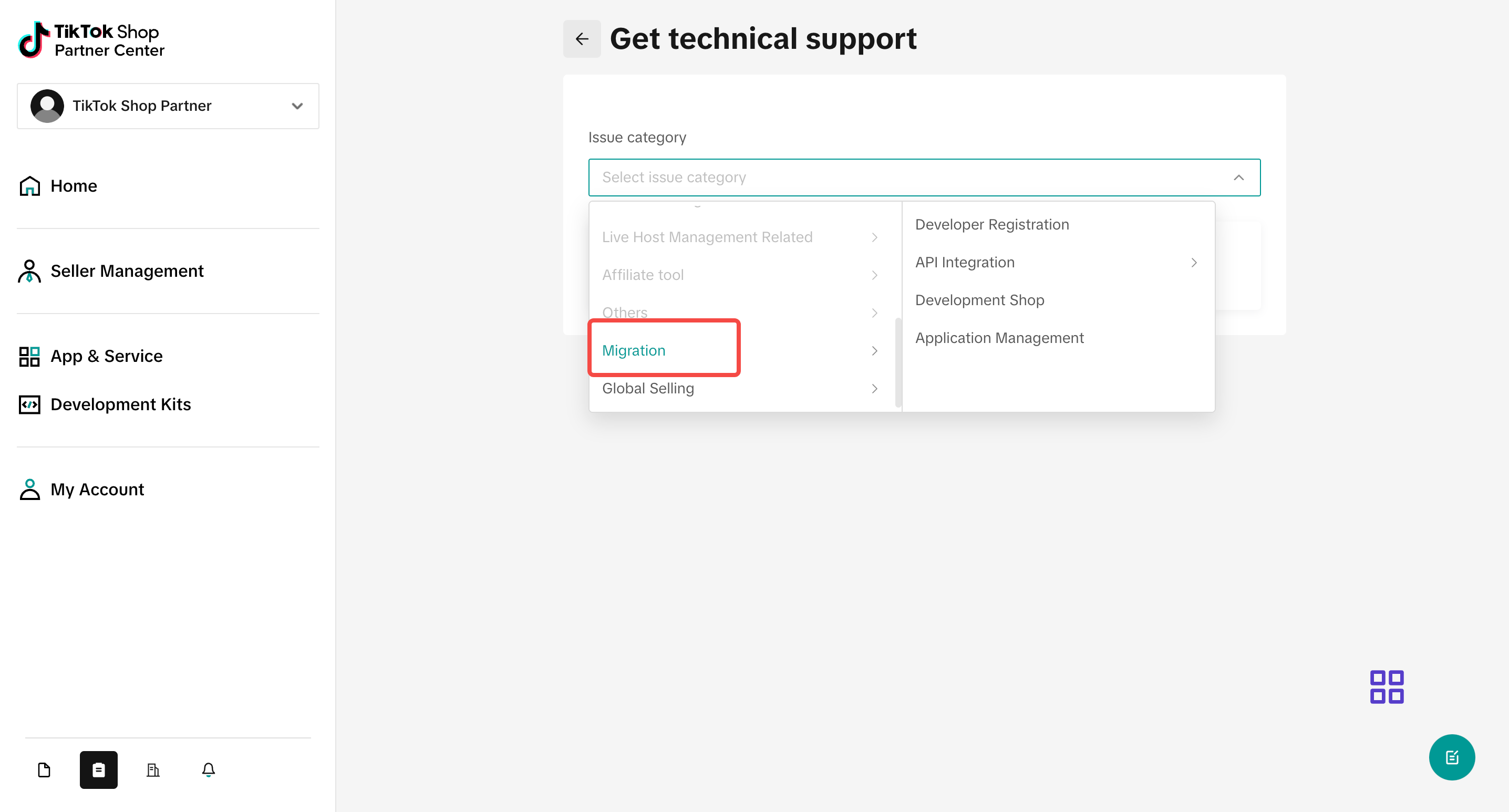
3. How to test API / Can I use the test shop?
There is the Sandbox (test tool) in Tokopedia & Shop Partner Center - Development Kits.
Refer to Step 5: Test your App and Publish for detailed steps.
4. I have API questions, how to solve it?
Please access the Help Center https://partner.tiktokshop.com/ticket/landing